cPanel shared hosting13 October 2022By Aurélien T. 4 min read
Using Redis as a persistent object cache for WordPress on cPanel
Procédure
What is Redis?
Redis is a very high-performance key-value storage service. Quite similar to Memcached, Redis has the advantage of being persistent: the data is not volatile.
Given the fairly simplistic nature of its data structure, and the fact that all the data is preloaded into memory when Redis starts up, searching and retrieving information from a Redis database using its unique key is much faster and less resource-intensive than retrieving the same information from a traditional database such as PostgreSQL or MySQL.
Why and when should I use Redis as an object cache for WordPress?
The Redis object caching system is not to be confused with page caching systems such as Fastest Cache, LiteSpeed or WP-Rocket. Page caching systems cache an entire page that has already been built, whereas an object caching system allows you to cache certain elements of the site, such as an article, a comment, a product, etc.
An object cache system simply makes less of a demand on the MySQL database when building a page, while reducing response time, whereas a page cache system keeps a page completely built for later use. As a result, a Redis object cache system will not be beneficial for predominantly static sites such as blogs and storefront sites.
Only websites that are highly dynamic (their page content cannot be cached for long enough) are good candidates for object caching. This is particularly the case for certain ecommerce sites, sites with members' areas, discussion forums and certain blogs where the comment section is particularly active.
If your website has static content, you will be better off optimising page caching with Fastest Cache or LiteSpeed.
How do I activate Redis on cPanel?
The Redis service is available for all cPanel accounts on the default port (TCP 6379). For a PHP script to be able to communicate with a Redis server, it will need to be supplied with a suitable library. The most popular libraries include :
PhpRedis (written in C language, supplied as a PHP extension): to be activated via the cPanel interface
Predis (written in PHP, supplied as a PHP dependency that can be installed using the composer utility): to be installed using the composer command or, in most cases, already supplied inside your PHP script (usually in the "vendor" folder).
Depending on the PHP script you're using, you'll be able to use one, the other or both. The WordPress plugin we're going to recommend is compatible with both libraries.
Activating PhpRedis on cPanel
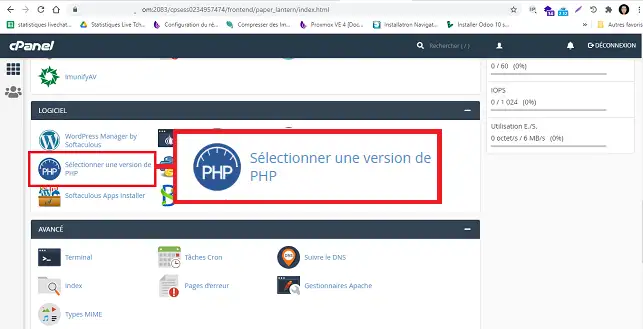
To activate PhpRedis, which is the PHP Redis extension, log in to your cPanel interface and click on"Select a PHP version" in the"Software" section.
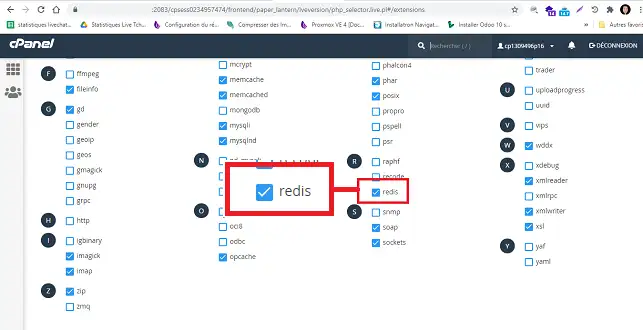
Tick the"Redis" extension to activate it.
How do I use Redis as a persistent object cache on WordPress?
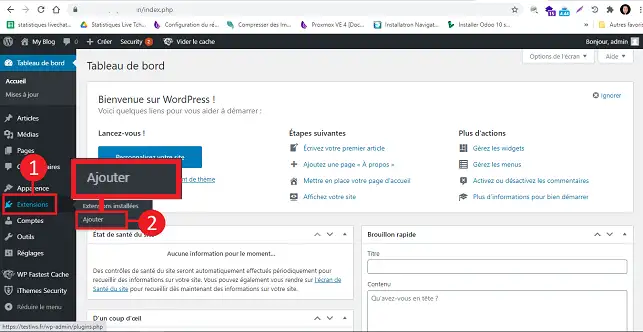
To use Redis as an object cache on WordPress, you will need to install the Redis Object Cache plugin. From your WordPress dashboard, go to"Extensions" then"Add".
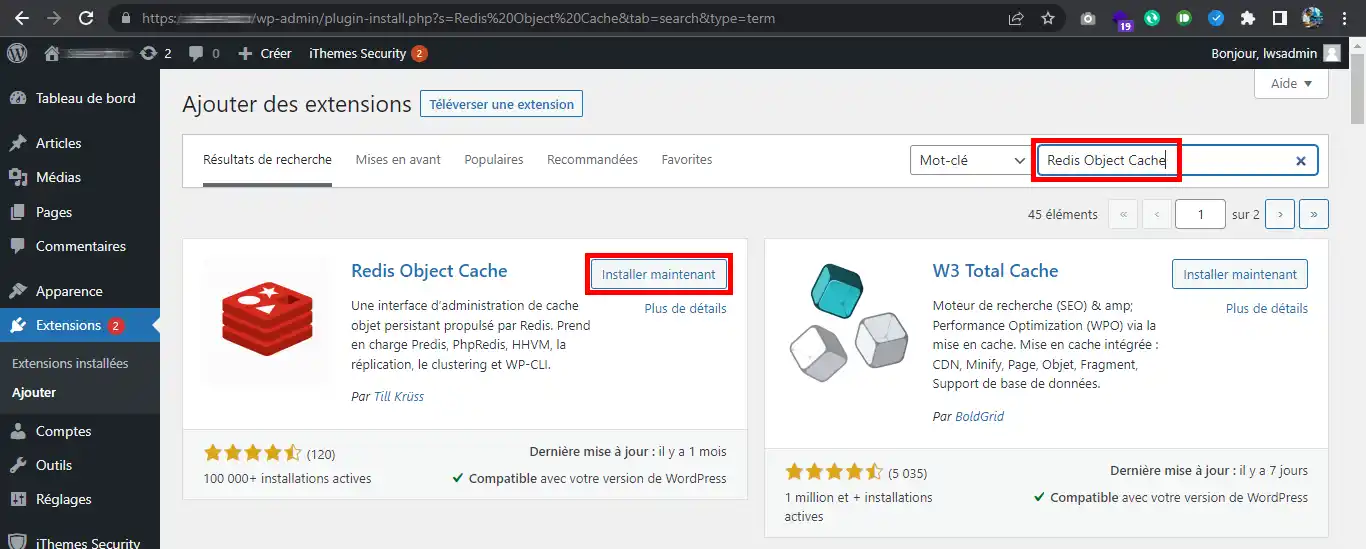
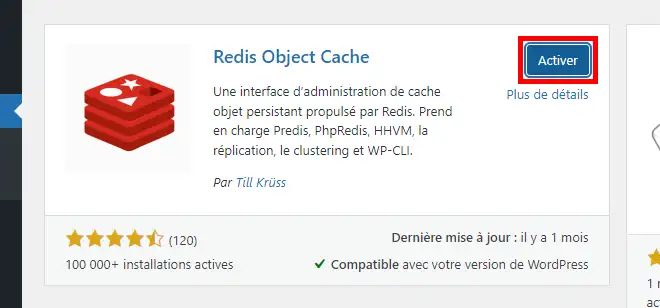
Search for the"Redis Object Cache" plugin and click on"Install now".
Once the installation is complete, activate the plugin by clicking on the"Activate" button.
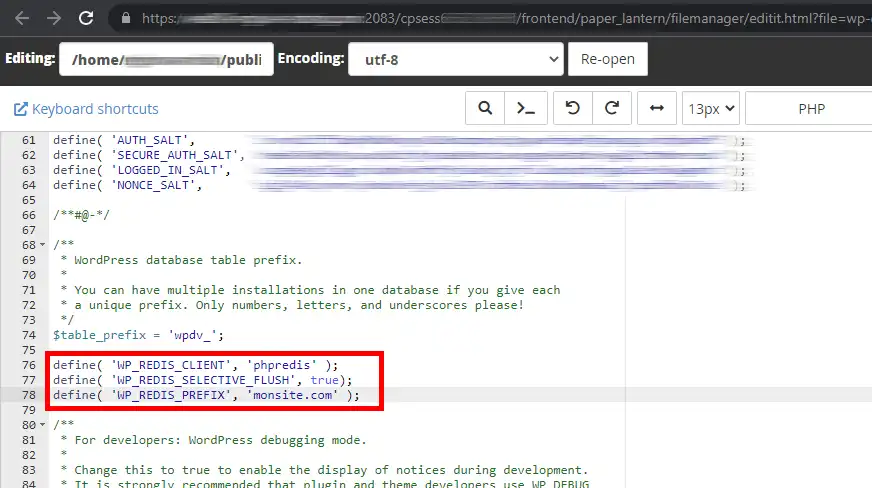
From your cPanel file manager, edit your wp-config.php file and add the following lines:
The value of WP_REDIS_CLIENT allows you to choose the library used by the WordPress plugin to access Redis: phpredis or predis.
The value of WP_REDIS_SELECTIVE_FLUSH allows you to delete only the data with the prefix defined on WP_REDIS_PREFIX during a total cleanup of the Redis cache.
The value of WP_REDIS_PREFIX allows you to specify a key prefix for the data on your site (so that it does not conflict with other sites). It is important to specify a unique prefix for each site.
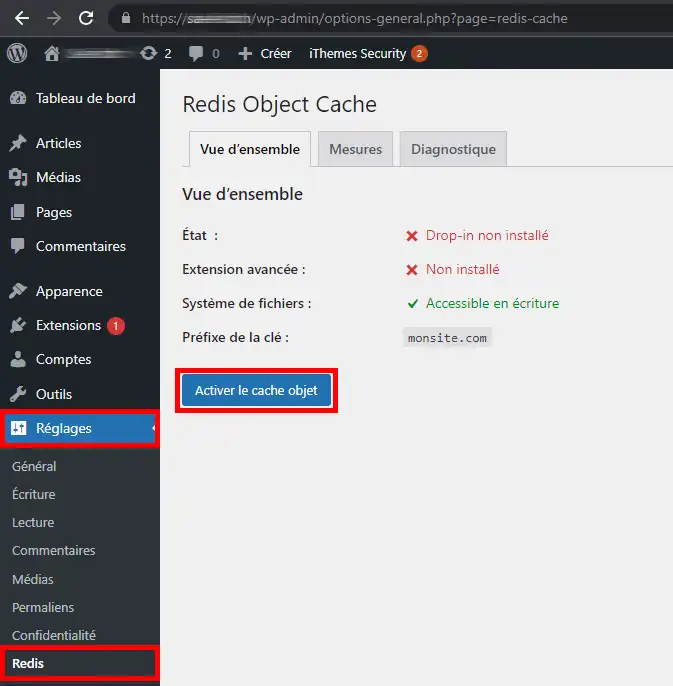
Once you've added these settings and saved the file, return to your WordPress dashboard. In Settings then Redis, activate the Redis object cache system:
Cache calibration options can be added to wp-config.php for more specific needs. For more information, please consult the plugin's official documentation.
How can I use Redis on WordPress with W3 Total Cache?
You can also use the WordPress plugin W3 Total Cache to cache the results of database queries. Note that this method is different from object caching. It is only recommended if a heavily used plugin does not use the WordPress object system (such as custom post types) to store and retrieve data.
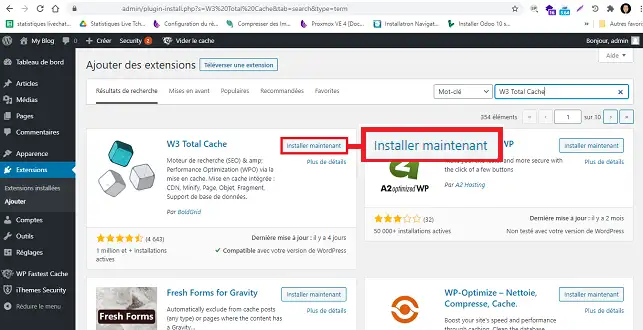
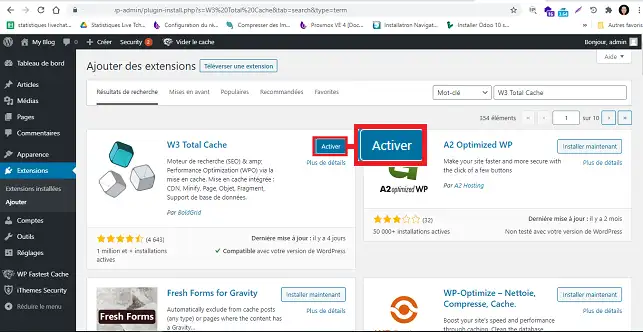
11. Log into your WordPress Dashboard and go to"Extensions/Add".
22. Search for the"W3 Total Cache" plugin and click on"Install now".
33. Activate the plugin by clicking on the button.
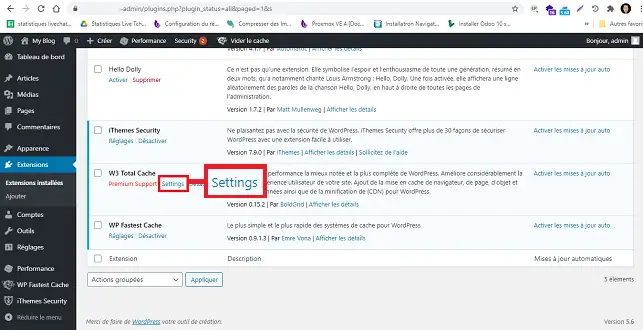
44. Click on"Settings" below the plugin to access its configuration.
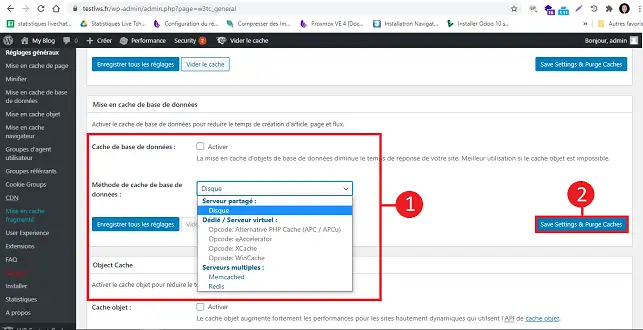
55. Go to the"Database caching" section, tick the"Database checkbox" box and choose"Redis" from the drop-down window. Finally, click on"Save settings and purge cache" to save your request.
Conclusion
You are now able toactivate and configure the Redis Object Cache plugin on your Wordpress site with your cPanel web hosting. Note that all Redis data is accessible to all users of the same cPanel server. As a result, it is imperative never to store sensitive information on Redis.
Don't hesitate to share your comments and questions.
Bonjour,
J'amende ma question : j'ai bien trouvé l'onglet "Diagnostics" de l'extension Redis, mais cela ne m'avance pas beaucoup :
Status: Non connecté
Client: PhpRedis (v5.3.4)
Drop-in: Valid
Disabled: No
Connection Exception: Connection refused
B✓
Benjamin-LWS Official answer
1 Feb 2023
Bonjour,
Merci de votre retour,
Le message "Connection refused" indique que l'extension Redis ne parvient pas à se connecter au serveur Redis.
Le problème rencontré peut-être dû à plusieurs facteurs, que nous ne pouvons pas déterminer via cette plateforme de Question.
Nous vous invitons donc à passer par notre système de support technique disponible depuis votre espace client, afin de vous apporter l'aide adéquate. (https://aide.lws.fr/a/268)
Cordialement, L'équipe LWS.
Was this answer helpful?
F
Fred
5 Apr 2023
Je ne trouve pas redis dans mon Cpanel. Absent de ma rubrique Logiciels.
B✓
Benjamin-LWS Official answer
13 Apr 2023
Bonjour,
Merci de votre retour.
Grâce aux informations renseignées à l'ouverture de votre question, j'ai pu constater que vous ne possédez de formule cPanel.
Une formule cPanel est nécessaire pour bénéficier des fonctionnalités que vous souhaitez.
Je vous remercie de votre attention et reste à votre disposition pour toute autre question ou complément d'information.
Nous vous invitons à contacter notre service support à travers votre espace client, afin de vous apporter une aide si vous rencontrez des difficultés quelconque. (https://aide.lws.fr/a/268)
Cordialement, L'équipe LWS
Was this answer helpful?
A question about this article?
Ask the LWS team and the community. Answers are published after moderation.
Ask the LWS team and its community a question
!
To enable this form, please tick the two consent boxes below.



 Yes
Yes No
No About
About 