Procédure
How to put Wordpress in maintenance mode
It is sometimes necessary to change the design of your website, to incorporate functional changes such as modifying the design or improving speed. In most cases, you can look for new plugins. Meanwhile, you should block your website from access by outside users as there are security risks involved.
This situation of blocking a website from the view of Internet users is called maintenance mode.
How to put Wordpress in maintenance mode
There are various ways of placing a website in maintenance mode. This allows you to display a message to your visitors indicating that you are working on resolving certain problems or on the design of your site.
In this tutorial, we're going to use the WP Maintenance extension to activate this mode.
To install the extension :
- Connect to your Wordpress back office
- In the menu bar, click on Extensions, then Add
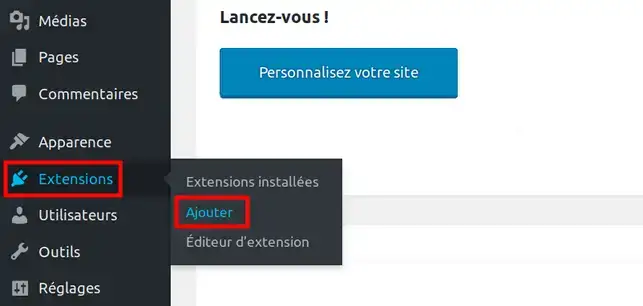
Enter WP Maintenance as the keyword to search for the extension:

Locate the following extension among the others, and click on the Install button, then Activate .

Next, to activate maintenance mode, from the Maintenance mode menu, click on General
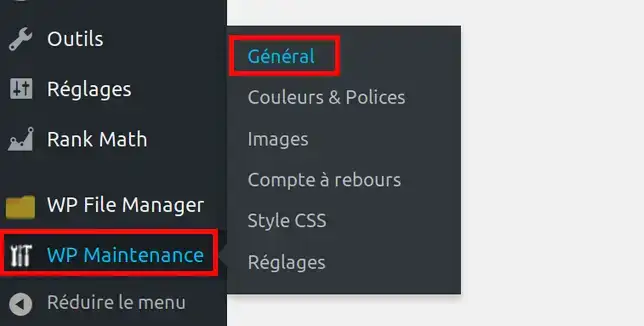
Then activate maintenance mode by clicking on the YES button and then on the Save changes button at the bottom of the page :

Conclusion:
You've learned how to put your Wordpress in maintenance mode. This mode will disable access to your website, while creating an attractive page clearly explaining that the website is under construction.
Don't hesitate to share your thoughts and questions!

 Contact us
 Customer Area
 Visit LWS


 Yes
Yes No
No Article read
24274 once
Article read
24274 once Merci ! N'hésitez pas à
poser des questions sur nos documentations si vous souhaitez plus d'informations et nous aider à les
améliorer.
Merci ! N'hésitez pas à
poser des questions sur nos documentations si vous souhaitez plus d'informations et nous aider à les
améliorer.
 About
About