Contact us
 Customer Area
 Visit LWS
Rate this article :
This article was useful to you ?
 Yes
Yes
 No
No
 Article read
25230 once
Article read
25230 once Merci ! N'hésitez pas à
poser des questions sur nos documentations si vous souhaitez plus d'informations et nous aider à les
améliorer.
Merci ! N'hésitez pas à
poser des questions sur nos documentations si vous souhaitez plus d'informations et nous aider à les
améliorer.Vous avez noté 0 étoile(s)



Procédure
There are several reasons why you may not remember your login details:
If you can't remember your login details for your LWS customer area, don't worry, we'll explain how to recover them easily.
Open your web browser and go to the LWS Customer Centre login page or simply click on this link.
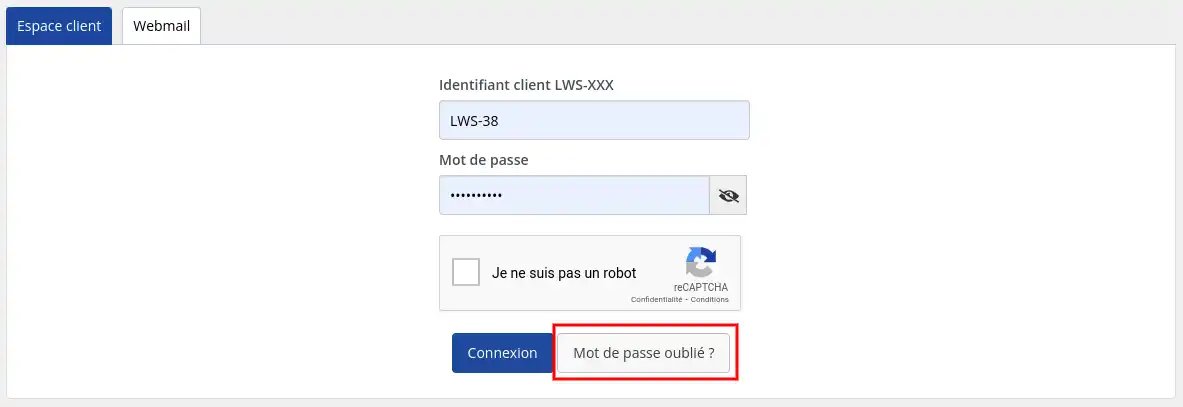
On the login page, you will see a button labeled "Forgot your password?". Click on it to access the login recovery page.
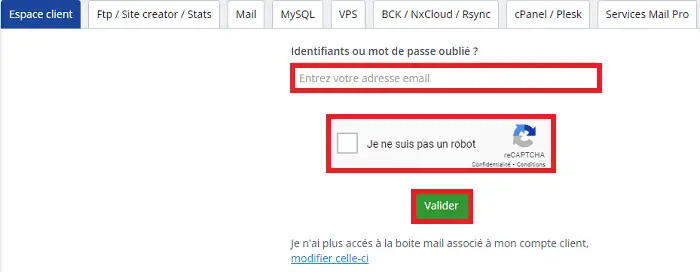
On the login recovery page, you will need to provide the email address associated with your LWS account. Make sure you enter the correct email address you used when you created your account. You must then tick the "I am not a robot" box and click on the green "Confirm" button.
If you no longer have access to the contact address for your LWS account, you must first change it before recovering the login details. To do this, you need to follow this documentation :
Once you have entered your e-mail address and clicked on the "Validate" button. LWS will send you an email with further instructions and a link to reset your login details.
[
Check your inbox and look for the email from LWS. Open it and follow the instructions provided to reset your login details.
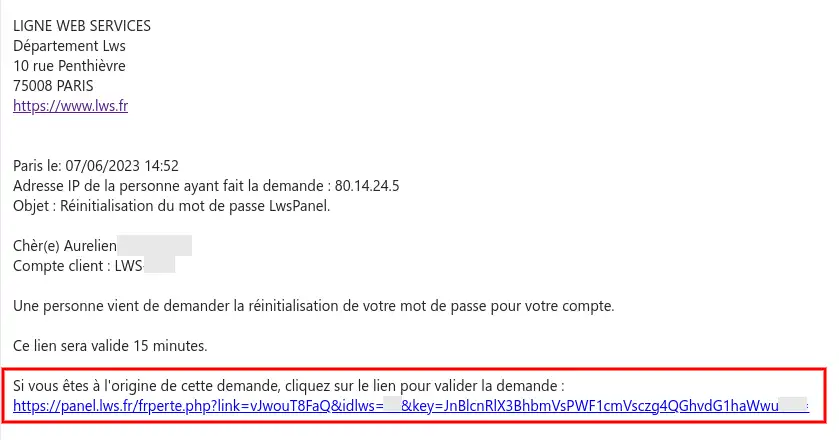
[
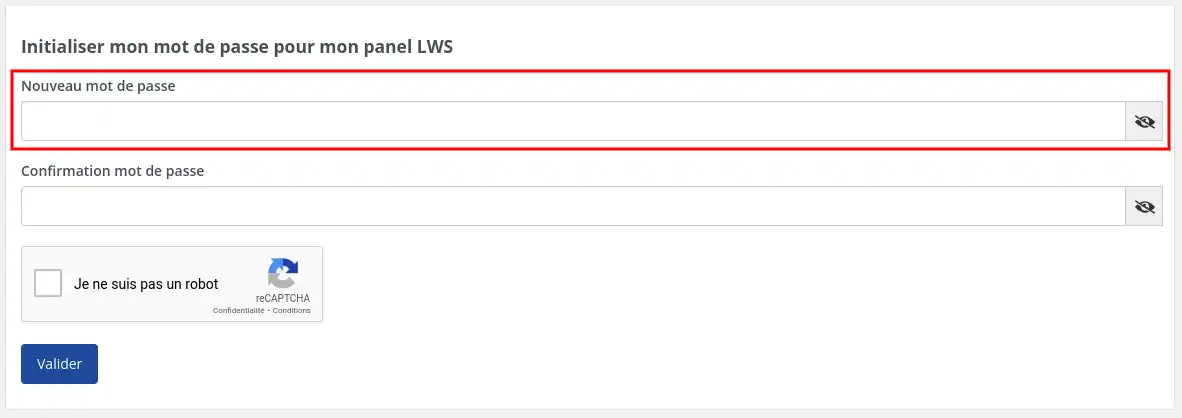
Clicking on the link will take you to a form where you can enter a new password for your customer area. You will need to confirm it, tick the "I'm not a robot" box and then click on the "Validate" button to finalise the procedure.
[
Once you've reset your login details, return to the LWS Customer Area login page. Enter your LWS identifier (of the type LWS-XXX where XXX represents a number between 2 and 6 digits) and the new password you have defined, tick the "I am not a robot" box and then click on the "Connect" button.
That's it! You should now be able to access your LWS customer area with your new login details.
It is essential to keep your login details safe and memorise them. If you forget them again, you can always follow the same steps to recover them.
Don't forget that if you have any problems recovering your login details, you can contact LWS Customer Services by Livechat, Telephone or via the form on our website for further help and personalised advice.
We hope you have found this guide useful and that you will find it easy to regain access to your LWS customer area.
Rate this article :
This article was useful to you ?
Yes
No
3mn reading
How do I change my password for the customer area?
2mn reading
How do I log on to the LWS Panel with dual identification?
1mn reading
Code request when logging into the LWS customer area
1mn reading
My password has been deactivated. How can I recover it?
Bonjour,
Nous vous remercions pour votre question et votre intérêt envers LWS. Malheureusement, votre question est trop précise et concerne votre cas personnel, ce qui rend difficile pour nous de fournir une réponse satisfaisante.
Nous vous invitons donc à contacter notre système de support client pour obtenir de l'aide spécifique à votre situation. Nous avons une équipe de professionnels qualifiés prêts à vous aider et à répondre à toutes vos questions avec précision et rapidité. (https://aide.lws.fr/a/268)
Merci de votre compréhension et nous espérons pouvoir vous aider bientôt.
Cordialement, L'équipe LWS
Bonjour,
Cependant, il peut arriver qu'à un moment donné, on vous demande ces identifiants, en particulier si vous avez déjà utilisé une session cPanel auparavant ou si vous avez été déconnecté pour une raison quelconque.
Les identifiants de connexion à cPanel sont envoyés par e-mail lors de l'achat du service d'hébergement cPanel.
Je vous remercie de votre attention et reste à votre disposition pour toute autre question ou complément d'information.
Nous vous invitons à contacter notre service support à travers votre espace client, afin de vous apporter une aide si vous rencontrez des difficultés quelconque. (Contacter le support)
Cordialement, L'équipe LWS
Bonjour,
Je vous remercie pour votre retour.
Malheureusement, à l'heure actuelle, il n'est toujours pas possible d'utiliser un identifiant personnalisé.
Il est probable que dans le futur, nous offrons à nos clients la possibilité de s'identifier par le biais d'une adresse email, mais cela n'est encore pas totalement décidée en interne, mais il est fort probable que cette modification ait lieu courant 2024, bien que cela soit encore incertain.
Nous vous remercions pour votre attention et restons à votre disposition pour toutes autres demandes ou interrogations à propos de nos services. Vous pouvez nous contacter directement par le biais de l'espace client ou directement depuis cette page.
Cordialement, L'équipe LWS
Bonjour,
Merci pour votre message.
Si votre abonnement a expiré, il est encore possible de récupérer votre nom de domaine et vos fichiers, selon la date d’expiration. Voici les étapes à suivre :
Nom de domaine :
Vérifiez s’il est encore dans sa période de grâce (généralement 30 à 45 jours après expiration). Dans ce cas, vous pouvez le renouveler directement depuis votre espace client. Passé ce délai, des frais de restauration supplémentaires peuvent s’appliquer, ou il pourrait ne plus être récupérable s’il a été supprimé ou racheté.
Fichiers du site :
Selon le temps écoulé depuis l’expiration, il est parfois encore possible de restaurer les fichiers et les bases de données, il est important de préciser qu'au-delà de trois mois, il ne sera plus possible de récupérer vos données. L'idéal étant de contacter le support technique pour vos données, cela pouvant entrainer des frais supplémentaires liés à la restauration.
Dans tous les cas, plus vous agissez rapidement, plus vous avez de chances de récupérer vos données et votre nom de domaine.
Je vous remercie pour votre attention et reste à votre disposition pour toute autre question ou complément d'information.
Cordialement, L'équipe LWS
Bonjour,
Si vous ne parvenez plus à vous connecter au panel avec vos identifiants, je vous invite dans un premier temps à utiliser la procédure de réinitialisation de mot de passe disponible sur la page de connexion.
Concernant le domaine, si celui-ci n’est plus récupérable pour une quelconque raison (expiration, suppression, etc.), il reste tout à fait possible, sous certaines conditions, de récupérer les données associées à l’hébergement.
Pour cela, je vous invite à me fournir à contacter le support par mail (https://aide.lws.fr/a/434) avec les informations suivantes afin de pouvoir vérifier votre identité et l’état du service :
Le nom de domaine concerné
L’adresse e-mail utilisée lors de la création du compte
Un justificatif prouvant que vous êtes bien le propriétaire du service (facture, mail de commande, vérification de niveau 2 ...)
Dès réception de ces éléments, nous pourrons vous indiquer les démarches à suivre pour récupérer vos données.
Restant à votre disposition,
Cordialement,
Bonjour,
Je vous remercie pour votre message.
Je suis désolé de l'inconfort que vous rencontrez actuellement.
Afin d'investiguer, pourriez-vous nous contacter par ce biais : https://www.lws.fr/contact ?
En cas de difficulté, merci de poster une question en précisant le nom de domaine commandé, nous vous contacterons sur le numéro présent sur votre fiche client.
Bonne journée,
Cordialement, L'équipe LWS
 About LWS :
LWS is a 100% French web hosting company that focuses on quality and innovation and offers a responsive and competent technical service at affordable prices.
About LWS :
LWS is a 100% French web hosting company that focuses on quality and innovation and offers a responsive and competent technical service at affordable prices.