Contact us
 Customer Area


 Visit LWS
Rate this article :
This article was useful to you ?
 Yes
Yes
 No
No
 Article read
13263 once
Article read
13263 once Merci ! N'hésitez pas à
poser des questions sur nos documentations si vous souhaitez plus d'informations et nous aider à les
améliorer.
Merci ! N'hésitez pas à
poser des questions sur nos documentations si vous souhaitez plus d'informations et nous aider à les
améliorer.Vous avez noté 0 étoile(s)



Sommaire
Procédure
This documentation explains how to request a demonstration hosting account with LWS.
A demonstration account allows you to test a hosting plan before ordering, to check if it fits your website, needs, and usage level.
This documentation pertains to demonstration requests for the following hosting plans:
The VPS plans are not available for demonstration.
The request for a demonstration account can be made:
Depending on the requested plan, the demonstration account may then allow you to test an environment such as LWS Panel, cPanel or Plesk.
Before making your request, prepare the following information:
A demonstration hosting account is a temporary access provided by LWS.
It allows you to discover a hosting plan before ordering it. You can thus test the proposed environment, check the available features, and better understand if the plan fits your project.
The demonstration account is time-limited. It can be opened for a duration of 1 month or 2 months.
At the end of the demonstration period, the account is automatically deleted.
A demonstration hosting account has the same quotas and functionalities as a standard hosting account.
LWS demonstration accounts use a temporary address of the type LWS.HOST subdomain.
This means you are not testing the hosting with your own domain name, but with a temporary address provided for the demonstration.
For security reasons, sending emails from a PHP script is disabled on demonstration accounts. This limitation helps prevent abuses and fraudulent sending.
Demonstration accounts are not intended to host a production website. They are solely for testing a plan before placing an order.
The procedure depends on your situation.
If you are not yet an LWS client, you can make your request from the LWS website.
Step 1: go to the LWS website.
Step 2: click on the Contact button.
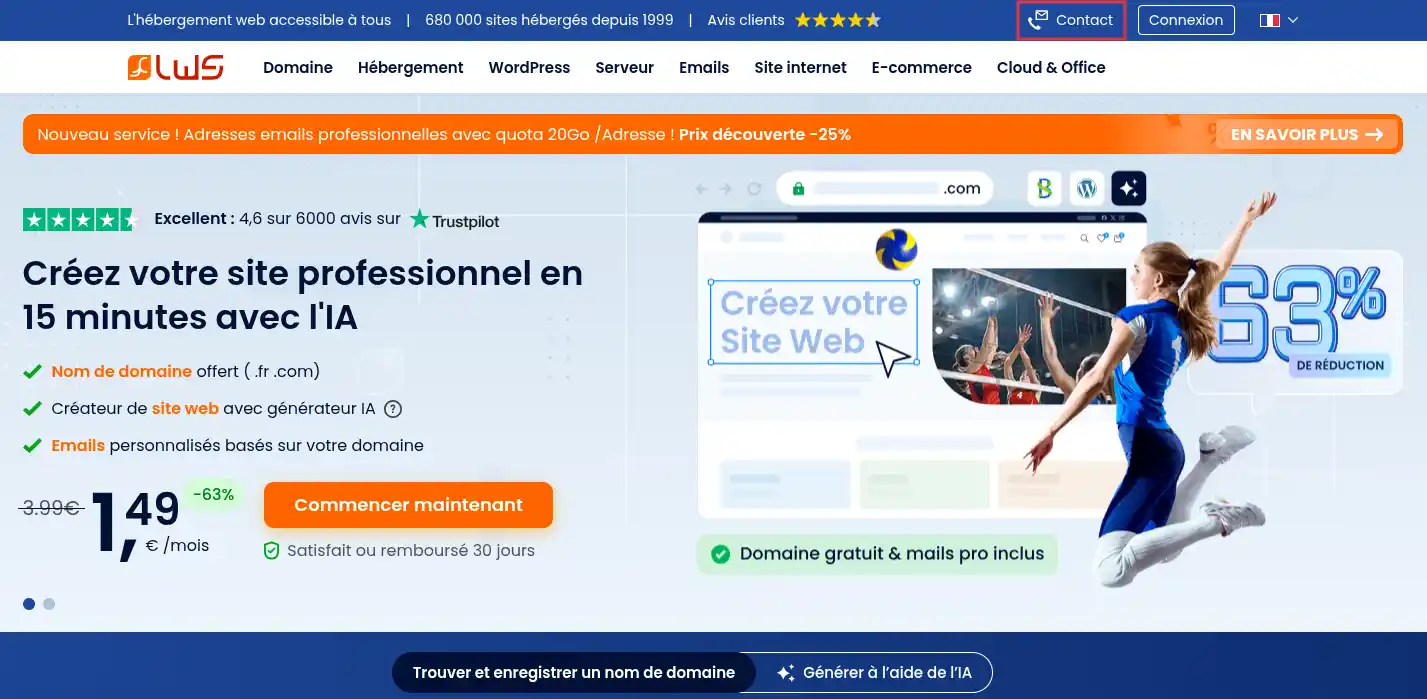
This button allows access to the request form for people who want to obtain information before ordering.
Step 3: indicate that you are not a client by clicking on the "I am not a client" button:

Step 4: Fill in the requested fields in the form.
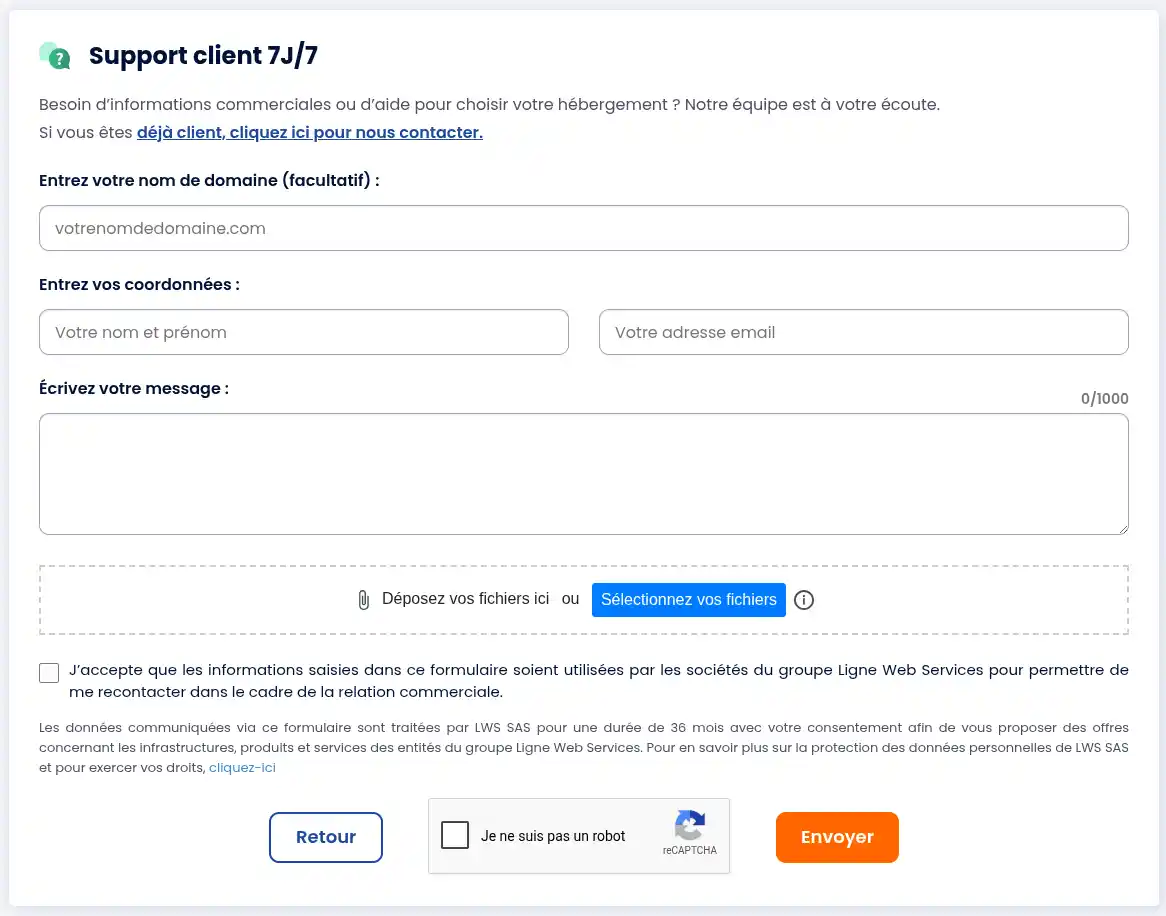
Clearly indicate that you wish to obtain a demonstration account.
Your message must specify:
Step 5: Check the information entered, then submit the form.
After submitting, a confirmation message should appear indicating that your request has been successfully sent.
If you are already an LWS client, you must make your request from your client area by opening a commercial contact.
After sending your request, you generally receive an initial automatic email confirming that your request has been received.
Your request is then reviewed by the relevant department.
If your request is accepted, you will receive an email containing the necessary information to access the demonstration account.
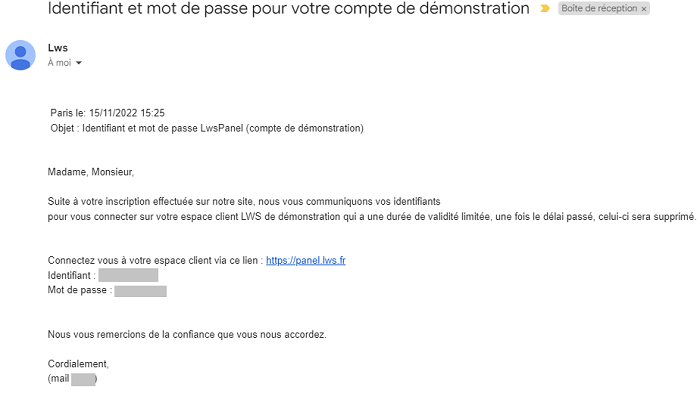
This email contains, among other things:
Keep this email for the entire duration of the demonstration.
Processing time
The processing time may vary according to the period and the type of request.
Your request is not necessarily processed immediately after submitting the form. Monitor your inbox and your Spam or Junk folder.
If you do not receive any response after several business days, contact LWS again, recalling your initial request.
I did not receive the confirmation email
First, check your Spam, Junk, or Promotions folder.
Also ensure that the email address specified in the form is correct.
If you are already a client, also check the responses available in your LWS client area.
The automatic email only confirms that your request has been received. It does not contain the demonstration account credentials.
The credentials are sent after examination and acceptance of your request.
If you have not received anything after several business days, contact LWS again, specifying:
If you are unsure between several plans, mention it in your message.
You can also specify the type of site you wish to create:
The VPS plans are not available for demonstration accounts.
If you would like information about a VPS plan, contact LWS for advice before ordering.
Demonstration accounts use a temporary address provided by LWS, usually in the form of a LWS.HOST subdomain.
They are not intended to directly host a site with your own domain name.
You can order a standard hosting plan with a domain name of your choice and benefit from the “satisfaction guaranteed or your money back” guarantee.
Sending emails via PHP function is disabled on demonstration accounts.
This limitation is normal. It helps prevent abuses and the sending of fraudulent emails.
You can still test the other hosting features available as part of the demonstration.
LWS allows you to request a demonstration hosting account for several plans, notably LWS Panel, SiteBuilder Pro, Plesk, cPanel, and Cloud cPanel.
To obtain this account, you must contact LWS specifying the desired plan and the requested demonstration duration.
The demonstration account is temporary, limited to 1 or 2 months, and is for testing a plan before ordering only.
Rate this article :
This article was useful to you ?
Yes
No
 About LWS :
LWS is a 100% French web hosting company that focuses on quality and innovation and offers a responsive and competent technical service at affordable prices.
About LWS :
LWS is a 100% French web hosting company that focuses on quality and innovation and offers a responsive and competent technical service at affordable prices.