Dedicated VPS server with ISP Config6 October 2021By Aurélien T. 3 min read
How do I access ISPConfig on my dedicated VPS server?
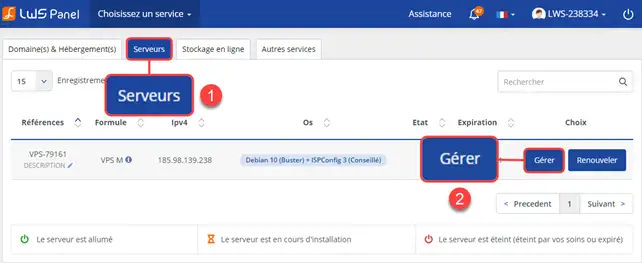
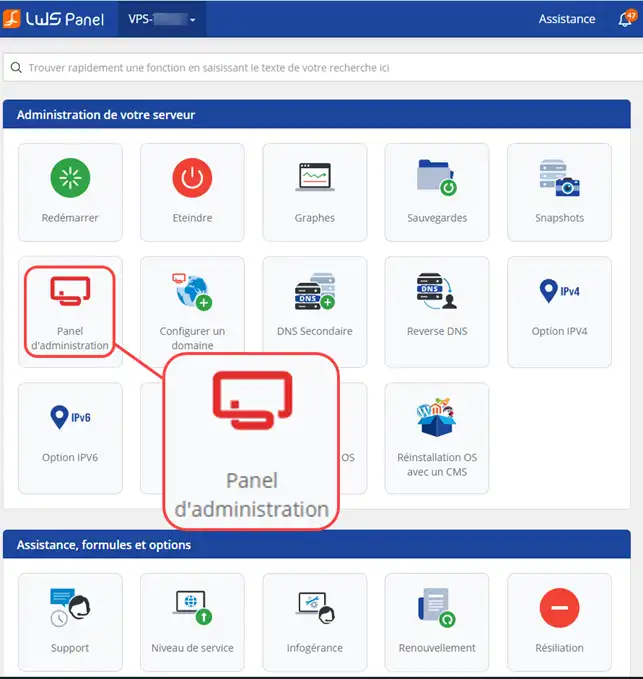
Procédure
What is the purpose of administering my server?
LWS provides a management interface called 'ISPConfig' which makes it easy to manage all current operations.
You can use this interface to add websites, create FTP users, create e-mail addresses, manage your DNS and much more.
What is ISPConfig?
ISPConfig 3, the best open-source interface for web hosting
The ISPConfig 3 control panel is specially designed formulti-site web hosting packages. It gives you full control over your Linux server.
TheISPConfig interface istranslated into 20 languages and has an intuitive web interface. The interface lets you control your server quickly and easily, without needing any technical knowledge of server administration. You can control and modify your web servers, databases (MySQL) and mail servers from any browser you like. ISPConfig allows you to optimise the consumption of your resources and the performance of your sites.
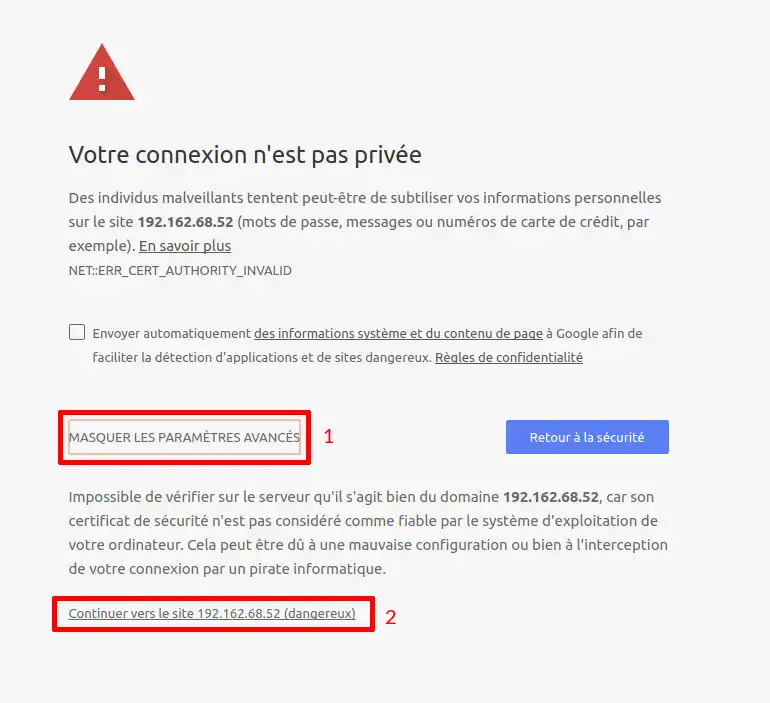
You may arrive on a page indicating a security problem, this is due to the self-signed certificate set up on the VPS server. Simply click on Hide advanced settings (1) and then on Continue to the site (2). Adding a security exception is not a problem for your VPS or your PC.
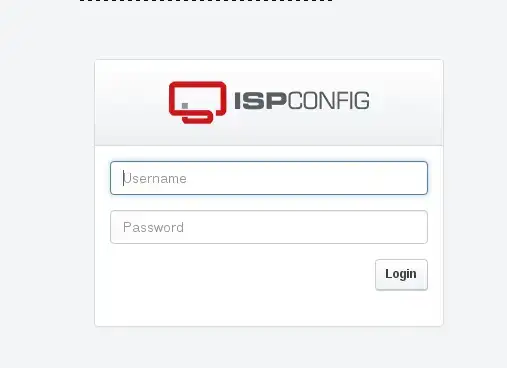
55. Enter the password and user ISPConfig
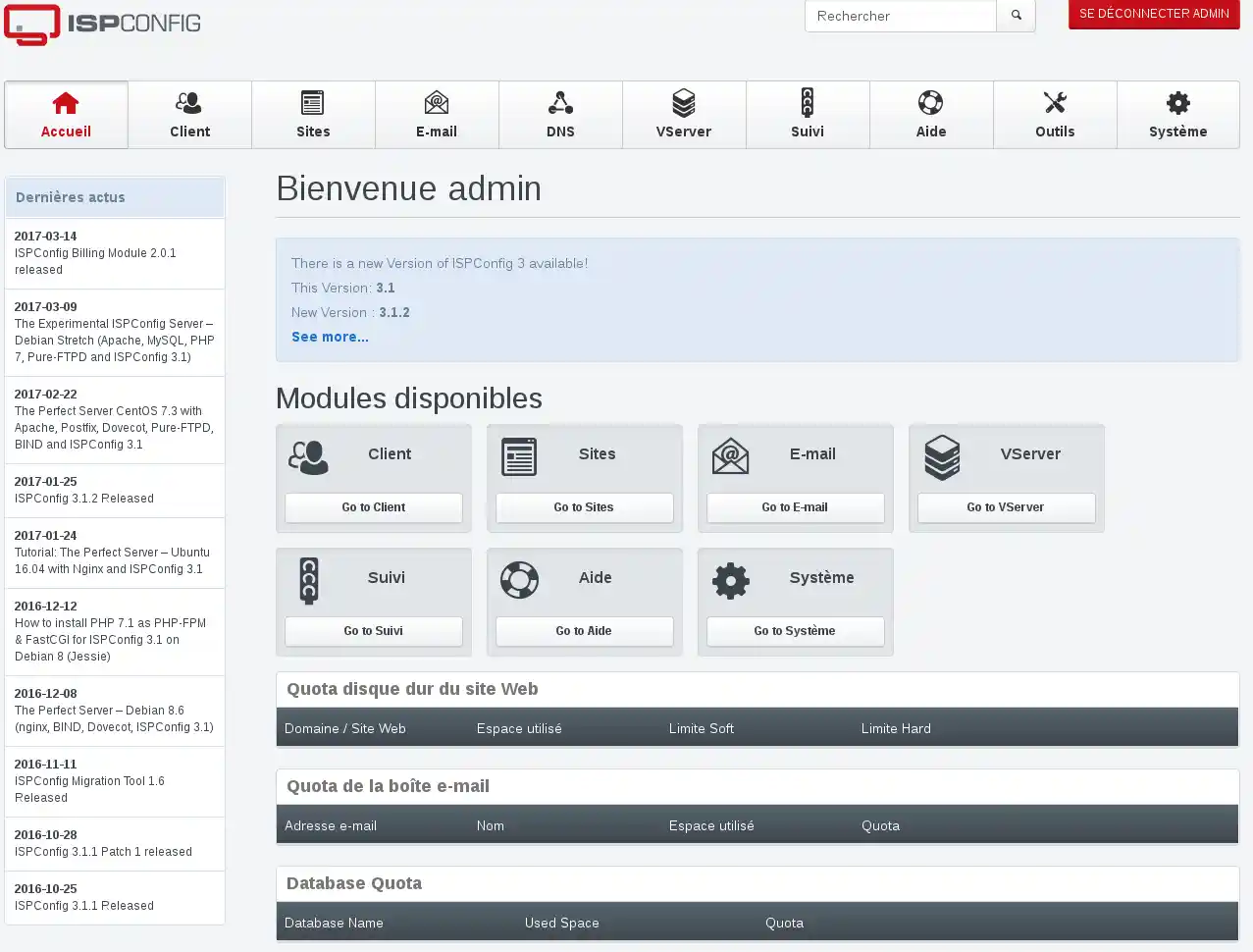
66. You are now connected to your ISPConfig panel.
I no longer have access to connect to ISPConfig how do I get it back?
Your login details for your server have been sent to your email address.
If you no longer have this email, you can reset the ISPConfig access password via your LWS Panel Customer Centre.
22. Click on the "Click here" button next to Lost/forgotten server password?
33. An e-mail will be sent to you with your login details.
When I connect to ISPConfig my browser displays that this site is not valid, why?
The ISPConfig administration page of your VPS Dedicated Server uses the"HTTPS" protocol in order to secure the data. This protocol involves checking with a third-party company, which must certify this page using an SSL certificate.
In the case of server administration, it is not necessary to validate with a third-party company, as only the site administrator needs to access this page. Your certificate is therefore self-signed.
This is why your web browser displays this warning message.
So there's no need to worry, just click on the "Continue" button.
How can I access ISPConfig directly without going through the LWS Panel customer area?
You can access your server's administration directly by entering your server's IP address with port 8080 in the address bar
for example: https://127.0.0.1:8080/
I don't want to use your ISPConfig tool, what should I do?
It is possible to create your own user panel. To do this, you need to choose an operating system without ISPConfig.
You can then choose other free or paid solutions. Below is a non-exhaustive list of panels that are compatible with our hosting packages:
Je souhaite créer un utilisateur de base de données et créer aussi une base de données. comment faire?
J✓
Jordan-LWS Official answer
25 Mar 2025
Bonjour,
Il est tout à fait possible de créer une base de données et d'y accéder à distance via ISPConfig. Pour vous guider dans cette démarche, je vous invite à consulter les documentations suivantes :
https://aide.lws.fr/a/284
https://aide.lws.fr/a/482
Ces ressources vous fourniront des étapes détaillées pour configurer correctement votre base de données et l'utilisateur associé.
N'hésitez pas à revenir vers nous si vous avez des questions ou si vous avez besoin d'aide supplémentaire.
Cordialement,
Was this answer helpful?
Q
Quentin92
il y a 8 mois
Bonsoir cher support, espérant que vous allez bien, merci de m'aider à résoudre un problème. J'aimerais créer un serveur FTP sur mon ISPCONFIG et y accéder par Filezilla mais la connexion m'envoie un message d'erreur. L'objectif est de configurer une save
J✓
Jordan-LWS Official answer
il y a 7 mois
Bonjour,
Je vous remercie pour votre message.
Pour toute demande concernant ce sujet, je vous invite à contacter directement l’assistance client depuis votre espace client.
Il vous suffit de vous connecter, puis de vous rendre dans la rubrique « Assistance » afin d’ouvrir une demande. Votre requête sera ainsi prise en charge par le service compétent dans les meilleurs délais.
Je vous remercie pour votre compréhension.
Cordialement, L'équipe LWS
Was this answer helpful?
A question about this article?
Ask the LWS team and the community. Answers are published after moderation.
Ask the LWS team and its community a question
!
To enable this form, please tick the two consent boxes below.



 Yes
Yes No
No About
About 