Procédure
What is DMARC and how does it work?
DMARC(Domain-based Message Authentication, Reporting and Conformance) is a technical specification created by a group of organisations to help reduce the misuse of email, such as spam and phishing, by providing a solution for deploying and monitoring email authentication issues.
You can configure DMARC authentication by adding rules to your domain's DNS records, which define how your domain handles suspicious emails.
How does a DMARC field on a domain name work?
11. How a DMARC field works
A DMARC field on a domain name will look like this:
TXT @ v=DMARC1; p=quarantine; pct=5; rua=mailto:postmaster@votre_domaine.com
Common tags used in DMARC TXT records :
| Tag |
Mandatory |
Description and values |
Example |
|
v
|
mandatory |
Protocol version. This value must be DMARC1.
|
v=DMARC1
|
|
p
|
required |
Defines how your domain handles suspicious messages:
none: take no action on the message, log suspicious messages in the daily report
quarantine: mark messages as spam and preserve them for later processing
reject: cancel the message so that it is not sent to the recipient
|
p=quarantine
|
|
pct
|
optional |
Defines the percentage of suspicious messages to which the DMARC rule applies. Suspicious messages are messages not validated by DMARC checks. The default value is 100.
|
pct=20
|
|
rua
|
optional |
Creation of URI (Uniform Resource Identifier) reports for global reports. To obtain reports on DMARC activity for your domain, use this option with your own e-mail address.
|
rua=mailto:mail@exemple.com
|
| sp |
optional |
Sets the rule for messages from subdomains of your main domain. Use this option if you wish to apply a different DMARC rule for your subdomains. The possible values are the same as for the p tag.
|
sp=reject
|
| aspf |
optional |
Sets the alignment mode for SPF (ASPF) to determine the exact match required between message information and SPF signatures. The default value is relaxed.
r: "relaxed" allows partial matches, for example subdomains within a domain.
s: "strict" requires an exact match.
|
aspf=r
|
A few examples:
Take no action on messages that appear to come from your domain, but do not pass DMARC checks. Send the daily report to "postmaster@votre_domaine.com".
v=DMARC1; p=none; rua=mailto:postmaster@votre_domaine.com
Quarantine 5% of messages that appear to come from your domain but do not pass DMARC checks. Send the daily report to "postmaster@votre_domaine.com".
v=DMARC1; p=quarantine; pct=5; rua=mailto:postmaster@votre_domaine.com
Reject 100% of messages that appear to come from your domain but do not pass DMARC checks. Send the daily report to "postmaster@votre_domaine.com" and "dmarc@votre_domaine.com".
v=DMARC1; p=reject; rua=mailto:postmaster@votre_domaine.com, mailto:dmarc@votre_domaine.com
2. How to set up the default DMARC LWS field
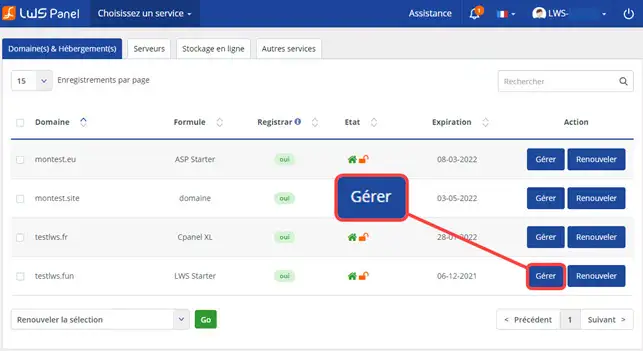
11. go to your domain's admin area
22. Choose your domain name and click on"Manage".
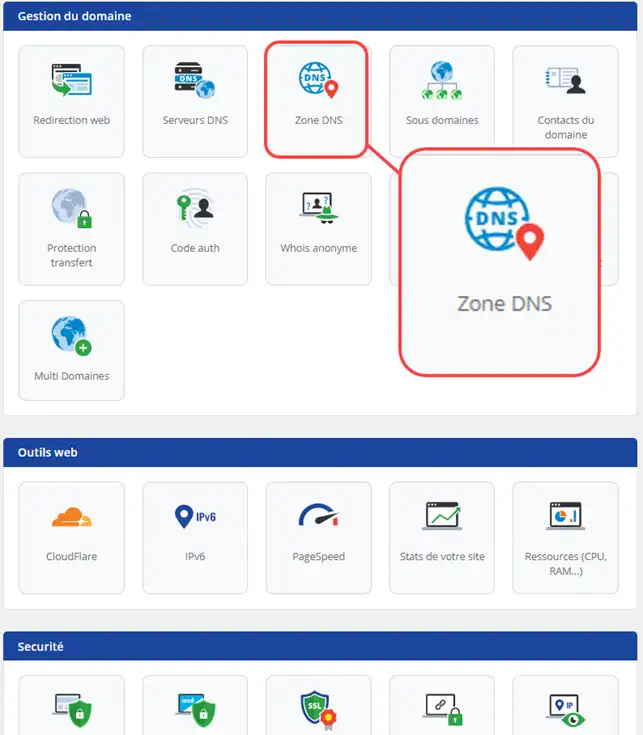
33. Click on the"DNS Zone" icon
55. To add a DMARC record to a DNS zone, simply fill in the following fields :
.
- TXT: Choose the type of Zone
- Add a "_dmarc".
- Enter the value for the DMARC field
- Enter the TTL for your DNS Server
- Click on the "Add" button
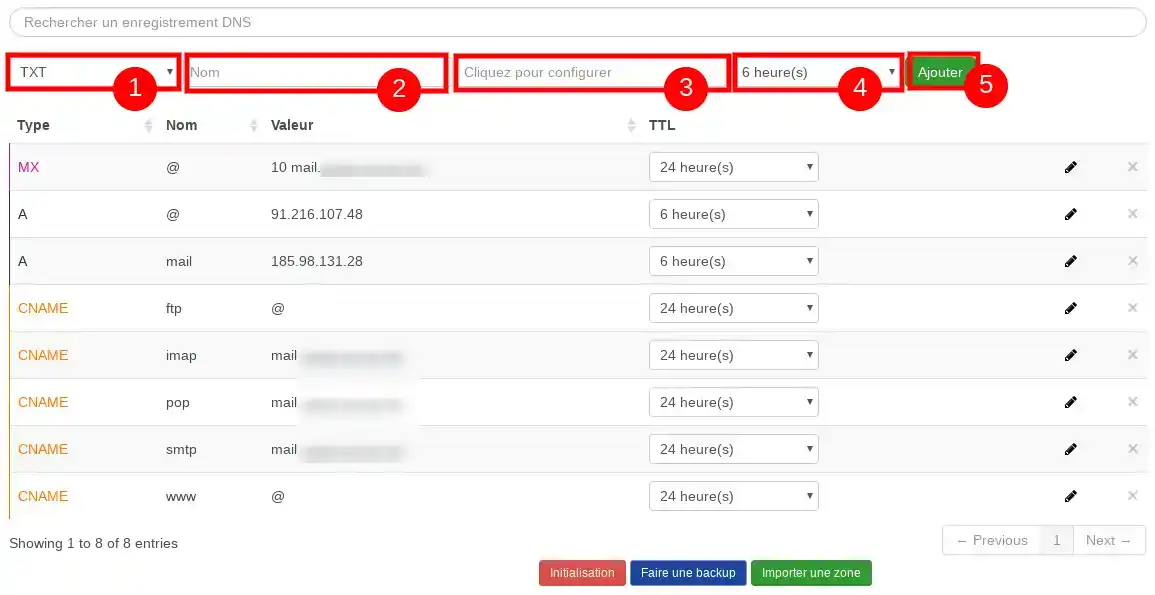
In the"complex zone for experts", this will create a TXT field with the value of your DMARC record.
Conclusion
You can now add an SPF field to your domain name on your LWS shared hosting. The SPF allows you to send the list of servers authorised to send emails to the email service.
Don't hesitate to share your comments and questions!



 Yes
Yes No
No About
About 