How to change the PHP version in Terminal Web LWS Panel

Procédure

What is the SSH Terminal?

The Terminal tool in the LWS Panel allows you to have a SSH shell directly on your web hosting, via your web browser while being logged into your client area, without needing an SSH client like Putty.

It is a practical tool if you need to run commands on your hosting.

The SSH Terminal is available from the LWS Starter to Performance plans, by going to "SSH Terminal" located in the "Software" section. Thanks to this Terminal, it is possible to modify and perform certain installations such as Composer.

By default, [ADDRESS] the Terminal's PHP version is the latest available version. You can view the version by going there and typing the following command:

php -v

However, it is possible, [PERSON_NAME], to change the PHP version to one of those available on the Terminal, from PHP 5.6 to PHP 8.1.

How to change the PHP version through the LWS Panel Web Terminal?

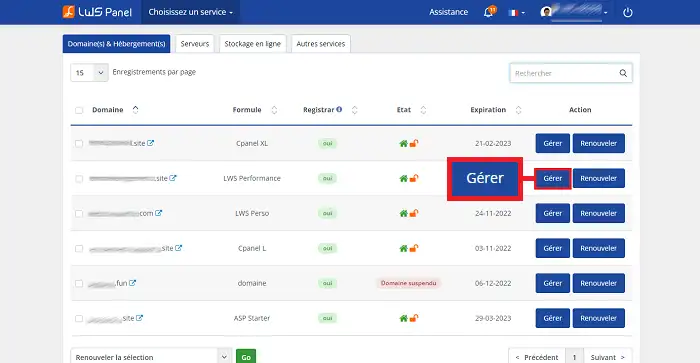
Log in to your LWS client area and click on "Manage" located behind the relevant LWS plan
How to change the PHP version in Terminal Web LWS Panel

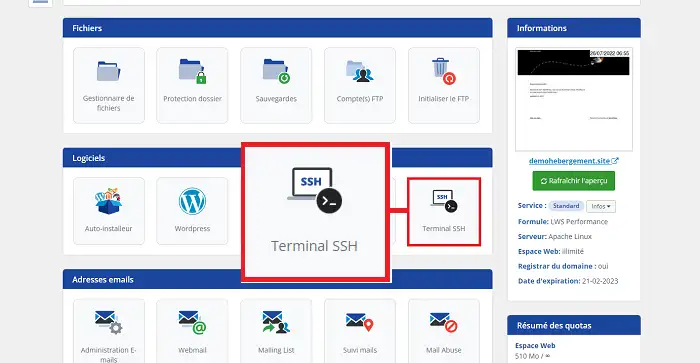
Click on the "SSH Terminal" tool located in the "Software" section.
How to change the PHP version in Terminal Web LWS Panel

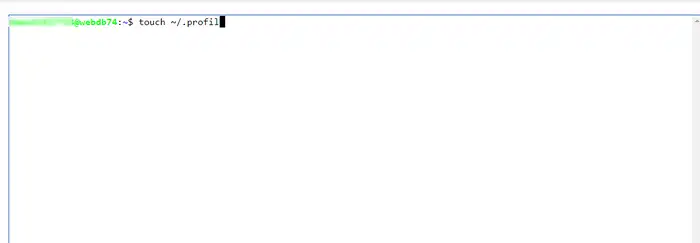
In the SSH Terminal, you will need to create a new profile using the "touch" command.

touch ~/.profil 

You can replace "profil" with the desired name. Please note that for each command, it will be necessary to replace the name "profil" with the one you have chosen.
How to change the PHP version in Terminal Web LWS Panel

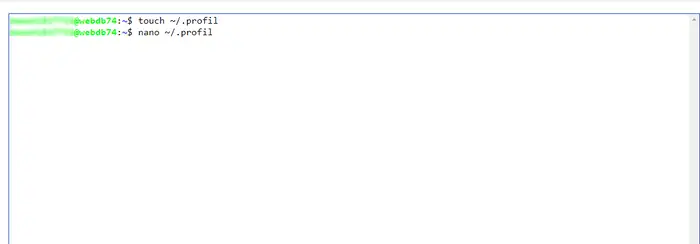
[PERSON_NAME] the "profil" file using the following command:

nano ~/.profil
How to change the PHP version in Terminal Web LWS Panel

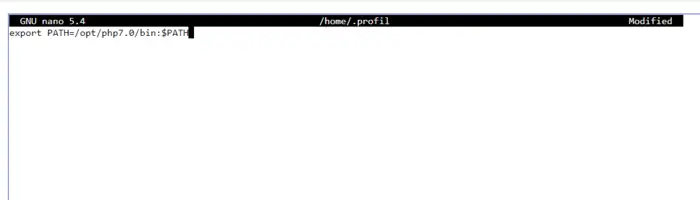
Add the following code to the "./profil" file:

export PATH=/opt/php7.0/bin:$PATH

When adding the code line, remember to change php7.0 to the desired PHP version. The available versions are as follows:

  • php5.6
  • php7.0
  • php7.1
  • php7.2
  • php7.3
  • php7.4
  • [PERSON_NAME]>
  • php8.1
  • php8.2
  • php8.3
  • php8.4
  • php8.5

How to change the PHP version in Terminal Web LWS Panel

Press [CTRL] + X simultaneously, then "Y" and the "Enter" key to save the file.

How to change the PHP version in Terminal Web LWS Panel

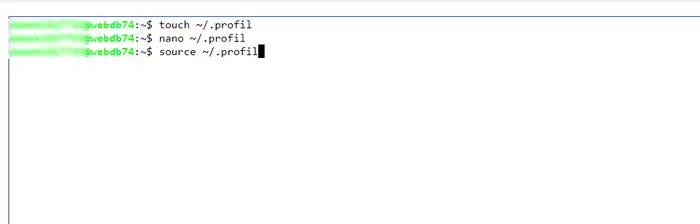
Finally load the .profil file using the following command:

source ~/.profil
How to change the PHP version in Terminal Web LWS Panel

You can check the PHP version used by the SSH Terminal using the following command:

php -v

How to change the PHP version in Terminal Web LWS Panel

Rate this article :

5/5 | 1 opinion

This article was useful to you ?

Article utileYes

Article non utileNo

MerciMerci ! N'hésitez pas à poser des questions sur nos documentations si vous souhaitez plus d'informations et nous aider à les améliorer.



Vous avez noté 0 étoile(s)

Similar articles

1mn reading

How do I connect to the Web Terminal with LWS Panel? (ssh web console)

3mn reading

How can I use GIT with the Web terminal on my LWS shared hosting?

10mn reading

What can I do on my WordPress site using the Web Terminal?

10mn reading

How can I use the Web Terminal on my Prestashop site?


Questions sur l'article (3)

Ask a question
LChris57
18 nov. 2022
Bonjour Mon logiciel réclame une version minimale PHP de 7.1.0, même si, pour l'instant je peux tout de même exporter mon site avec une version PHP antérieure. Comment puis-je procéder pour passer de la version actuelle de PHP à cette version 7.1.0.
fabrice-LWS Reponse officielle
19 nov. 2022
Bonjour, vous avez la possibilité de modifier la version PHP en suivant la procédure suivante: https://aide.lws.fr/a/84
Cette reponse vous a aide ?
asrarquoran
5 janv. 2023
pourquoi je ne peux pas accéder à mon site wordpress [domaine masqué]
Benjamin-LWS Reponse officielle
6 janv. 2023

Bonjour,

Si vous souhaitez avoir une aide sur votre problème Wordpress, je vous invite à ouvrir un ticket sur notre support technique.

Voici une documentation portant sur l'ouverture de ticket via votre espace client : https://aide.lws.fr/a/268

Cette reponse vous a aide ?
nicolas
11 mai 2025
ne marche absolument pas sur offre starter ! comme beaucoup d'autre chose très déçus de cette hébergeur !!!!
Jordan-LWS Reponse officielle
14 mai 2025

Bonjour,

Je vous invite à contacter directement notre support technique afin que nous puissions examiner plus en détail le problème auquel vous êtes confronté.

Il est possible que la version de PHP que vous avez sélectionnée ne soit pas installée sur votre espace d’hébergement, ce qui pourrait expliquer le dysfonctionnement.

N’hésitez pas à joindre une capture d’écran ou à préciser les étapes menant à l’erreur afin de faciliter l’analyse.

Je vous remercie pour votre attention et reste à votre disposition pour toute autre question ou complément d'information.

Cordialement, L'équipe LWS 

Cette reponse vous a aide ?

Ask the LWS team and its community a question

RGPD : Responsable LWS-Ligne Web Services. Finalité : modération et publication publique de votre question, notification éventuelle d'une réponse. Base légale : consentement (art. 6.1.a RGPD). Conservation des emails : 90 jours après notification, 12 mois maximum sans réponse. Vous pouvez exercer vos droits via notre nos CGV - section RGPD.