
Online help
The web host accessible to all
Procédure
The purpose of this help section is to guide you in customising your Nextcloud online storage by customising the access URL from your customer area.
To register a domain, follow these instructions. To create a CNAME or an A from your DNS zone from your LWS panel, follow these documentations.
To change the access URL to your cloud storage, follow these simple steps:
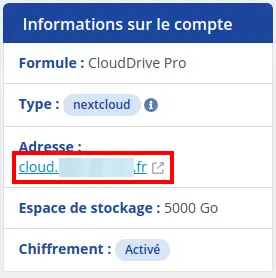
Step 1: First, you need to log into your LWS account and access cloud storage management for the Nextcloud you want to manage.
Consult the "Account information" box. Click on "Address".
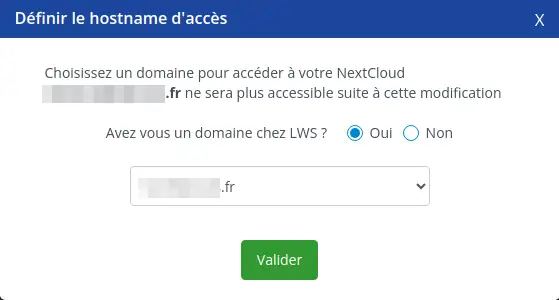
Step 2 : If you have a domain registered with LWS, check yes, and select your domain from the drop-down menu. A cloud A IP record will be automatically generated.
If your domain is registered elsewhere, you will need to create the cloud.yourdomain.ext subdomain yourself.
If your domain name is linked to shared hosting on cPanel, follow this documentation to create the "cloud" sub-domain: https: //help.lws-hosting.com/en/create-a-subdomain-in-cPanel.
If your domain name is linked to ISP-Config hosting, follow this documentation to create the "cloud" sub-domain: https: //help.lws-hosting.com/en/How-to-create-a-subdomain-on-a-dedicated-VPS-server
If your domain name is linked to a Plesk hosting, follow this documentation to create the "cloud" sub-domain: https: //help.lws-hosting.com/en/how-do-i-create-a-subdomain-in-plesk
If you are using another service provider, contact the support department of that service provider.
After creating/modifying the "cloud" sub-domain, you may have to wait for DNS propagation to take place. This can take from a few minutes to a few hours depending on the DNS propagation time .
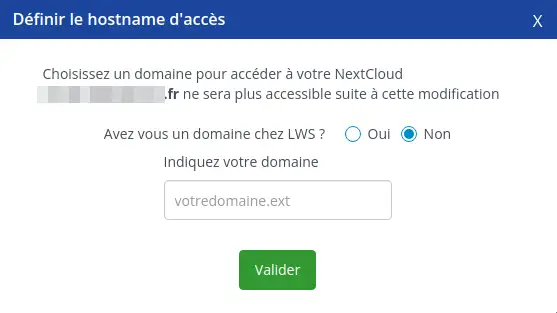
Step 3 : Click on "Validate". Notify your employees of the change of address.
By following these instructions, you can easily change the access URL to your Nextcloud Pro storage. If you have any further questions or need assistance, don't hesitate to contact our support team , who will be happy to help. If you don't yet have an online storage package or would like to upgrade to a cloud storage package with advanced features, please consult this documentation to place your order, and find information about Nextcloud and Nextcloud Pro packages here.
Ask the LWS team and the community. Answers are published after moderation.
 About LWS :
LWS is a 100% French web hosting company that focuses on quality and innovation and offers a responsive and competent technical service at affordable prices.
About LWS :
LWS is a 100% French web hosting company that focuses on quality and innovation and offers a responsive and competent technical service at affordable prices.



 Yes
Yes No
No