


How do I change my Plesk password?

Procédure

How do I create a secure password?

Plesk allows you to change the password for your management interface. However, it is advisable to make your password secure to prevent anyone with malicious intent from accessing your interface and the data on your website. It is advisable to use special characters, numbers and letters in your password.

When choosing your new Plesk password, it is advisable not to use personal information such as your surname, first name or date of birth.

Plesk will automatically generate a strong password for you.

How do I change my Plesk password via your LWS customer area?


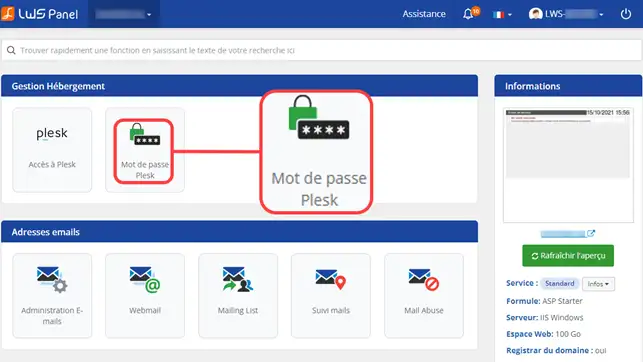
1. connect to the administration of your Web formula. To do this

2. Click on the "Plesk password" button in the "Hosting Management" section.

How do I change my Plesk password?

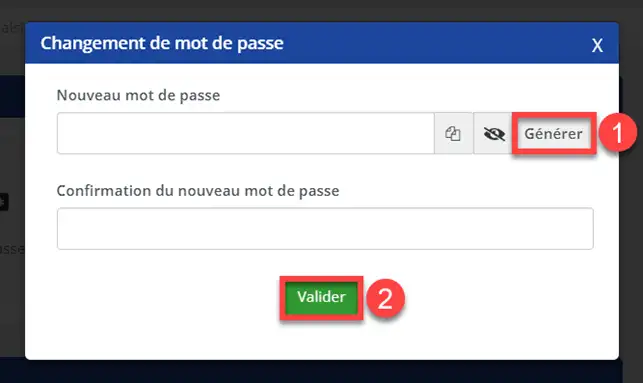
3. Change the password for your Plesk interface by clicking on "Generate" (1) and click on "Validate" (2).

How do I change my Plesk password?

How do I change my Plesk password?

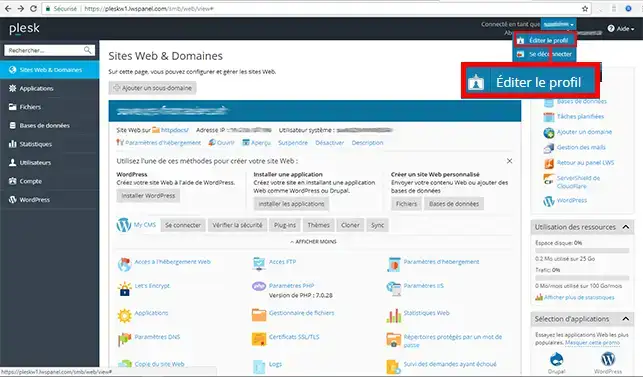
1. Connect to your Plesk interface.

2. Click on your first name at the top right of your screen and then on"Edit Profile".

How do I change my Plesk password?

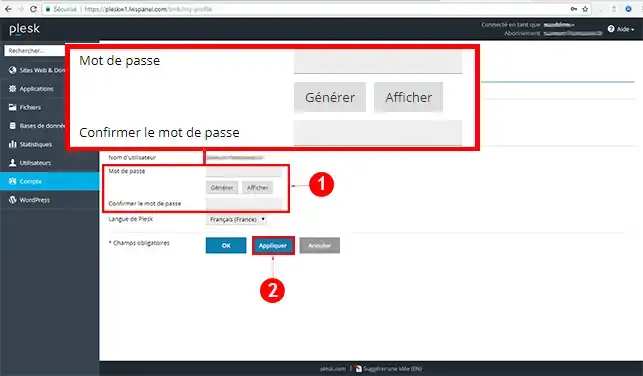
3. Choose a new password and click the"Apply" button to save it. You can click on the "Generate" button to automatically create a password for your Plesk space.

How do I change my Plesk password?

Conclusion

You can now change your Plesk hosting password with LWS. We advise you to use a password that includes a mixture of upper case, lower case, numbers, letters and special characters.

Don't hesitate to share your comments and questions!

help.lws.net/a/1074
Was this article helpful?

Yes

No

Read 13 281 times

Thank you! Feel free to ask questions about our documentation if you would like more information, and help us improve it.

Similar articles

Questions about the article 1

Ask a question
tang
25 Jun 2025
comment recuperer lacces à un nom de domaine d'entreprise au cas ou l'ancien gestionnaire est décédé
Maxence-LWS Official answer
26 Jun 2025

Bonjour,

Je vous remercie pour votre message.

Je suis désolé de l'inconfort que vous rencontrez, ce type de cas est très particulier en effet.

Pourriez-vous ouvrir un ticket auprès du support technique ? Nous vous indiquerons la marche à suivre, et les justificatifs à nous transmettre.

Je vous remercie pour votre attention et reste à votre disposition pour toute autre question ou complément d'information.

Nous sommes là pour vous aider et vous accompagner.

Vous pouvez nous contacter depuis votre espace client ou sur cette page : https://www.lws.fr/contact

Cordialement, L'équipe LWS.

Was this answer helpful?

A question about this article?

Ask the LWS team and the community. Answers are published after moderation.

Ask the LWS team and its community a question

GDPR: Controller: LWS-Ligne Web Services. Purpose: moderation and public publication of your question, possible notification of an answer. Legal basis: consent (Art. 6(1)(a) GDPR). Email retention: 90 days after notification, 12 months maximum without an answer. To exercise your rights, see the GDPR section of our Terms and Conditions.