


How do I configure the DNS servers for a domain on a cPanel cloud server?

Procédure

How do I configure the DNS servers for a domain on a cPanel Cloud Server?

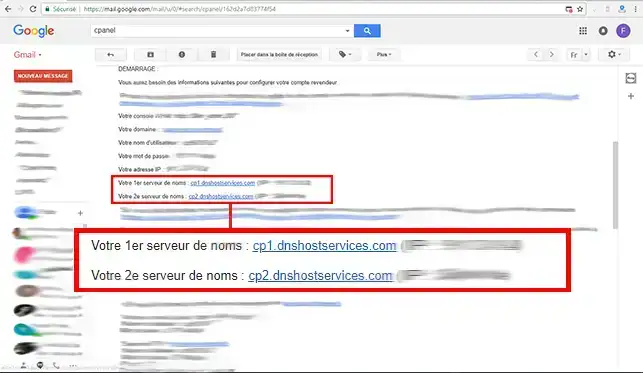
When you subscribed to your cPanel Cloud Server, you received the connection information for your WHM interface as well as information about the DNS servers attached to it.

How do I configure the DNS servers for a domain on a cPanel cloud server?

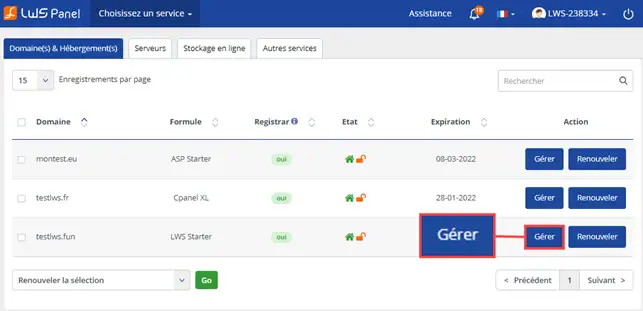
1. Log in to your LWS customer area and click on"Manage" behind the domain name you want to point to your cPanel Cloud Server.

How do I configure the DNS servers for a domain on a cPanel cloud server?

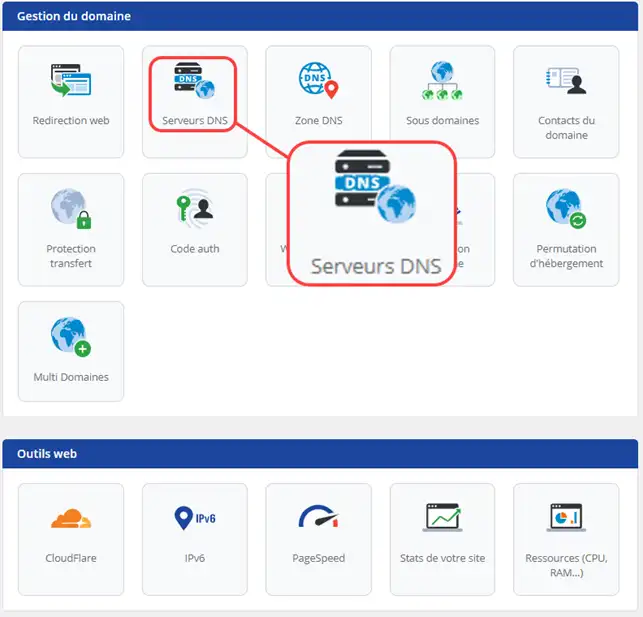
2. Click on"DNS Servers".

How do I configure the DNS servers for a domain on a cPanel cloud server?

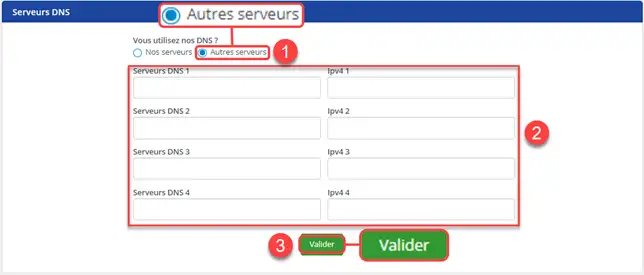
3. Check the box"Other servers" and indicate the DNS servers you have in the subscription email for your cPanel Cloud Server. Confirm your request to save the new servers. It can take up to 24 hours for the new DNS servers to propagate and for your domain name to be accessible on your server.

How do I configure the DNS servers for a domain on a cPanel cloud server?

Conclusion

You can now configure the DNS servers via your customer area so that your domain name points to your cPanel Cloud server with LWS. Once the changes have been made, you will be able to associate the domain name with your cPanel account.

Don't hesitate to share your comments and questions!

help.lws.net/a/1215
Was this article helpful?

Yes

No

Read 24 055 times

Thank you! Feel free to ask questions about our documentation if you would like more information, and help us improve it.

Similar articles

Questions about the article 1

Ask a question
RR
23 Sept 2025
pourquoi j'ai du mal à recevoir tout le temps les émails venant des autres serveurs sur outlook, comme gmail
Jordan-LWS Official answer
26 Sept 2025

Bonjour,

Il est compliqué de déterminer l’origine du problème sans davantage de détails. Nous vous invitons à contacter notre assistance technique en leur transmettant des éléments complémentaires, tels que plusieurs exemples précis (date et heure de l’incident, adresse e-mail de l’expéditeur et du destinataire concernés, etc.).

Ces informations permettront à nos équipes d’analyser la situation plus efficacement et d’identifier la cause du problème.

Je vous remercie pour votre attention et reste à votre disposition pour toute autre question ou complément d'information.

Cordialement,

Was this answer helpful?

A question about this article?

Ask the LWS team and the community. Answers are published after moderation.

Ask the LWS team and its community a question

GDPR: Controller: LWS-Ligne Web Services. Purpose: moderation and public publication of your question, possible notification of an answer. Legal basis: consent (Art. 6(1)(a) GDPR). Email retention: 90 days after notification, 12 months maximum without an answer. To exercise your rights, see the GDPR section of our Terms and Conditions.