
Online help
The web host accessible to all
Procédure
This is a very simple anti-spam system which consists of temporarily rejecting an e-mail message, by sending a temporary refusal code to the sending computer server (MTA). In the majority of cases, the sending servers resend the e-mail after a few minutes. Most servers that send spam do not take this step. What's more, if they do, they will have given spam-trapping software time to register them on spammers' blacklists.
1. Connect to your customer area
3. Go to the"E-Mail" section and click on"Configure Greylisting".
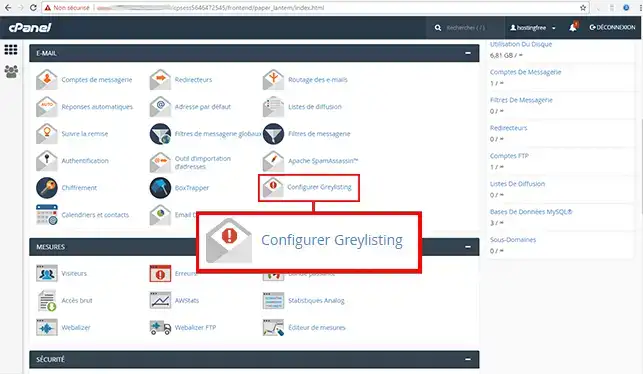
4. By default this is set to"Enabled", click on "Disabled" to make it inactive.
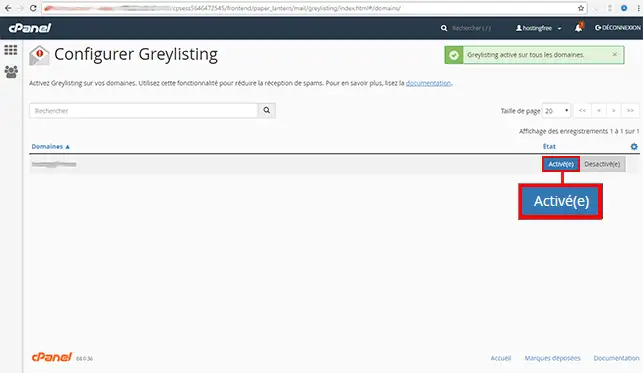
You can now activate and deactivate the "Greylisting" function on your cPanel hosting with LWS. Thanks to this function accessible from your cPanel interface, you will be protected against spam and all types of unwanted email.
Don't hesitate to share your comments and questions!
Ask the LWS team and the community. Answers are published after moderation.
 About LWS :
LWS is a 100% French web hosting company that focuses on quality and innovation and offers a responsive and competent technical service at affordable prices.
About LWS :
LWS is a 100% French web hosting company that focuses on quality and innovation and offers a responsive and competent technical service at affordable prices.



 Yes
Yes No
No