


How do I connect to the Web Terminal with LWS Panel? (ssh web console)

Procédure

What is a web console?

The web console that we have made available from the customer area is a terminal for entering Linux command lines.

It can be used to launch various configuration or installation actions on web hosting services.

Which packages include the Web console?

The Web console is available in our Linux shared hosting packages (excluding cPanel hosting) from the LWS Starter package upwards.

A similar console is also available for our VPS packages.

In the case of a cPanel package, you will find an equivalent, the"Web Terminal" available in the cPanel control panel.

How do I access the web console?

To access the web console all you need to do is :

First, you need to connect to your LWS account and access the shared hosting for which you want to use the Web Terminal.

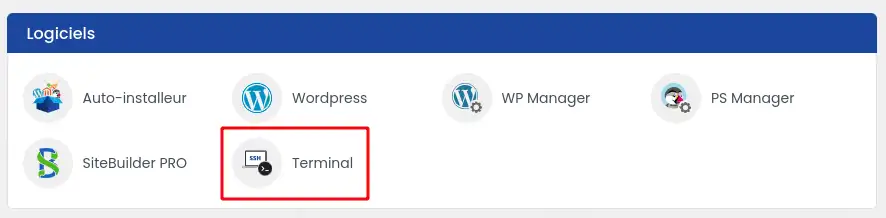
In the"Software" section, click on the"Terminal" icon.

How do I connect to the Web Terminal with LWS Panel? (ssh web console)

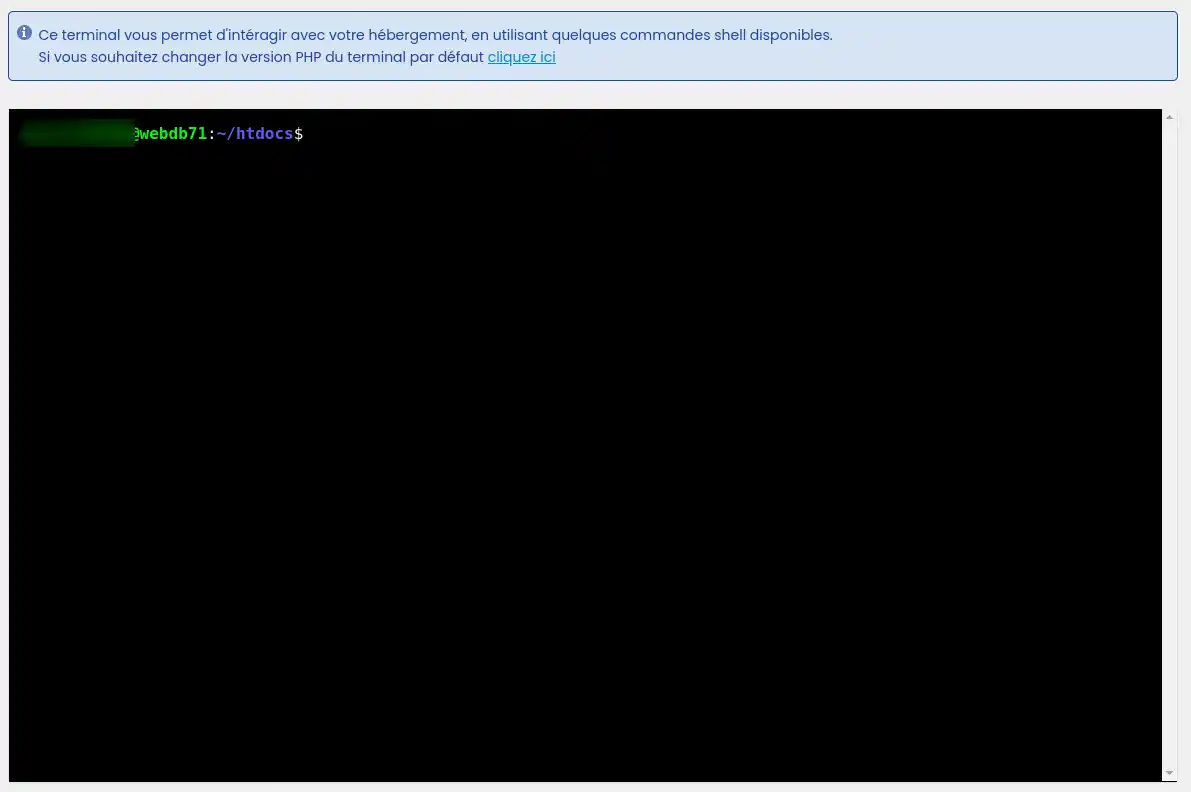
This will take you to the Web Terminal interface where you can write command lines and run them on your hosting.

How do I connect to the Web Terminal with LWS Panel? (ssh web console)

What actions are possible with this web console?

Various actions are possible with the web terminal. We have listed the most common below:

How to use the SSH terminal on my shared hosting package

Conclusion

You now know how to :

  • Discover the features of the web console and its essential role in managing your hosting.
  • Identify the hosting packages that include this powerful tool, from the LWS Starter package to specialist VPS solutions.
  • Access the web console by logging into your LWS account and navigating to the Software section to launch the Terminal.
  • Perform a multitude of actions, from using GIT to managing your WordPress or Prestashop site, including compressing files and running PHP scripts.

🚀 Thanks to this article, mastering the web console becomes child's play and opens the door to greater control over your online presence. Take full advantage of this interface to boost your site's performance and security. 🛠️

We hope this information helps you make the most of your LWS hosting experience. Thanks for reading! 😊 Please feel free to share your thoughts or ask questions by leaving a comment below. Your feedback is valuable to us! 💬

help.lws.net/a/1572
Was this article helpful?

Yes

No

Read 25 567 times

Thank you! Feel free to ask questions about our documentation if you would like more information, and help us improve it.

Similar articles

Questions about the article 1

Ask a question
De_Lazio
29 May 2024
Puis-je heberger une application node js sur mon LWS Panel
Jordan-LWS Official answer
30 May 2024

Bonjour, 

Je vous remercie pour votre message.

Malheureusement, il ne sera pas possible d'installer une application Node JS sur les formules LWS standard, néanmoins, cela est totalement possible par le biais d'une formule cPanel, que vous pouvez retrouver ici.

Je vous remercie pour votre attention et reste à votre disposition pour toute autre question ou complément d'information.

Cordialement, L'équipe LWS

Was this answer helpful?
Jordan-LWS Official answer
30 May 2024

Bonjour, 

Je vous remercie pour votre message.

Malheureusement, il ne sera pas possible d'installer une application Node JS sur les formules LWS standard, néanmoins, cela est totalement possible par le biais d'une formule cPanel, que vous pouvez retrouver ici.

Je vous remercie pour votre attention et reste à votre disposition pour toute autre question ou complément d'information.

Cordialement, L'équipe LWS

Was this answer helpful?

A question about this article?

Ask the LWS team and the community. Answers are published after moderation.

Ask the LWS team and its community a question

RGPD : Responsable LWS-Ligne Web Services. Finalité : modération et publication publique de votre question, notification éventuelle d'une réponse. Base légale : consentement (art. 6.1.a RGPD). Conservation des emails : 90 jours après notification, 12 mois maximum sans réponse. Vous pouvez exercer vos droits via notre nos CGV - section RGPD.