
Online help
The web host accessible to all
Procédure
Wordpress is one of the most powerful content management systems (CMS) available today, but certain modifications to the configuration of your Wordpress site can make it inaccessible.
One of the most common problems is the"404 page not found" error. Usually, when you get this page when browsing your website, you are still able to connect to the Wordpress dashboard. This error generally occurs when your ".htaccess" file has been deleted when it contained information relating to some of your extensions such as caching extensions, but it can also occur if the rewriting rules defined in this file are not the correct ones. All you need to do is set your permalink parameters via your Wordpress dashboard.
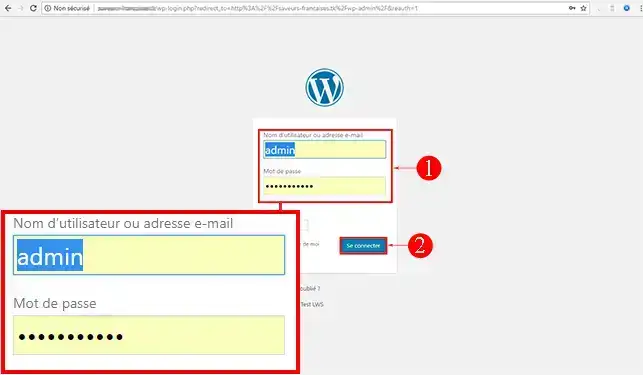
1. Connect to the dash board of your Wordpress website. The default url for the connection page is http://nomdedomaine.ext/wp-admin.
You will need to replace "domainname.ext" with the domain name you use for your website.
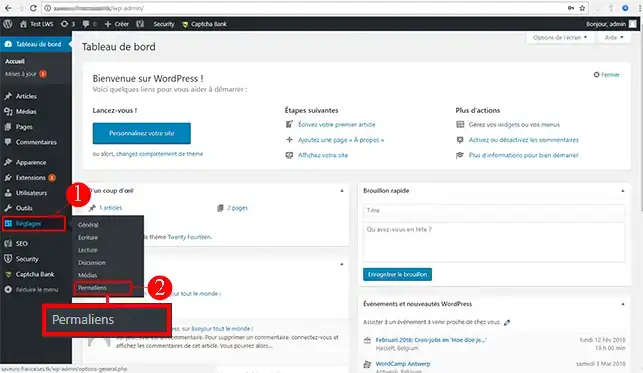
2. Click on"Settings" and then on the"Permalinks" tab.
3. Click on the"Save changes" button to reset the permalinks.
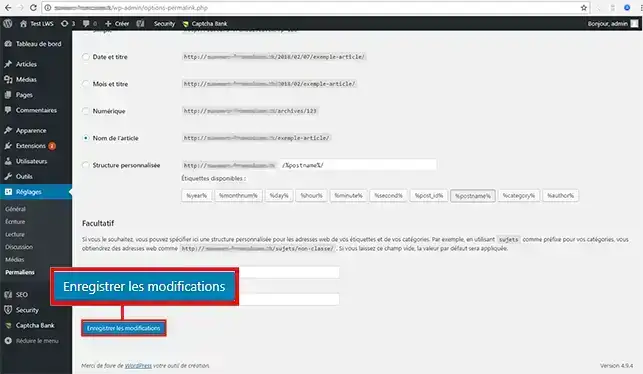
This will update your"permalinks" parameters and empty the rewriting rules in your ".htaccess" file. In most cases, this solution will correct the"404 page not found" error.
You are now able to correct a 404 error on your Wordpress site hosted by LWS. This error is often due to a problem with the rewriting of permalinks defined in your .htaccess file. You can modify the .htaccess file yourself to add your own rules.
Don't hesitate to share your comments and questions!
Ask the LWS team and the community. Answers are published after moderation.
 About LWS :
LWS is a 100% French web hosting company that focuses on quality and innovation and offers a responsive and competent technical service at affordable prices.
About LWS :
LWS is a 100% French web hosting company that focuses on quality and innovation and offers a responsive and competent technical service at affordable prices.



 Yes
Yes No
No