
Online help
The web host accessible to all
Procédure
The PhpMyAdmin tool lets you work on your database easily using a Web interface available in Plesk. Various actions are possible on PhpMyAdmin, including
The PhpMyAdmin tool can only be accessed from your Plesk interface once you have logged in to it.
1. Connect to the Plesk administration of your web hosting.
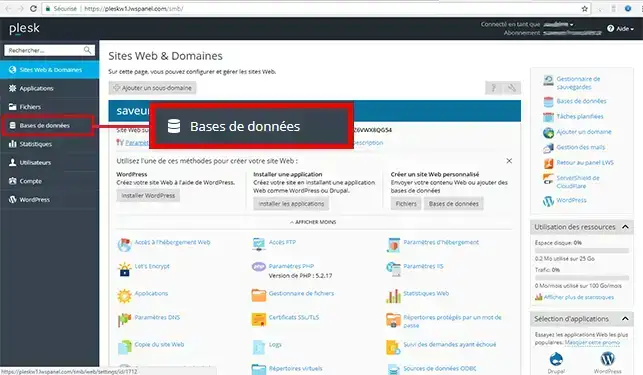
2. Click on the"Databases" button in the left-hand menu.
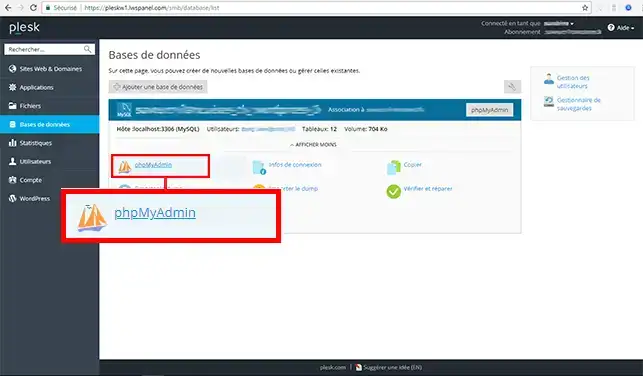
3. Click on the"PhpMyAdmin" tab to access your SQL Server databases.
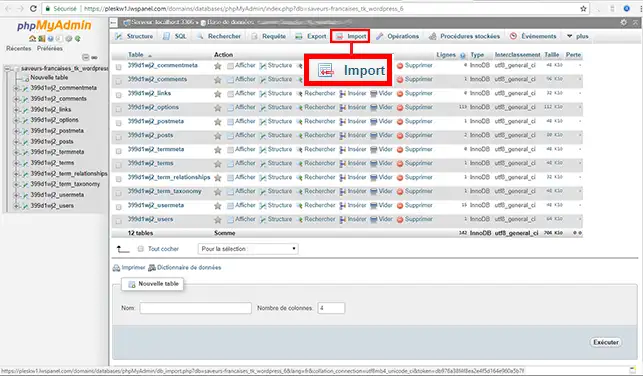
4. Click on the "Import" tab
5. Click on the"Choose a file" button. You can choose a SQL or ZIP file. Click on the"Execute" button to import it.
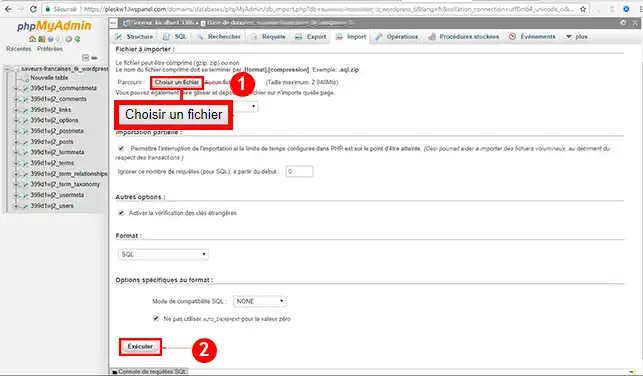
You are now able toimport a SQL Server database with your LWS ASP hosting. The import enables you to upload your database to your Plesk hosting.
Don't hesitate to share your comments and questions!
Ask the LWS team and the community. Answers are published after moderation.
 About LWS :
LWS is a 100% French web hosting company that focuses on quality and innovation and offers a responsive and competent technical service at affordable prices.
About LWS :
LWS is a 100% French web hosting company that focuses on quality and innovation and offers a responsive and competent technical service at affordable prices.



 Yes
Yes No
No