
Online help
The web host accessible to all
Procédure
Just like Wordpress, you canadd a module to SiteBuilder Pro allowing your visitors to leave a comment on your website.
This allows your visitors to react to your publications, to what they have just read. This extension is very useful if you're setting up a blog so as not to close the discussion with your readers. Comments allow you to
In order to insert a comment system for your visitors, you need to log in toyour website administration.
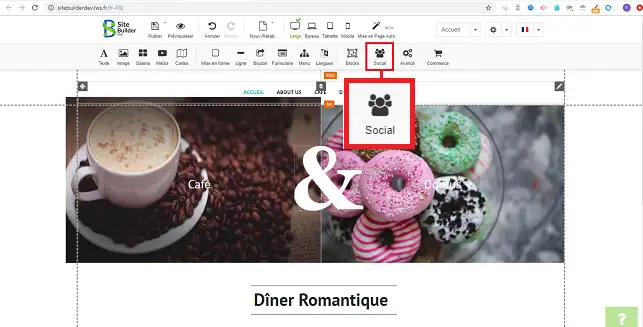
1. Once logged in, click on the"Social" tab in the toolbar.
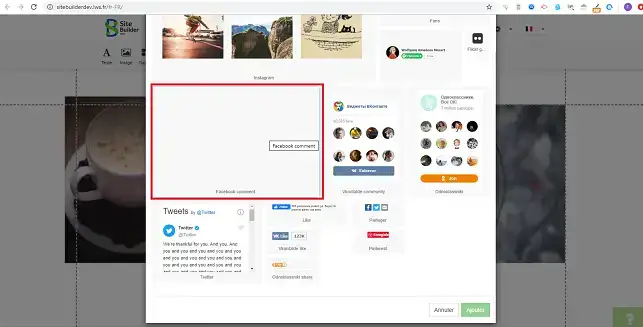
2. Select the"Facebook Comments" item by clicking on it.
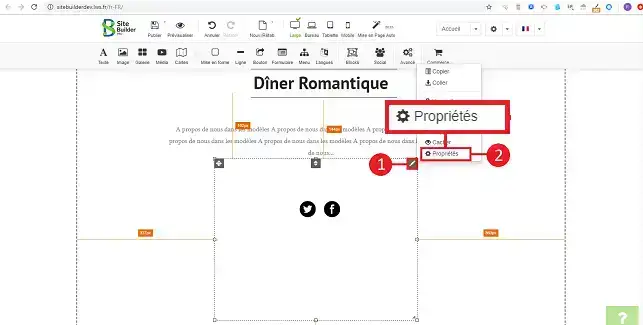
3. To configure the module, click on the stylus at the top right of the item and then on"Properties".
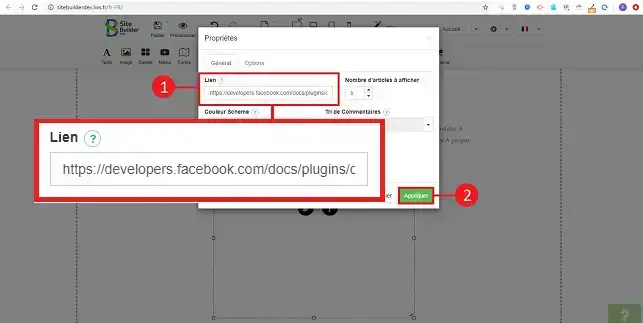
3. Change the URL of the facebook link to the link where the comments will be published. Finally, click on"Apply" to save your changes.
You can now insert comments on your site created with SiteBuilder Pro from LWS. Comments will allow you to interact with your visitors and find out more about them.
Don't hesitate to share your comments and questions!
Ask the LWS team and the community. Answers are published after moderation.
 About LWS :
LWS is a 100% French web hosting company that focuses on quality and innovation and offers a responsive and competent technical service at affordable prices.
About LWS :
LWS is a 100% French web hosting company that focuses on quality and innovation and offers a responsive and competent technical service at affordable prices.



 Yes
Yes No
No