


How do I insert music into SiteBuilder Pro?

Procédure

Why add music to SiteBuilder Pro?

SiteBuilder Pro has an audio player that allows you to enhance your site by adding soundscapes. However, it should be noted that you should only upload music files in MP3 format in order to reduce their size. What's more, this format is compatible with all current Web browsers.

How do I add music to SiteBuilder Pro?

1. Log in to your SiteBuilder Pro interface.

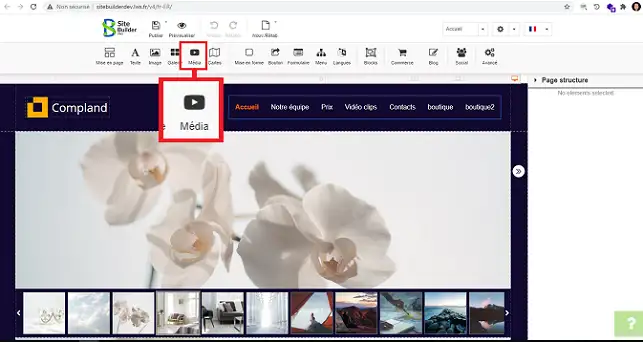
2. Click on the"Media" button on the toolbar at the top of the page.

How do I insert music into SiteBuilder Pro?

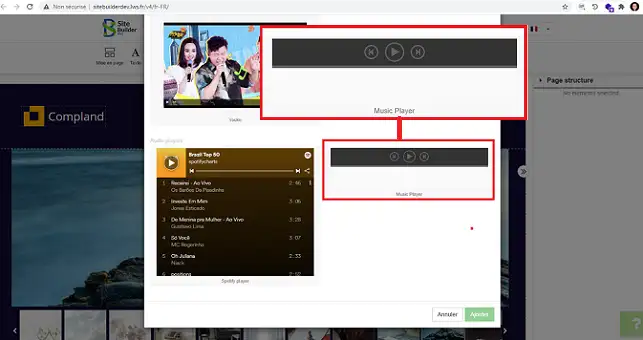
3. Then click on the"Music Player" item that you are viewing in the new window.

How do I insert music into SiteBuilder Pro?

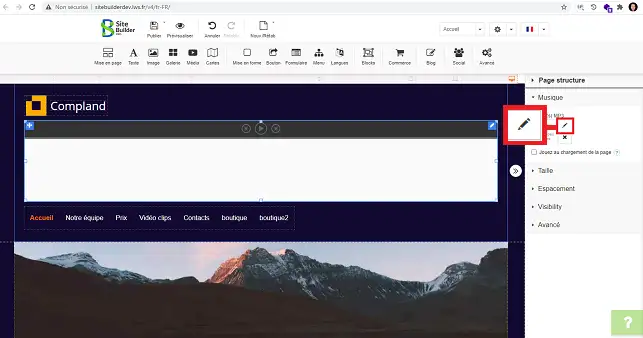
4. Select the item you have just set up and click on the stylus in the right-hand column under"Music" to add your MP3 file.

How do I insert music into SiteBuilder Pro?

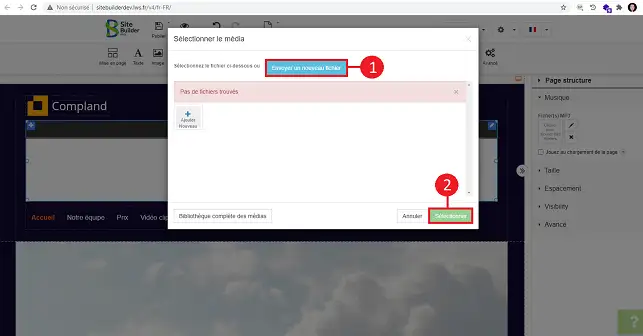
5. Click on"Send a new file" to add your music file. Then click on"Select" to save your request.

How do I insert music into SiteBuilder Pro?

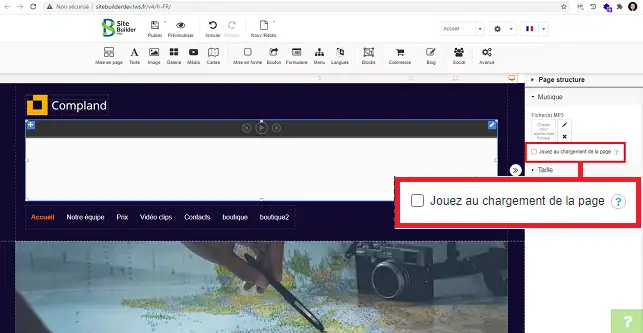
6. In the"Music" section, there is a tick box called"Play on page load". This box allows you to start the music while your page is loading.

How do I insert music into SiteBuilder Pro?

Conclusion

You now know how to add music to your SiteBuilder site. It is necessary to upload files in MP3 format so as not to reduce the loading speed of your website.

Don't hesitate to share your comments and questions!

help.lws.net/a/1491
Was this article helpful?

Yes

No

Read 16 611 times

Thank you! Feel free to ask questions about our documentation if you would like more information, and help us improve it.

Similar articles

Questions about the article 1

Ask a question
Francisco
12 May 2023
Como insertar un widgets de audio en sitebuilder pro?
Benjamin-LWS Official answer
17 May 2023

Bonjour,

Merci de votre réponse.

Tous les éléments à ajouter dans votre site construit avec SiteBuilderPro sont disponibles dans la barre de navigation en haut de votre écran. Si vous souhaitez avoir d'autres fonctionnalités qui ne sont pas disponibles, nous vous invitons à en faire directement à https://site.pro/

Je vous remercie de votre attention et reste à votre disposition pour toute autre question ou complément d'information.

Nous vous invitons à contacter notre service support à travers votre espace client, afin de vous apporter une aide si vous rencontrez des difficultés quelconque. (Contacter le support LWS)

Cordialement, L'équipe LWS 

Was this answer helpful?

A question about this article?

Ask the LWS team and the community. Answers are published after moderation.

Ask the LWS team and its community a question

GDPR: Controller: LWS-Ligne Web Services. Purpose: moderation and public publication of your question, possible notification of an answer. Legal basis: consent (Art. 6(1)(a) GDPR). Email retention: 90 days after notification, 12 months maximum without an answer. To exercise your rights, see the GDPR section of our Terms and Conditions.