
Online help
The web host accessible to all
Procédure
Divi builder is included in ourWordpress web hosting packages. If you would like support for DIVI builder, you must subscribe to a license directly on the Elegent theme Divi website.
LWS offers 3 premium plugins from Elegant Themes (Divi, Bloom and Monarch). These are regularly updated. Once you are an LWS customer, you will have free access to these plugins by choosing the 'Divi Builder' distribution when installing the Wordpress CMS with our Auto-Installer.
If you have a cPanel package or have already installed Wordpress with this distribution, but do not have access to all the themes or updates, please let us know by giving us the access details for the administration area of your Wordpress site so that a technician can update the licence.
Please note: you will need to take out an Elegant Themes licence to benefit from support. LWS does not provide support for these products.
Elegant Theme is a very powerful Wordpress theme customisation tool with a host of features, including 87 trendy themes and two brand new extensions.
This tutorial will help you through the process of installing an Elegant Themes theme. Let's get started!
1. Log in to the administration area of your site using your username and password.
2. In the left-hand menu, select Appearance then Themes.
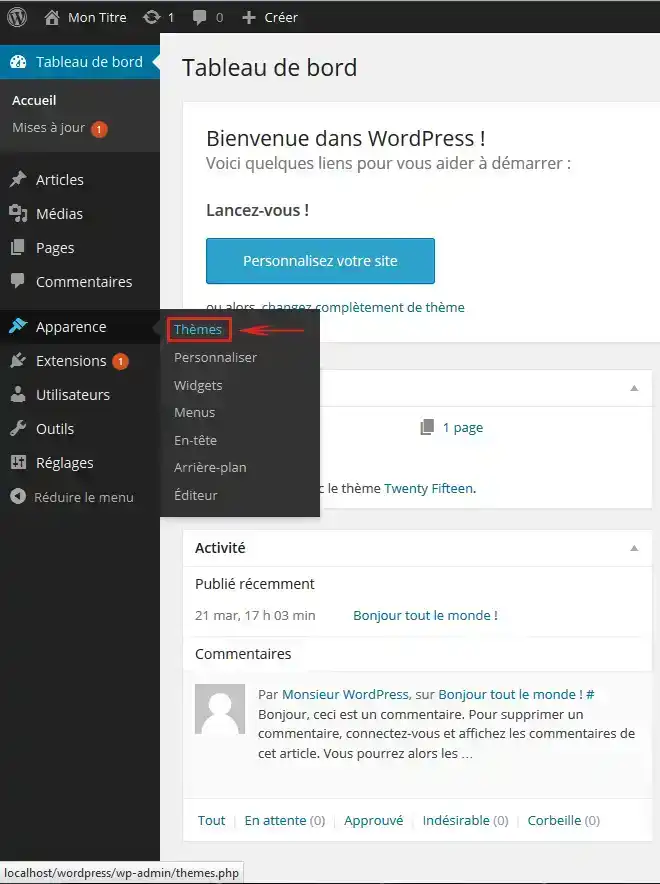
3. A list of your themes will appear, so all you have to do is click Activate by passing your cursor over the desired theme.
Congratulations, you've just installed and activated your Elegant Themes theme on your site!
See you soon for a new tutorial ;)
Overview of Elegant Themes for WordPress
How do I set up an Elegant Themes theme?
> Consult our Elegant Themes help section
Ask the LWS team and the community. Answers are published after moderation.
 About LWS :
LWS is a 100% French web hosting company that focuses on quality and innovation and offers a responsive and competent technical service at affordable prices.
About LWS :
LWS is a 100% French web hosting company that focuses on quality and innovation and offers a responsive and competent technical service at affordable prices.



 Yes
Yes No
No