Procédure
Service concerned: Web Hosting LWS with WordPress
Concerned panel: WordPress
Level: beginner
Divi Builder is a page builder developed by Elegant Themes. It allows you to visually create and customize the content of your WordPress pages without having to modify their code.
The Divi Builder plugin is intended for sites that use a WordPress theme other than Divi or Extra. It can be installed on a WordPress site hosted by LWS from the ZIP file provided by Elegant Themes.
Are you already using the Divi or Extra theme?
You do not need to install the Divi Builder plugin. The Divi Builder is directly integrated into these two themes.
This help article concerns only the installation of the Divi Builder plugin with another WordPress theme.
LWS does not provide an Elegant Themes license with its hosting offers. To download Divi Builder, receive updates, and benefit from the publisher's support, you must have your own Elegant Themes account that grants access to the product.
Before you begin
You must have the Divi Builder installation file.
Log in to your Elegant Themes member area, download Divi Builder, then keep the obtained ZIP file on your computer.
Install Divi Builder in WordPress
Log in to your WordPress site's administration dashboard.
In the left menu, click Plugins, then Add New Plugin.
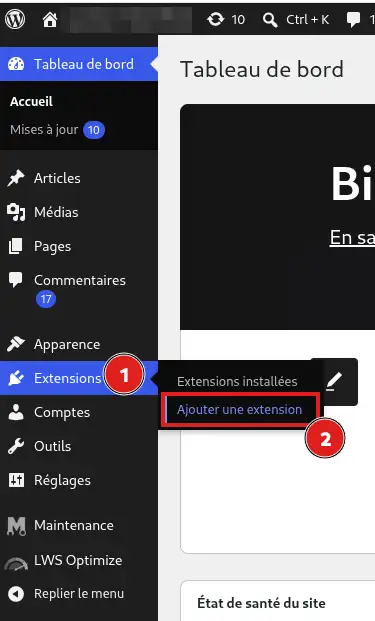
Then click Upload Plugin.
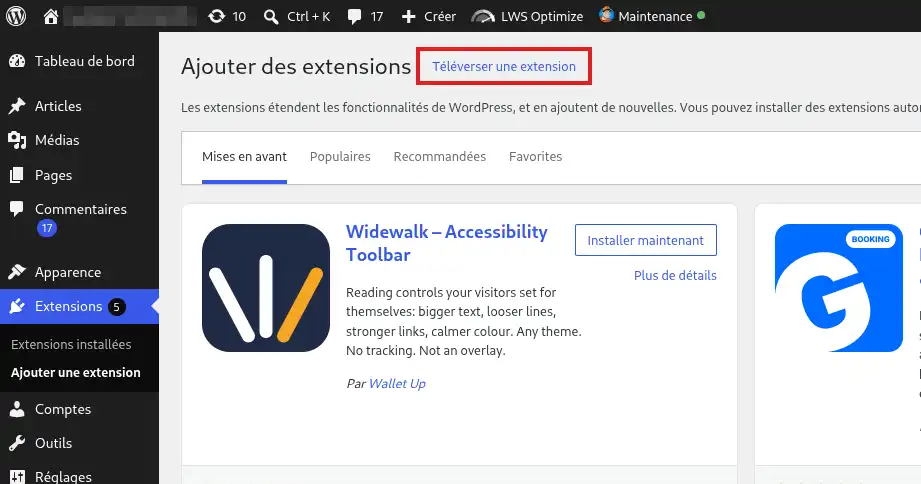
Click Choose File
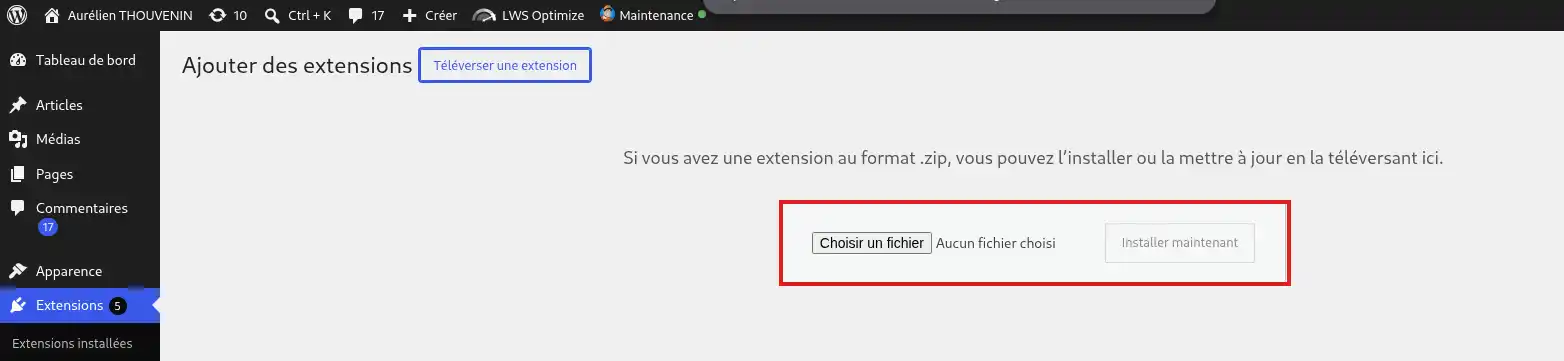
then select the Divi Builder ZIP file downloaded from your Elegant Themes account.
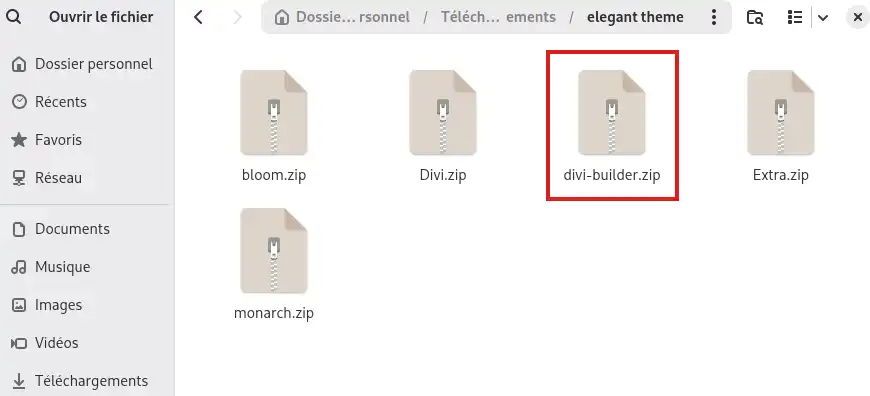
Click Install Now.

WordPress transfers the Divi Builder files to your hosting and automatically installs it.
Once the installation is complete, click Activate Plugin.
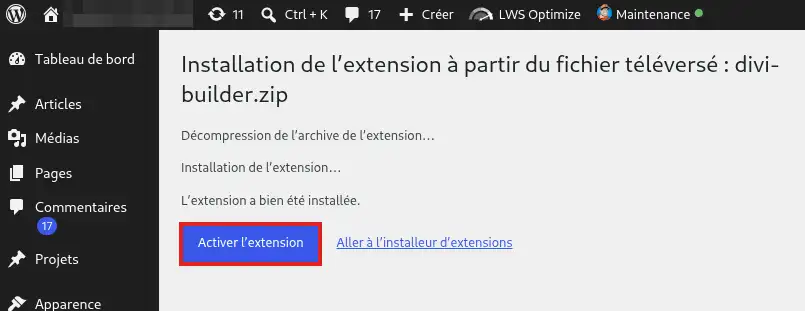
Divi Builder is now installed and activated on your WordPress site. You can use the Divi builder with your current WordPress theme.
Enable Divi Builder updates
To receive new versions of Divi Builder directly from WordPress, you must link the plugin to your Elegant Themes account.
In your WordPress dashboard, go to Divi > Plugin Options, then open the Updates tab.
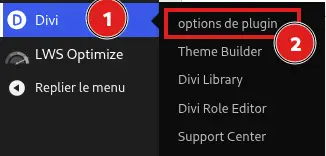
Enter:
- your Elegant Themes username;
- your Elegant Themes API key.
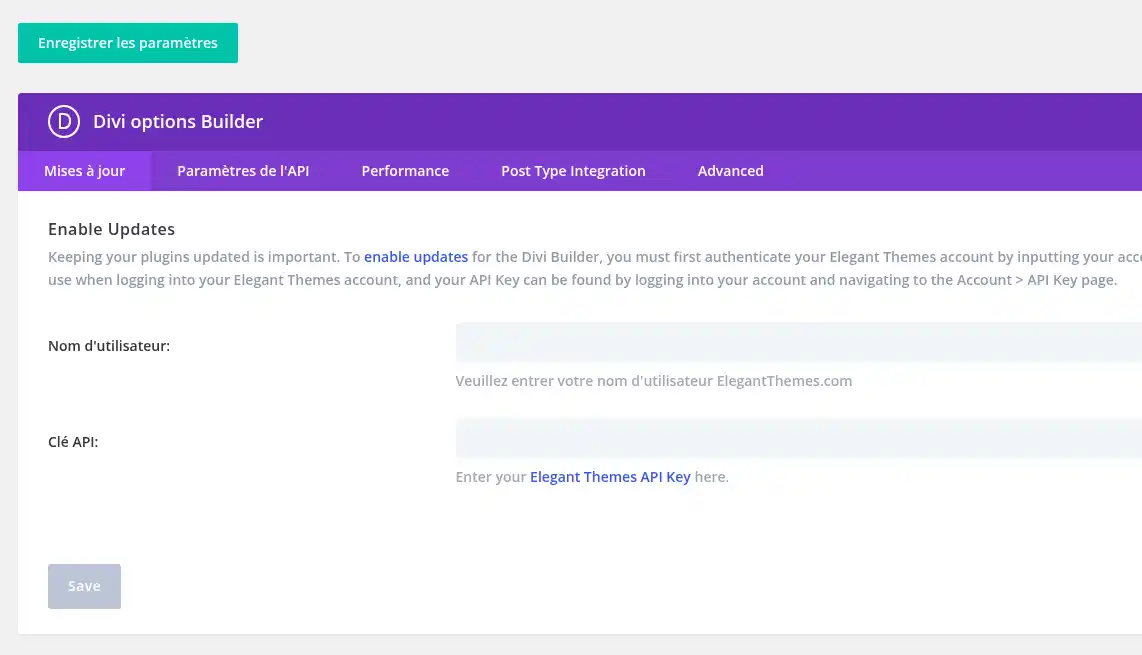
You can find your username and create or manage your API keys from your Elegant Themes member area, in the Account > Username & API Key section.
Then save the information. Once your account is authenticated, Divi Builder will be able to receive updates offered by Elegant Themes from WordPress.
The Elegant Themes API key is different from your account password. It is used to authenticate your WordPress installation with Elegant Themes in order to authorize, among other things, product updates.
Check that Divi Builder works
In the WordPress dashboard, open Pages, then edit an existing page or create a new one.
The editor should offer you the option to activate or use the Divi builder.
Launch Divi Builder and check that its creation interface displays correctly.
If the Divi builder opens and allows you to edit your page, Divi Builder is correctly installed and activated.
You can also open Dashboard > Updates to check whether a new version of the plugin is available. Updates require an Elegant Themes account with access to the product as well as valid authentication.
Common issues
I already use the Extra theme: do I need to install Divi Builder?
No. Divi Builder is directly integrated into the Extra theme. You can therefore use the builder without separately installing the Divi Builder plugin.
Authentication of your Elegant Themes account and update management are then handled from the Extra theme settings.
I already use the Divi theme: do I need to install Divi Builder?
No. The Divi Builder is directly integrated into the Divi theme. Installing the Divi Builder plugin in addition to the Divi theme is therefore unnecessary.
Use the builder provided with the theme directly.
I do not see "Divi > Plugin Options" in WordPress
First, check that you are indeed using the Divi Builder plugin with a theme other than Divi or Extra.
Then check in Plugins > Installed Plugins that Divi Builder is present and activated.
For the standalone Divi Builder plugin, Elegant Themes indicates that the update information is accessible from Divi > Plugin Options > Updates.
If you are indeed using the standalone plugin with another theme and this menu is still missing, check that you have installed the latest version downloaded from your Elegant Themes member area. If necessary, contact Elegant Themes support to verify the operation of your Divi Builder version.
WordPress refuses the file I am trying to install
Make sure you are importing the Divi Builder ZIP file from Plugins > Add New Plugin > Upload Plugin.
Do not try to import an uncompressed folder directly. If your browser automatically extracted the downloaded file, download the ZIP file again from your Elegant Themes member area.
I am not receiving automatic Divi Builder updates
Divi Builder updates are distributed by Elegant Themes.
Check in Divi > Plugin Options > Updates that your Elegant Themes username and an active API key are correctly saved.
Your Elegant Themes account must also grant access to product updates. A deactivated or deleted API key can no longer authenticate updates.
If you do not have an Elegant Themes license or subscription that grants access to Divi Builder and its updates, you must obtain one directly from Elegant Themes.
For any issue concerning your account, your license, your API key, or the distribution of updates, contact Elegant Themes support.
Divi Builder is not working properly or I am encountering a bug
If Divi Builder is correctly installed and activated but the builder does not open, a feature does not work as expected, or you encounter a bug, consult the Divi documentation or contact Elegant Themes support.
Since Divi Builder is developed and maintained by Elegant Themes, their support can assist you with the builder's operation, its features, settings, and any product bugs.
LWS support can help you when a problem concerns your hosting, WordPress, PHP, or server resources. For the internal operation of Divi Builder, its features, its license, or its updates, support is provided by Elegant Themes.



 Yes
Yes No
No About
About 