Procédure
Divi builder is included in ourWordpress web hosting packages. If you would like support for DIVI builder, you must subscribe to a licence directly on the Elegent theme Divi website.
Introduction
LWS offers 3 premium plugins from Elegant Themes (Divi, Bloom and Monarch). These are regularly updated. Once you are an LWS customer, you will have free access to these plugins by choosing the 'Divi Builder' distribution when installing the Wordpress CMS with our Auto-Installer.
If you have a cPanel package or have already installed Wordpress with this distribution, but do not have access to all the themes or updates, please let us know by giving us the access details for the administration area of your Wordpress site so that a technician can update the licence.
Please note: you will need to take out an Elegant Themes licence to benefit from support. LWS does not provide support for these products.
How do I install the WordPress Monarch plugin?
Installing Elegant Themes plugins is child's play thanks to the WordPress Dashboard plugin installer. In this tutorial, we'll look at how to install the Monarch plugin.
Loading your plugin
When you access your WordPress site via the WordPress Dashboard, the Monarch plugin is activated by default. There are 2 ways to check this:
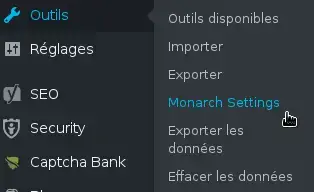
In "Tools"
When Monarch Settings is visible in your dashboard, it means that the plugin is active and ready to use. To do this, click on the Tools > Monarch Settings link in your WordPress dashboard. This will take you to the plugin's home page.
In "Installed Extensions
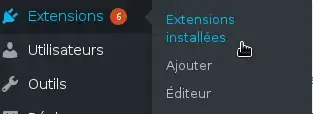
You can also check that this plugin is active via the Extension tab in the WordPress dashboard by clicking on the link: Extension > Installed Extensions. You will then have access to the page showing all the extensions already installed. You can activate or deactivate the Monarch plugin by clicking on the"Deactivate" button.

Conclusion
Congratulations! You can now start using the Monarch plugin.
See you soon for a new tutorial :)
To find out more about the Monarch plugin and how to use it
Full overview of the Monarch WordPress plugin
Adding and managing social media with Monarch
> See our Monarch plugin help section

 Contact us
 Customer Area


 Visit LWS


 Yes
Yes No
No Article read
13634 once
Article read
13634 once Merci ! N'hésitez pas à
poser des questions sur nos documentations si vous souhaitez plus d'informations et nous aider à les
améliorer.
Merci ! N'hésitez pas à
poser des questions sur nos documentations si vous souhaitez plus d'informations et nous aider à les
améliorer.
 About
About 