
Online help
The web host accessible to all
Procédure
The purpose of this value is to define the maximum size of a file to be uploaded. This value is generally set to 2MB maximum.
This limit is used to define a maximum time for executing a script. If this time is exceeded, the script automatically stops and returns an error.
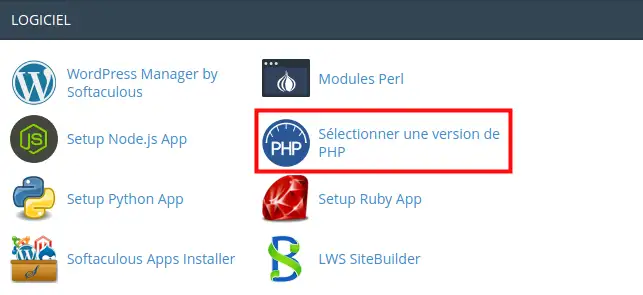
1. Log on to your cPanel management interface, go to the"Software" section and click on the"Select a PHP version" tab.
2. Select the"Options" tab.

3. First check the box next to"file_uploads" to authorise file uploads.
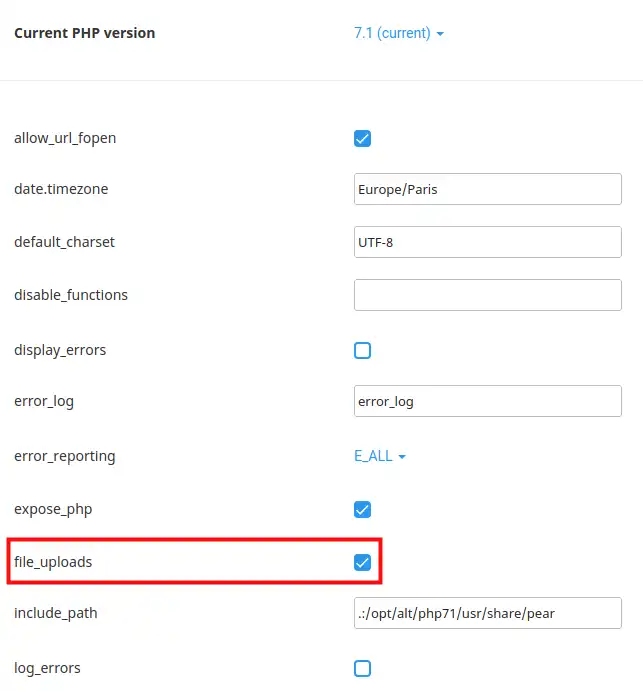
4. You can change the max_execution-time value in the field provided (1).
5. The "max_file_uploads" option (2) allows you to set the number of files to be published simultaneously in HTTP.
.webp "Click to display the original image")
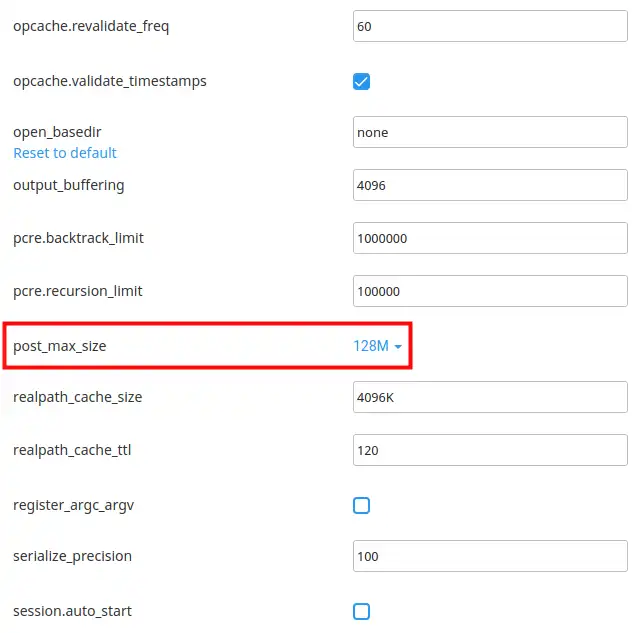
4. The option below allows you to modify the "post_max_size" value, changes are instantaneous, there is no button to validate modifications.
Ask the LWS team and the community. Answers are published after moderation.
 About LWS :
LWS is a 100% French web hosting company that focuses on quality and innovation and offers a responsive and competent technical service at affordable prices.
About LWS :
LWS is a 100% French web hosting company that focuses on quality and innovation and offers a responsive and competent technical service at affordable prices.



 Yes
Yes No
No