
Online help
The web host accessible to all
Procédure
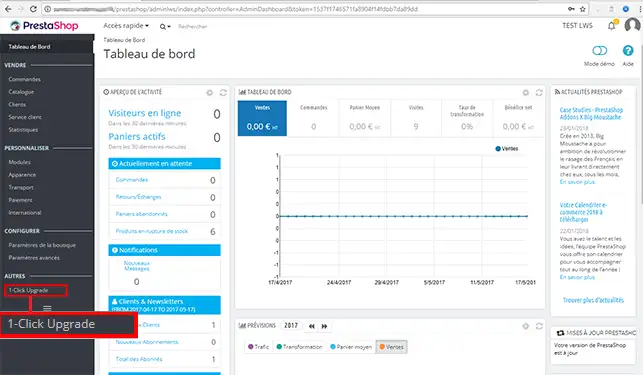
1. connect to the administration interface of your Prestashop online shop and click on the " 1-Click Upgrade" button in the left-hand column of your Prestashop CMS.
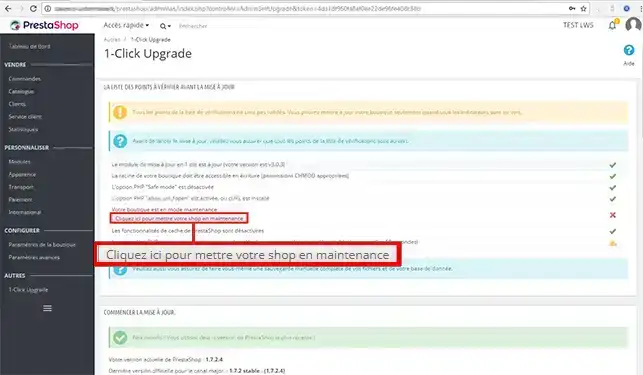
2. Then click on the"Click here to put your shop under maintenance" button before starting to update your online shop.
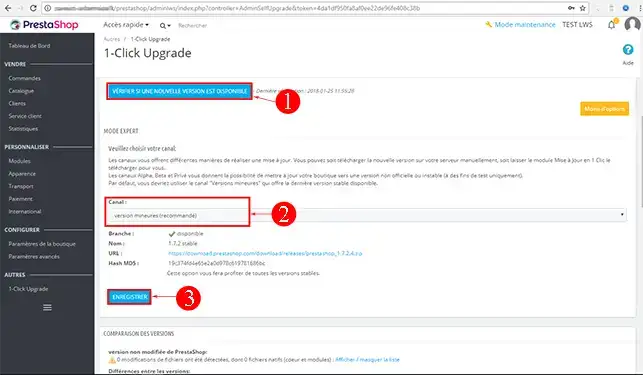
3. First check for available updates by clicking on the"Check if a new version is available" button. If a new version is available after checking, select"Minor version (recommended)" in the"Channel" box. It is preferable to update to a version recommended by Prestashop. Finally, click on"Save" and wait while your online shop is updated. Updating from one version to another may take a few minutes.
Ask the LWS team and the community. Answers are published after moderation.
 About LWS :
LWS is a 100% French web hosting company that focuses on quality and innovation and offers a responsive and competent technical service at affordable prices.
About LWS :
LWS is a 100% French web hosting company that focuses on quality and innovation and offers a responsive and competent technical service at affordable prices.



 Yes
Yes No
No