
Online help
The web host accessible to all
Procédure
With this tool, you can configure a default email address to receive all emails sent to an email address associated with your domain name. You also have the option to define how incoming messages are handled.
As a result, the default configured email address can receive messages sent to your existing email addresses if they contain typos. For example, if you have an email address contact@domaine.com and a sender sends an email to contacts@domaine.com, the email address configured as the default email address will receive the message.
Please note that:
Most domain names are configured to receive messages at the default configured email address when sent to an invalid email address. On cPanel, the system is configured to use the default mail account as the email address. This is usually the cPanel username. However, it is preferable to configure another email address as the default email address.
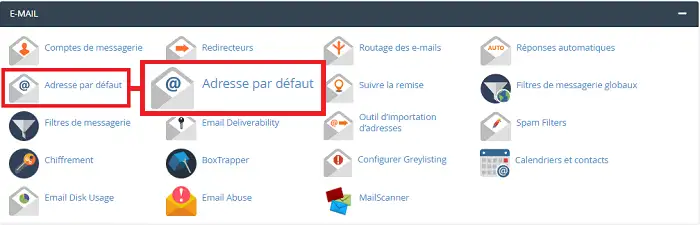
To configure or update the default email address on cPanel, click the "Default Address" tab found in the "Email" section of your cPanel interface.
Fill in the fields as follows:
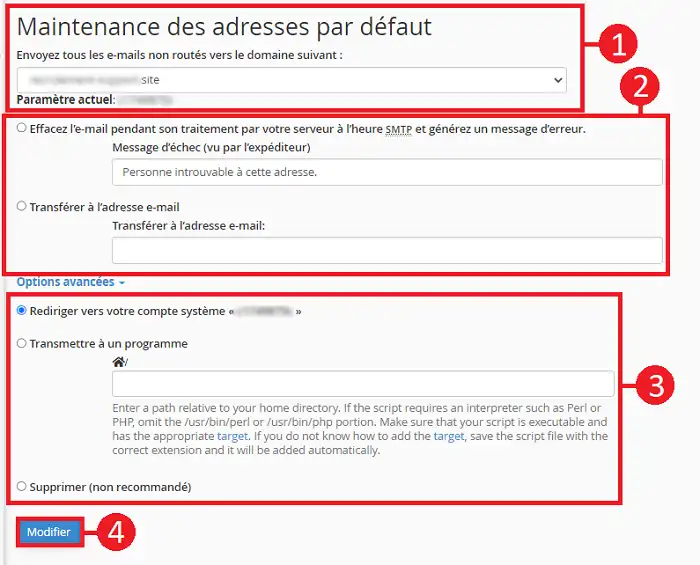
It is recommended not to select "Discard" because the sender will not be notified of the failure to deliver their email.
You are now able to configure the default email address. As seen in this help article, the default email address allows you to receive messages sent to a non-existent email address associated with your domain name.
Ask the LWS team and the community. Answers are published after moderation.
 About LWS :
LWS is a 100% French web hosting company that focuses on quality and innovation and offers a responsive and competent technical service at affordable prices.
About LWS :
LWS is a 100% French web hosting company that focuses on quality and innovation and offers a responsive and competent technical service at affordable prices.



 Yes
Yes No
No