
Online help
The web host accessible to all
Procédure
This tool makes it possible to identify any problems with your DNS records related to email for all domain names added to your cPanel plan. In fact, this system uses these records to verify that other servers can trust it as a sender.
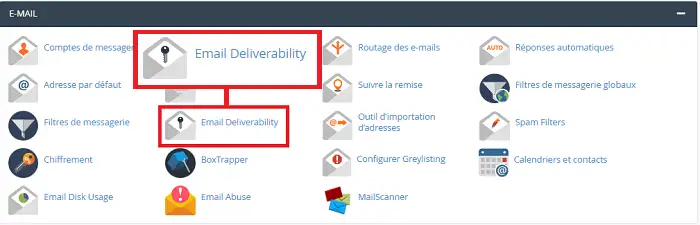
To access the Email Deliverability tool, log in to your cPanel interface and click on "Email Deliverability" located in the "Email" section.
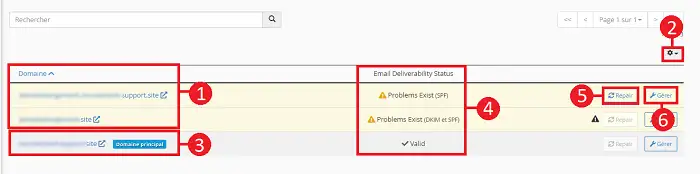
The email deliverability table lists your domains, provides their DNS record status, and allows you to manage DNS records related to email.
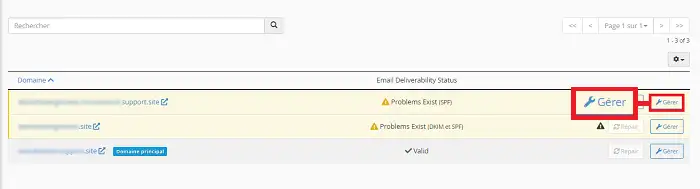
You can click the "Manage" button located behind the relevant domain in order to manually configure the email-related DNS records. The top of this new page will display the following information:
This information will be displayed if the HELO configuration and the domain do not match.

This section allows you to manage a domain's DKIM record, verify the sender and the integrity of a message. In addition, it allows the mail system to ensure that spammers have not modified an incoming message during transit. Lastly, this key makes it possible to verify that emails received by your domain actually come from the specified domain.
To install a DKIM record correctly, your server must be the authoritative nameserver.
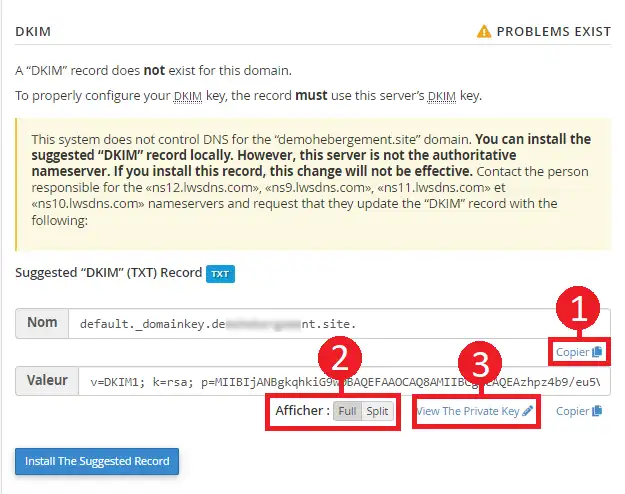
| Feature | Tool description |
| Copy (1) | Copies the record name and the value provided in the "DKIM Record" section. |
| Display (2) |
Modifies the record displayed in the value field:
|
| View the private key (3) |
Allows you to retrieve the suggested private key. You will be redirected to the interface intended for this purpose. |
Important :
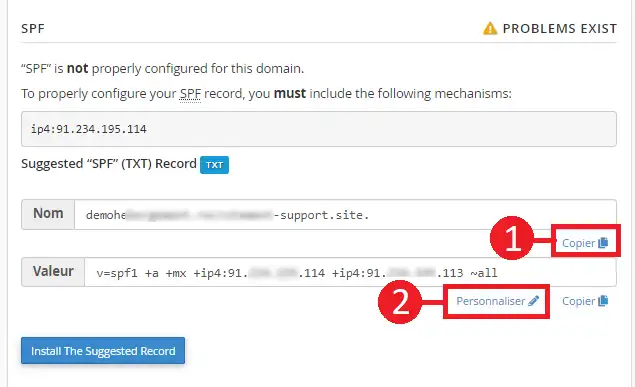
This section allows you to manage a domain's SPF record. This area checks that messages sent by your domains come from a listed and authorized server. If any problems are present in this DNS zone, a correct SPF configuration will appear in the "Suggested SPF Record" section. This section also allows you to perform the following actions:
| Feature | Tool description |
| Copy (1) | Copy the "Name" and "Value" records provided by the system in the "Suggested SPF Record" section. |
| Customize(2) |
Allows you to modify the suggested SPF record. This will redirect you to the "Customize an SPF record" interface |
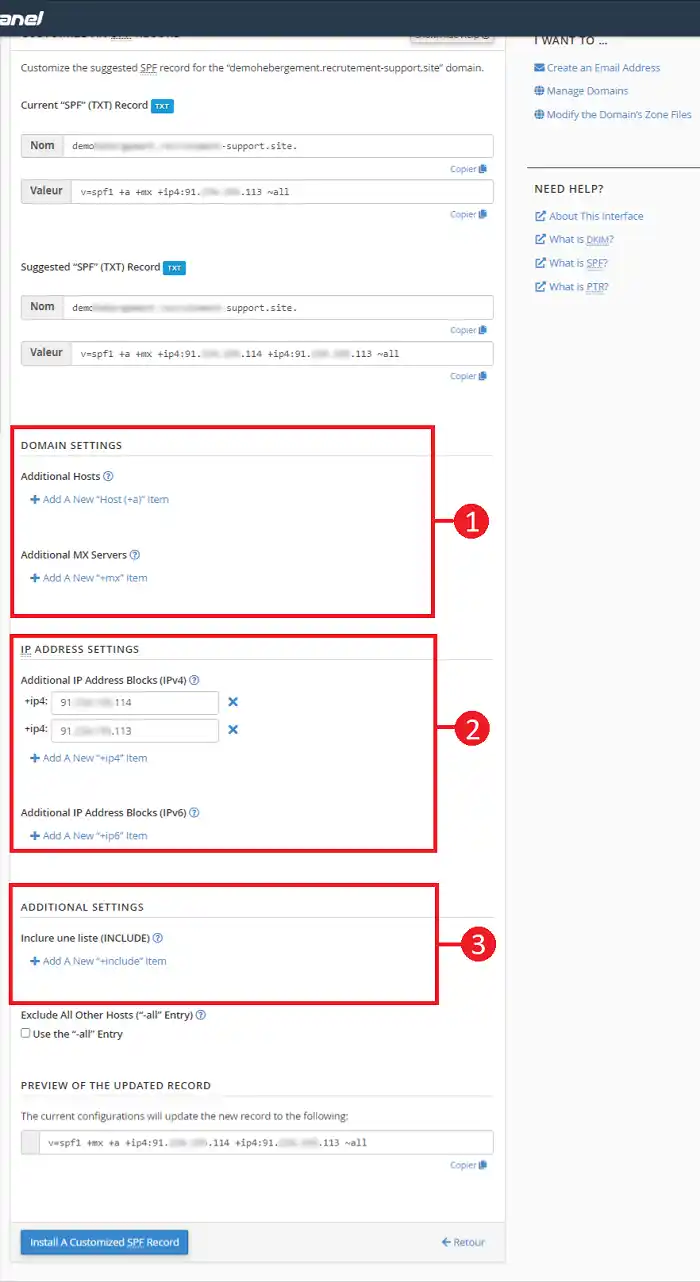
You can use this interface to customize the SPF record recommended by the system for your domain. The interface displays the current SPF name and value for the domain found in the "SPF Record (TXT Zone)" section of your DNS Zones, if it exists, and the system recommendations found in the "Suggested SPF Record" section.
You can modify the following settings here:
| Feature | Tool description |
| Domain setting (1) |
This section allows you to define the hosts or MX servers authorized to send emails from your domain name:
|
| IP Address Setting (2) | This section allows you to add additional IP address blocks to your domain name's SPF record. |
| Additionnal Setting (3) |
This section allows you to modify additional SPF record settings:
|
You are now able to identify any problems related to DKIM or SPF configuration on your domain. Please note that changing your configuration may cause issues when sending emails. Therefore, it is best to modify the SPF configuration only if this was requested by another provider such as Mailchimp or if you encountered an error when sending an email.
Ask the LWS team and the community. Answers are published after moderation.
 About LWS :
LWS is a 100% French web hosting company that focuses on quality and innovation and offers a responsive and competent technical service at affordable prices.
About LWS :
LWS is a 100% French web hosting company that focuses on quality and innovation and offers a responsive and competent technical service at affordable prices.



 Yes
Yes No
No