
Online help
The web host accessible to all
Procédure
The IIS dynamic IP address refusal manager allows you to secure your website. It prevents Denial of Service (DoS) attacks and allows you to ban an IP address when too many requests are made in a short space of time.
1. Connect to your Plesk management interface.
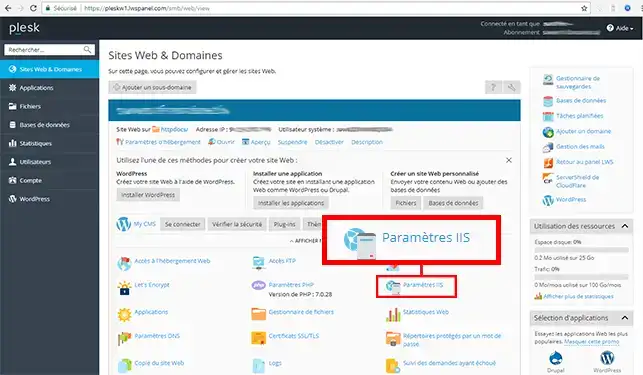
2. Click on the"IIS Settings" button
3. Go to"Preventing DoS attacks by restricting dynamic IIS IPs":
Click on the"Apply" button to save your choice.
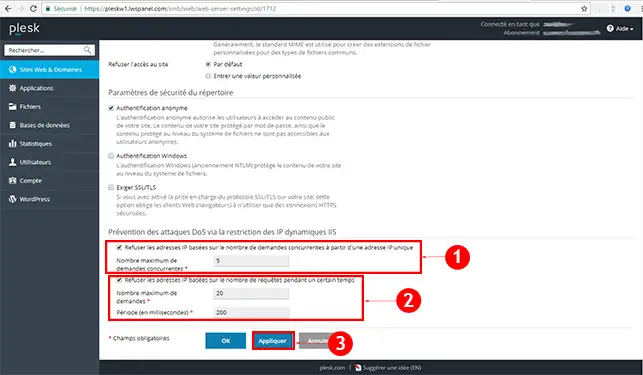
You are now able to configure the IIS dynamic IP address refusal manager with your Plesk LWS hosting. The IP Address Denial Manager allows you to secure your website against certain attack attempts, in particular Denial of Service (DoS) attacks.
Don't hesitate to share your comments and questions!
Ask the LWS team and the community. Answers are published after moderation.
 About LWS :
LWS is a 100% French web hosting company that focuses on quality and innovation and offers a responsive and competent technical service at affordable prices.
About LWS :
LWS is a 100% French web hosting company that focuses on quality and innovation and offers a responsive and competent technical service at affordable prices.



 Yes
Yes No
No