ISPconfig - How do I link my domain name to my VPS server?

Procédure

Why should I link my domain name to my VPS server?

If you have purchased a domain name with your VPS server, you will need to declare this domain name in your server and redirect it to the server so that you can use all the services linked to your VPS server with this domain name (create a site, create e-mail addresses, etc.).


What will you need to associate your domain name with your VPS server?

In order to link your domain name to your VPS server, you will need :

Step 1: Register your domain name on your VPS server

Follow the procedure: How do I add a domain name to a dedicated server?


Step 2: Point the DNS zones of your domain name to the IP of your VPS server

Pre-requisite: first you need to know the IP of your VPS (it is indicated in your delivery email and in the administration area of your server).

Once you have noted the IP of your VPS server, follow these steps :

1. Go to your domain's administration space.
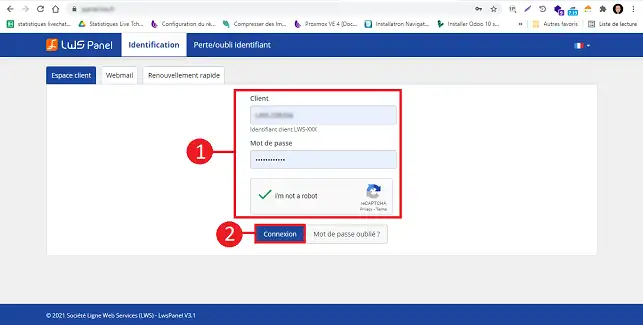
ISPconfig - How do I link my domain name to my VPS server?

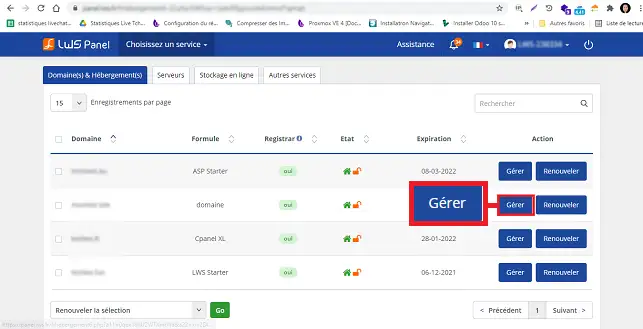
2. Click on the"Manage" button behind the domain name you want to link to your VPS package.
ISPconfig - How do I link my domain name to my VPS server?

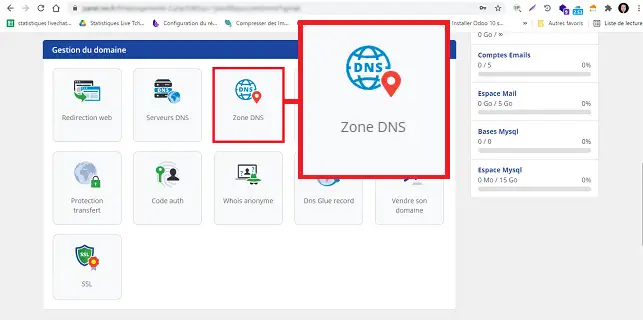
2. Then click on DNS Zone

ISPconfig - How do I link my domain name to my VPS server?

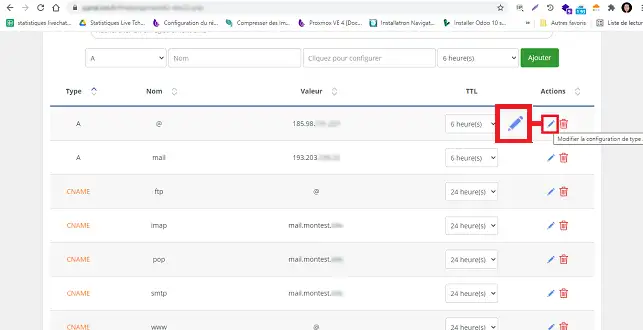
3. In the"DNS Zone" section, look for Zone"@". Click on the"Modify" stylus behind this Zone to change the IP.
ISPconfig - How do I link my domain name to my VPS server?

4. Change the IP and click on the "Save" button.
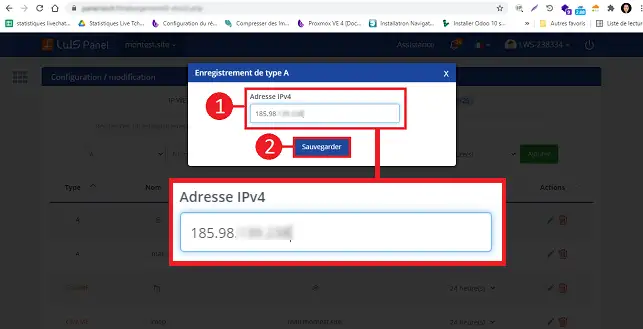
ISPconfig - How do I link my domain name to my VPS server?

Once the IP has been validated, your domain name will point to your VPS server in approximately 6 hours. You will then see the ISPConfig home page by default when you type your domain name into a browser.

Video procedure :


How do you find the IP of your VPS server?

You may have lost the e-mail containing all the information about your VPS server, including its IP address. In this case, you need to connect to your LWS customer area and click on"Servers".
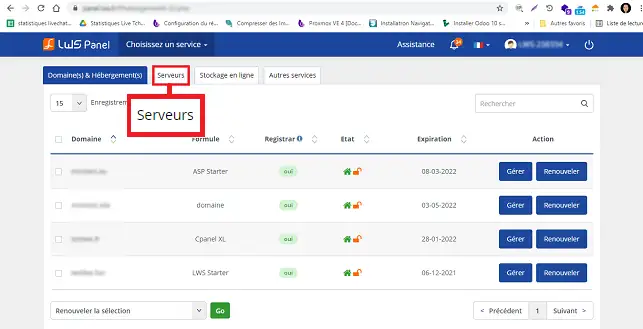
ISPconfig - How do I link my domain name to my VPS server?

The IP attached to your VPS server can be found in the"IPv4" box.
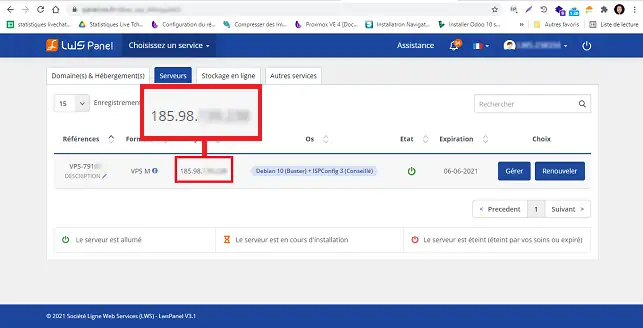
ISPconfig - How do I link my domain name to my VPS server?


Conclusion

You are now able to associate your domain name with your VPS server with LWS. Once you've made the changes to the DNS Zone, you'll need to wait up to 24 hours for the changes to work.

Don't hesitate to share your comments or questions!

Rate this article :

4.6/5 | 8 opinion

This article was useful to you ?

Article utileYes

Article non utileNo

MerciMerci ! N'hésitez pas à poser des questions sur nos documentations si vous souhaitez plus d'informations et nous aider à les améliorer.



Vous avez noté 0 étoile(s)

Similar articles

2mn reading

How do I add a website to an ISP Config VPS dedicated server?

1mn reading

How do I create a sub-domain on a dedicated VPS server?

1mn reading

It's easy to configure my domains on my VPS

1mn reading

How to migrate a Wordpress site from an ISPCONFIG Apache VPS to Nginx


Questions sur l'article (4)

Ask a question
claudye
3 janv. 2023
Can I add several domain names to my vps using this method?
Benjamin-LWS Reponse officielle
6 janv. 2023

Bonjour,

Oui tout à fait.

Après avoir ajouté votre domaine à votre VPS, voici une documentation pour configurer votre domaine nouvellement ajouté : https://aide.lws.fr/a/1285

Cette reponse vous a aide ?
Misslolo
22 mai 2023
J'ai demandé un transfert de domaine qui est actuellement encours,est t'il possible de republier mon ancien site sur ispconfig... pendant le transfert en cours?
Benjamin-LWS Reponse officielle
25 mai 2023

Bonjour,

Merci de votre retour.

C'est assez déconseillé de publier votre site après\pendant transfert d'un domaine, mais c'est tout à fait possible.

Je vous remercie de votre attention et reste à votre disposition pour toute autre question ou complément d'information.

Nous vous invitons à contacter notre service support à travers votre espace client, afin de vous apporter une aide si vous rencontrez des difficultés quelconque. (Contacter le support LWS)

Cordialement, L'équipe LWS 

Cette reponse vous a aide ?
julioA
7 aout 2024
Bonjour, je souhaite ajouter l'IP de ma box pour avoir mon site web depuis chez moi. Après ce changement je utilise [domaine masqué] pour voir si mon domaine correspond à l'IP public de ma box, mais il donne erreur. Qu'est ce que je peux faire?
Aurelien-LWS Reponse officielle
12 aout 2024

Bonjour,

Pour lier votre nom de domaine sur votre Serveur NAS par exemple pour auto-héberger votre site Internet, vous devez effectivement configurer l'enregistrement de Type A de la Zone DNS de votre domaine pour le faire pointer sur l'IP du Serveur.

L'IP à renseigner est dans le cas le plus courant l'IP Publique de votre connexion Internet. Veillez à bénéficier d'une IP Fixe auprès de votre opérateur, sinon vous devrez refaire le réglage à chaque changement d'IP.

Ensuite, vous devrez configurer votre Box qui sert également généralement de routeur pour configurer que les connexions entrantes depuis votre nom de domaine soient redirigées vers votre serveur NAS. Enfin, vous devrez configurer votre serveur NAS pour traiter les connexions entrantes via votre nom de domaine.

Comme ces configurations dépendent du modèle de Box Internet et du modèle de Serveur NAS, je vous invite à vous reporter au mode d'emploi de ces deux appareils pour vérifier ou mettre en place votre configuration.

Cordialement, L'équipe LWS

Cette reponse vous a aide ?
LAMINE
il y a 4 sem.
Bonjour mon abonnement pour mon nom de domaine tire a sa fin dois je le renouveler avant de prendre le VPS oui bien puis je prendre un abonnement incluant le VPS Merci
Jordan-LWS Reponse officielle
il y a 3 sem.

Bonjour,

Le nom de domaine et le VPS sont deux services distincts.

Si votre nom de domaine arrive prochainement à expiration, il sera nécessaire de le renouveler afin de conserver sa propriété et d'éviter toute interruption de service.

Vous pouvez tout à fait souscrire à un VPS dès maintenant, mais cela n’inclura pas automatiquement le renouvellement de votre nom de domaine sauf indication contraire dans l’offre choisie.

Je vous remercie de votre attention et reste à votre disposition pour toute autre question ou complément d'information.

Cordialement, L'équipe LWS

Cette reponse vous a aide ?

Ask the LWS team and its community a question

RGPD : Responsable LWS-Ligne Web Services. Finalité : modération et publication publique de votre question, notification éventuelle d'une réponse. Base légale : consentement (art. 6.1.a RGPD). Conservation des emails : 90 jours après notification, 12 mois maximum sans réponse. Vous pouvez exercer vos droits via notre nos CGV - section RGPD.