Procédure
Relevant service: domain name, associated shared web hosting
Relevant panel: LWS client area
Level: beginner
This help article explains how to renew a domain name and/or hosting from your LWS client area.
It also allows you to renew multiple services on the same invoice, for example several domains or associated hosting plans.
Before paying, take the time to check what you are renewing: only the domain, the hosting with the domain, or several services at once. This verification helps avoid renewing a plan or service you no longer need.
Do not wait until the due date to renew your domain name. In the event of a late renewal, your website, e-mail addresses or domain may be suspended. Depending on the extension and the domain status, restoration fees may also apply.
You can renew your service before its due date without losing the remaining days. The new renewal period is added to the current expiry date and does not start on the day of payment.
Check whether you want to renew:
- a single domain name;
- a domain name with its hosting;
- several domains and/or hosting plans on the same invoice;
- only the domain name, without keeping the associated hosting.
The due date to take into account is the one displayed in your LWS Panel client area. It may be different from the date shown in some Whois tools.
Grouped renewal is limited to a maximum of 99 services per operation, domains and/or hosting plans combined. If you need to renew more than 99 services, make several separate renewals.
Renew a single domain name or hosting service
- Log in to your LWS client area.
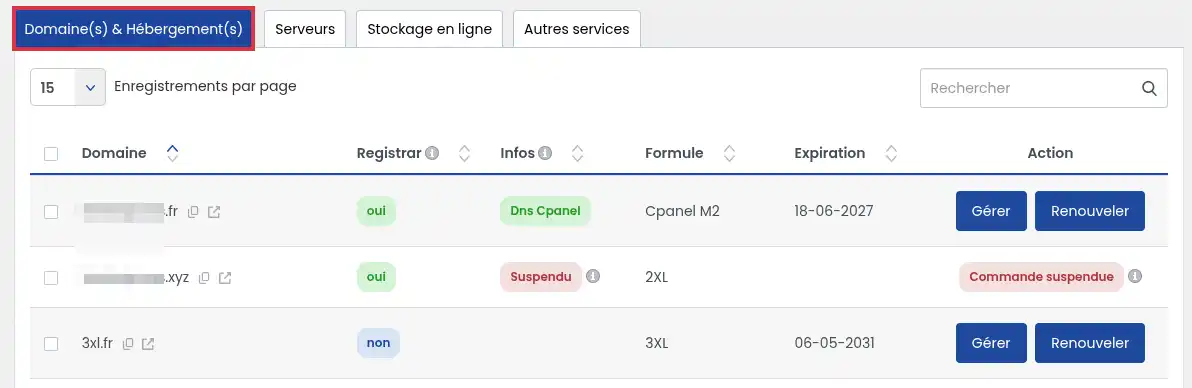
- Go to the Domain(s) & Hosting(s) section.
- Find the domain name or service to renew.
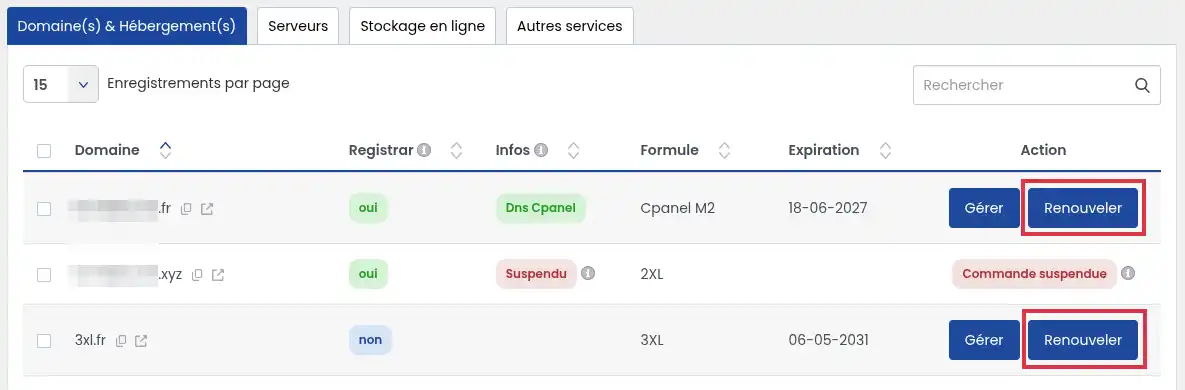
- Click the "Renew" button associated with the relevant service.
- Check the content of the displayed quote: domain name, relevant plan, renewal period and amount.
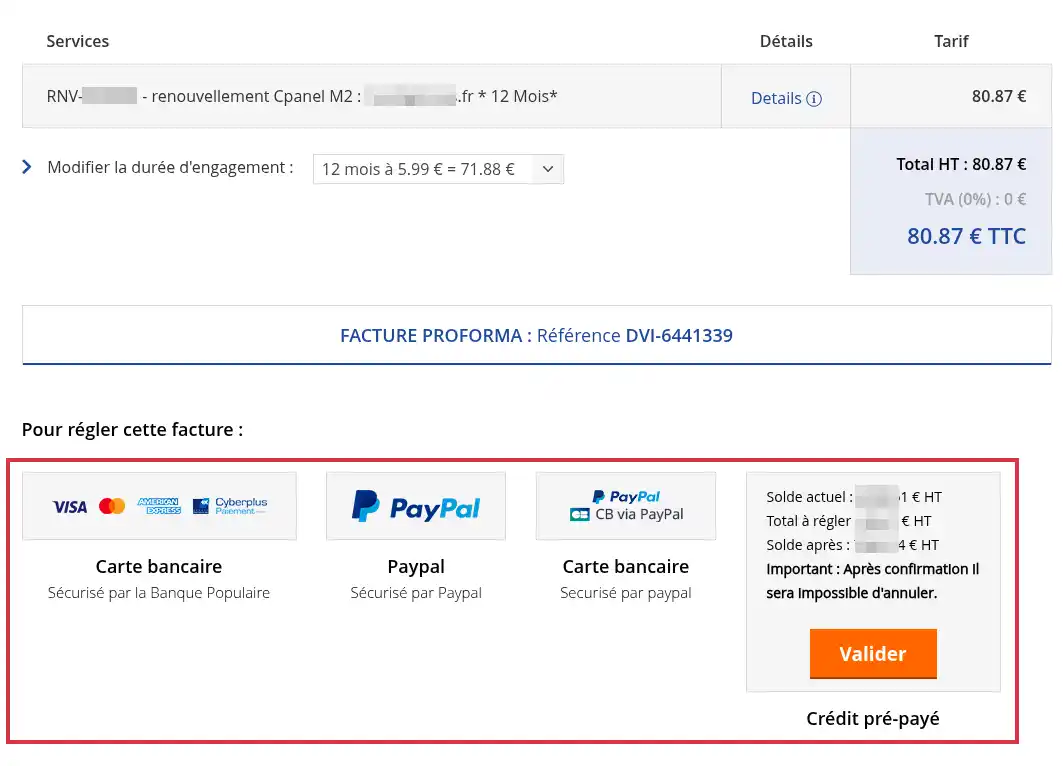
- Choose the desired period from those offered for your service. The available periods depend on the product and are shown directly in the renewal quote.
- Select your payment method, then confirm the order.
Once payment has been validated, the renewal is taken into account by LWS. The new expiration date should appear in your client area.
If the domain is associated with an LWS hosting plan, the Renew button applies to the full pack: the domain name and hosting are renewed together.
You can check exactly what will be renewed in the quote displayed at the next step.
Renew several domains or services on the same invoice
Grouped renewal lets you pay for several domains and/or hosting plans in a single order. This option is useful if you manage several LWS services and want to avoid making multiple separate payments.
- Log in to your LWS client area.
- Go to the Domain(s) & Hosting(s) section.
- Select the services (1) you want to renew.
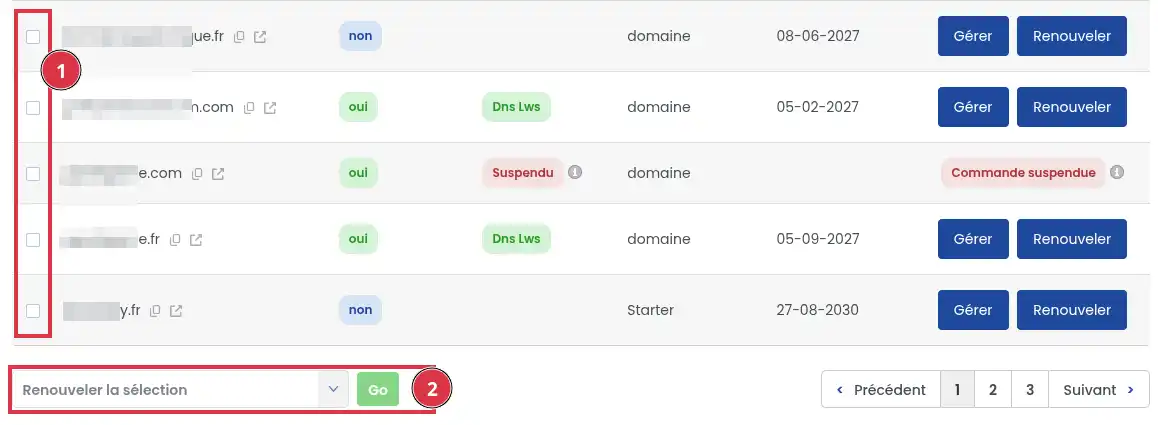
- Check your selection before continuing. Make sure you only select the domains or hosting plans you actually want to renew.
- Start the renewal of the selected items (2).
- Check the generated quote: included services, renewal periods, total amount and any associated options.
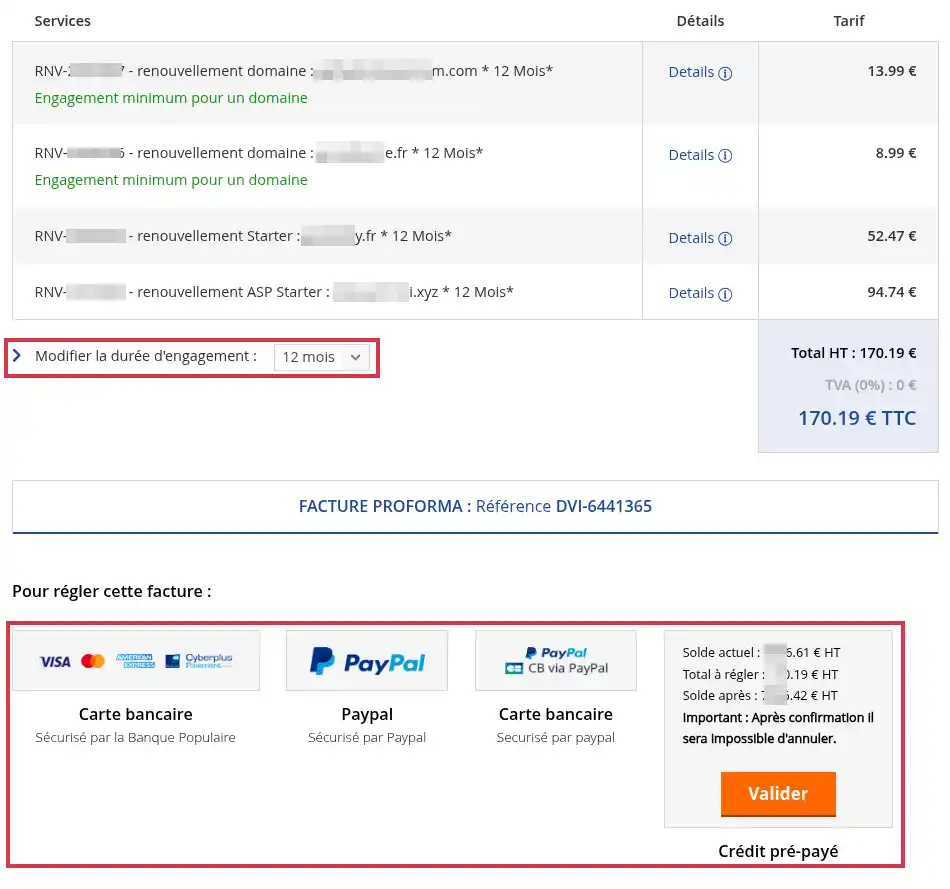
- Select your payment method, then confirm the order.
Once payment has been validated, the renewal is taken into account by LWS. The new expiration date should appear in your client area for each renewed service.
Renew only the domain name without the hosting
If your domain is associated with a paid hosting plan, its renewal normally applies to the full pack.
If you no longer want to keep this hosting plan and want to switch back to the Domain plan, you must make the change before renewing.
Switching to the Domain plan does not automatically keep the data and services from your current hosting. Before deleting any hosting, back up the files, databases and e-mails you want to keep.
In that case, first change your plan to a domain-only plan, then start the renewal.
If the service has already expired and the plan change is no longer available, it may be necessary to delete the associated hosting before renewing only the domain.
The procedures to follow depending on the status of your service are described in this documentation.
Deleting hosting results in the deletion of the files, databases, e-mail addresses or content associated with that hosting. Before taking this action, make sure you no longer need the data or that you have a usable backup.
After changing the plan or deleting the associated hosting, go back to your client area and restart the renewal of the domain name only.
Understanding renewal reminders
LWS sends reminders before your services expire. These messages help you anticipate renewal and avoid suspension.
If automatic renewal is enabled, LWS attempts to renew the service before expiry using the saved payment method. If the payment fails, you must renew the service manually from your client area.
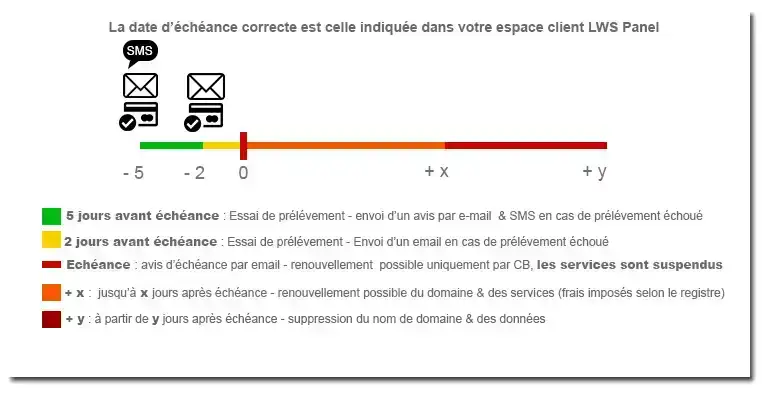
If automatic renewal is not enabled, you must make the payment yourself before the due date.
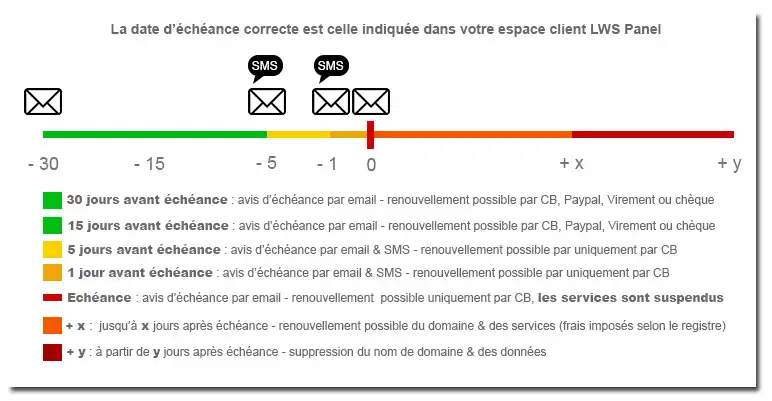
Check that the renewal has been taken into account
After payment, go back to the list of your services from the LWS client area.
Check that:
- the renewed domain or service still appears as active;
- the expiration date has been updated;
- the renewed services match those listed on your invoice;
- your website and e-mail addresses work normally, if hosting or mail services are associated.
The renewal is confirmed when the new expiration date appears in your LWS Panel client area. A delay of up to 30 minutes may be required between payment validation and the effective update of the service. If the new date does not appear immediately, refresh your client area a little later.
Common issues
I cannot see the service I want to renew
Check that you are logged in to the correct LWS client account. If the service is very old, cancelled or already deleted, it may no longer appear in the list of renewable services.
I want to renew my domain, but not the hosting
Do not confirm the renewal of the full pack. First change your plan to a domain-only plan. If the service has already expired, follow the procedure to keep only the domain or to delete the associated hosting before renewal.
I need to renew more than 99 services
Grouped renewal is limited to 99 services per operation. Split your renewals into several orders.
The payment was declined
Check the payment method used, then restart the renewal from your client area. If the domain is about to expire, use another available payment method to avoid suspension.
If you have just changed your payment method, make sure it is correctly saved before restarting the renewal.
The Whois date has not changed yet
The date shown in your LWS Panel client area is the reference for your LWS service. The date shown in some Whois tools may be different or update later.
I only see my domain name. Will my hosting also be renewed?
If your domain and hosting are part of the same LWS pack, renewing the service extends both.
Before paying, check the quote: it shows the plan and services concerned by the renewal.
I have already renewed but I am still receiving reminders
Check the service mentioned in the message you received.
You may have several domains, hosting plans or options with different expiry dates. It is therefore possible to have renewed one service while another is still about to expire.
Also check in your client area that the new expiry date is displayed for the service you paid for.
I no longer have access to my client area. Can I still renew?
No. For security reasons, renewing a service must be done from the LWS account that manages it.
First recover access to your client area. If you cannot recover your login details or contact e-mail address, use the account recovery procedures or contact LWS.
My domain has already expired. Can I still renew it?
It depends on its status and extension.
If it can still be renewed normally, carry out the renewal from your client area.
If it has entered a restoration or quarantine period, recovery may require a specific procedure and may involve fees imposed by the registry.
If the domain has been permanently deleted, you will need to check whether it is available for registration again.
I do not want to renew my service
If automatic renewal is enabled, disable it before the payment is initiated.
The service will then expire according to its normal cycle if you do not renew it.
If you also want to close your LWS client account, this is a separate process: first make sure that no active service you wish to keep is still linked to the account.
Can I get an invoice before paying for my renewal?
Before payment, the client area generates a renewal quote. It allows you to check the services, duration and amount before confirming.
The corresponding invoice is available after the payment has been processed.



 Yes
Yes No
No About
About 