
Online help
The web host accessible to all
Procédure
To better understand how LWS shared web hosting works, it is crucial to take the following elements into account.
LWS's shared web hosting plan offers users access to unlimited bandwidth in terms of data volume. In other words, your website can theoretically attract as many visitors and generate as much data transfer as needed, without strict limitations on the amount of traffic allowed.
However, to ensure a quality experience for all users sharing the same server, as well as to prevent abuse or the hosting of illegal sites, LWS has put in place a bandwidth management policy. This policy consists of defining a monthly data traffic quota for each hosted website.
| Quota / Plan | LWS Perso |
LWS Starter |
LWS Standard WP Business |
LWS Performance WP Premium |
| Optimal bandwidth | 25 GB / month | 45 GB / month | 120 GB / month | 150 GB / month |
When your website reaches this monthly data transfer quota (generally expressed in gigabytes, noted "XX GB" in your description), its bandwidth is temporarily reduced to 10 Megabits per second (Mbs). This measure is intended to encourage users to manage their traffic responsibly.
Once the calendar month has passed and your monthly data transfer quota is reset, your website will once again benefit from optimal bandwidth of 1 Gigabit per second (Gbs), meaning that your site will be able to handle higher traffic at high speed.
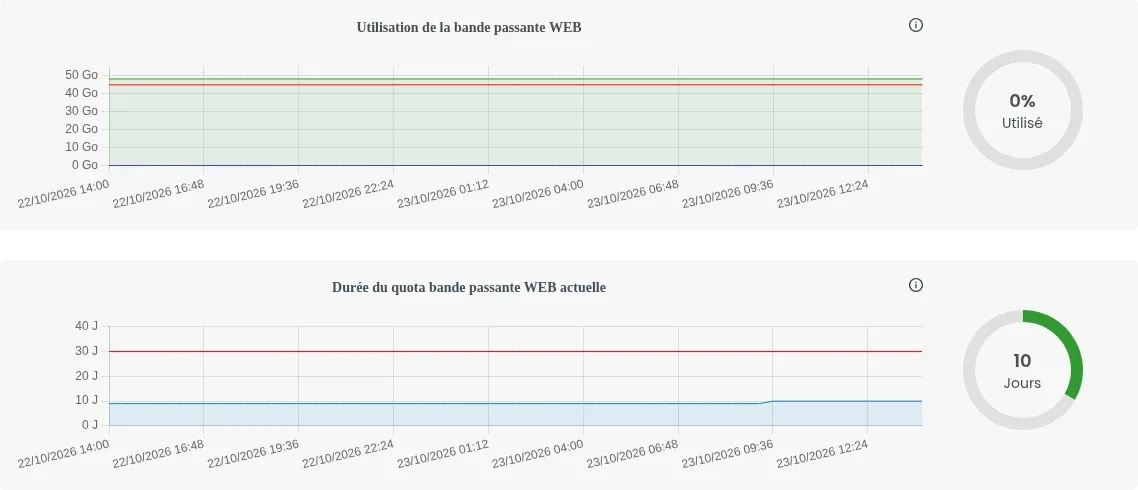
To view the bandwidth used by your website hosted at LWS, open your hosting management from your client area. In the “Optimization and performance” section, click on “Resources (CPU, RAM...)” (the “Bandwidth” link in the “Quota summary”, in the right-hand column of the dashboard, leads to the same page), then on the “Network resources” tab.

The “WEB bandwidth usage” chart shows the amount of data transferred by your site and the percentage of your quota used; the “Current WEB bandwidth quota duration” chart shows the number of days elapsed in the current period. The “period selection” list lets you display history from 1 hour to 24 months. This section will allow you to closely monitor your bandwidth usage and take appropriate action if necessary to manage your traffic effectively.
In conclusion, if you are experiencing a bandwidth limitation issue for your website and it is affecting your user experience, you have the option to change plans from your client area. This allows you to increase your monthly data transfer quota and obtain higher bandwidth to meet your specific needs.
For more details on data transfer quotas by LWS shared web hosting plan, see the help article Quotas for LWS Linux shared web hosting plans. In summary, this approach ensures optimal display quality for all hosted websites while giving users the flexibility to customize their bandwidth according to their needs.
Ask the LWS team and the community. Answers are published after moderation.
 About LWS :
LWS is a 100% French web hosting company that focuses on quality and innovation and offers a responsive and competent technical service at affordable prices.



 Yes
 No