


How do I change my Mysql password?

Procédure

How do I change the password for my MySQL databases?

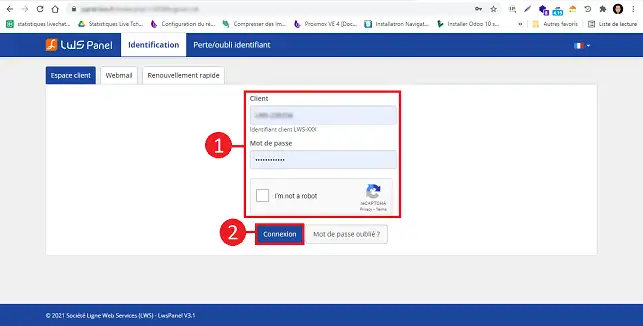
1. Log in to your LWS customer area.

How do I change my Mysql password?

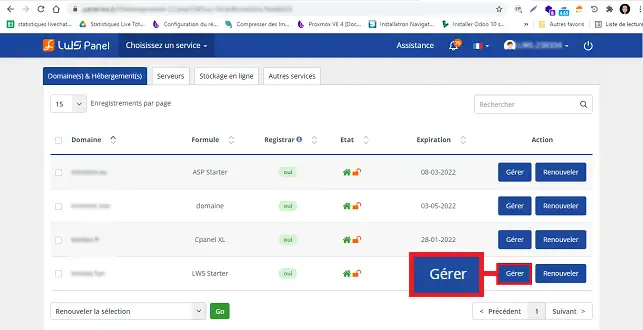
2. Click on the"Manage" button behind the formula for which you want to change the MySQL password.

How do I change my Mysql password?

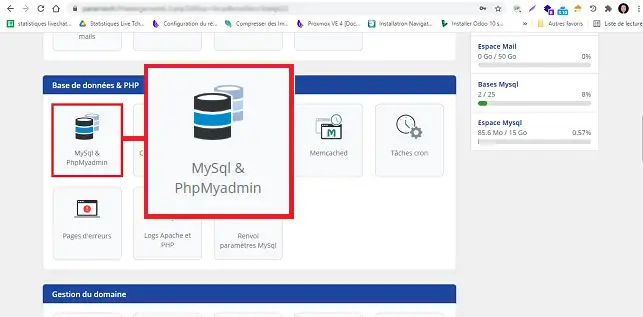
3. Click on the"MySQL and PHPMyAdmin" button in the"MySQL database and PHPMyAmin" section.

How do I change my Mysql password?

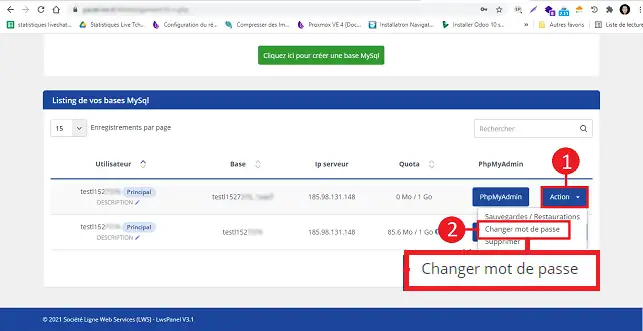
4. Click on the "Action" button behind the database in question and then on "Change password".

How do I change my Mysql password?

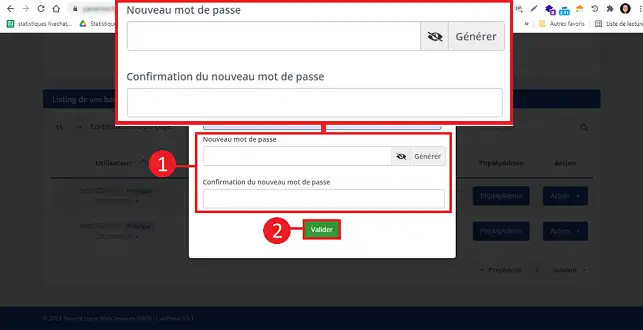
5. Enter your new password and confirm to save.
How do I change my Mysql password?

6. When youchange your password, you need to modify your site's configuration file with the new password( for Drupal, Jooma and Wordpress etc., the configuration file is usually located at the root of your site).

Procedure in video :

Conclusion

You can now change the password for your MySQL database on your shared hosting with LWS.

Don't hesitate to share your comments and questions!

help.lws.net/a/104
Was this article helpful?

Yes

No

Read 36 455 times

Thank you! Feel free to ask questions about our documentation if you would like more information, and help us improve it.

Similar articles

Questions about the article 1

Ask a question
Pseudo
8 Feb 2023
Hello I have a problem into my panel, in my file section the file manager and phpMyAdmin does not appear, what should I do? How to get that . please urgent
Benjamin-LWS Official answer
9 Feb 2023

Bonjour, 

Merci pour votre retour.

Ces fonctionnalités dépendent de la formule que vous possédez avec votre domaine.

Dans le cas où vous possédez la formule gratuite livrée à l'achat d'un domaine, ces fonctionnalités ne sont pas disponibles. Il faudra nécessairement passer sur une formule linux avec le LWS Panel. Voici un lien vers nos premiers prix de formules d'hébergement : LWS Hébergement Web

Si vous possédez une de ces formules, et que vous ne constatez pas les outils que vous avez besoin, nous vous invitons à revenir vers nous directement via le système de support disponible depuis votre espace client LWS, nous vous apporterons l'aide adéquate à votre souci. (https://aide.lws.fr/a/268)

Cordialement, L'équipe LWS

Was this answer helpful?

A question about this article?

Ask the LWS team and the community. Answers are published after moderation.

Ask the LWS team and its community a question

GDPR: Controller: LWS-Ligne Web Services. Purpose: moderation and public publication of your question, possible notification of an answer. Legal basis: consent (Art. 6(1)(a) GDPR). Email retention: 90 days after notification, 12 months maximum without an answer. To exercise your rights, see the GDPR section of our Terms and Conditions.