
Online help
The web host accessible to all
Procédure
MySQL databases are specially designed to be compatible with web applications and particularly easy to query using PHP. You can create it in a few clicks via your Plesk Panel with all our shared packages. Databases are essential for the proper functioning of certain software such as Joomla, Wordpress or Prestashop for example.
You can create two different types of database: MySQL or Microsoft SQL Server. MySQL does not fully support foreign keys.
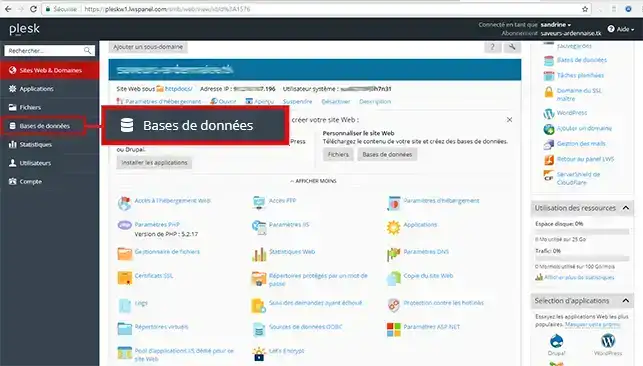
1. Connect to Plesk and click on Database
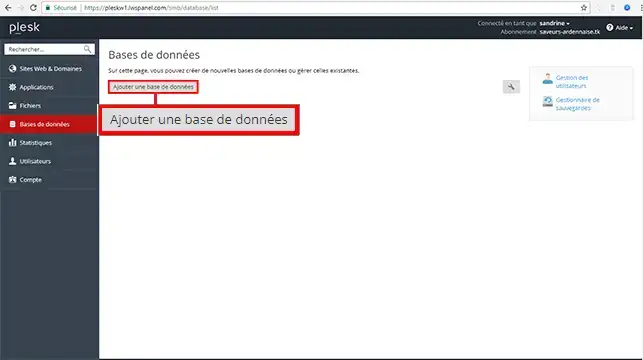
2. Click on Add a new database
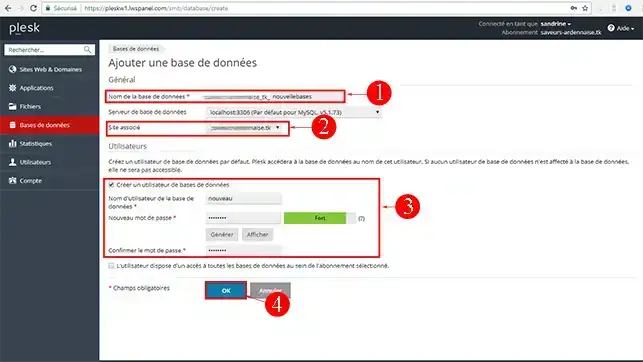
3. Fill in the Database name, Database user name and Password fields and click OK to confirm.
To find out more about the plesk panel you can consult the official resources:
Ask the LWS team and the community. Answers are published after moderation.
 About LWS :
LWS is a 100% French web hosting company that focuses on quality and innovation and offers a responsive and competent technical service at affordable prices.
About LWS :
LWS is a 100% French web hosting company that focuses on quality and innovation and offers a responsive and competent technical service at affordable prices.



 Yes
Yes No
No