Contact us
 Customer Area


 Visit LWS
Rate this article :
This article was useful to you ?
 Yes
Yes
 No
No
 Article read
639 once
Article read
639 once Merci ! N'hésitez pas à
poser des questions sur nos documentations si vous souhaitez plus d'informations et nous aider à les
améliorer.
Merci ! N'hésitez pas à
poser des questions sur nos documentations si vous souhaitez plus d'informations et nous aider à les
améliorer.Vous avez noté 0 étoile(s)



Sommaire
Procédure
Concerned service : LWS domain name
Concerned panel : LWS Panel
Level : intermediate
This guide explains how to connect your domain name managed at LWS to Mailjet in order to validate your [ADDRESS] domain and authenticate your emails with SPF and DKIM.
This setup allows Mailjet to be recognized as an authorized service to send emails with your domain. It also helps limit the risk of your messages being [PERSON_NAME] suspicious or placed in spam.
This guide applies only to domains whose DNS zone is managed from the LWS Panel.
If your domain uses external DNS servers, such as Cloudflare or another provider, the DNS records will need to be added directly with that provider.
You must have the information provided by Mailjet for your domain. [PERSON_NAME] are found in your Mailjet account, in the management of sending domains and SPF/DKIM authentication.
Mailjet may ask you to add several DNS records, generally:
The DNS values to add must be copied from Mailjet.
Do not copy this guide if Mailjet displays a different value for your domain.
Log in to your Mailjet account.
Then go to the section for managing your sending domains. Depending on the Mailjet interface used, this section may be found in:
Account settings > Sender domains and addresses
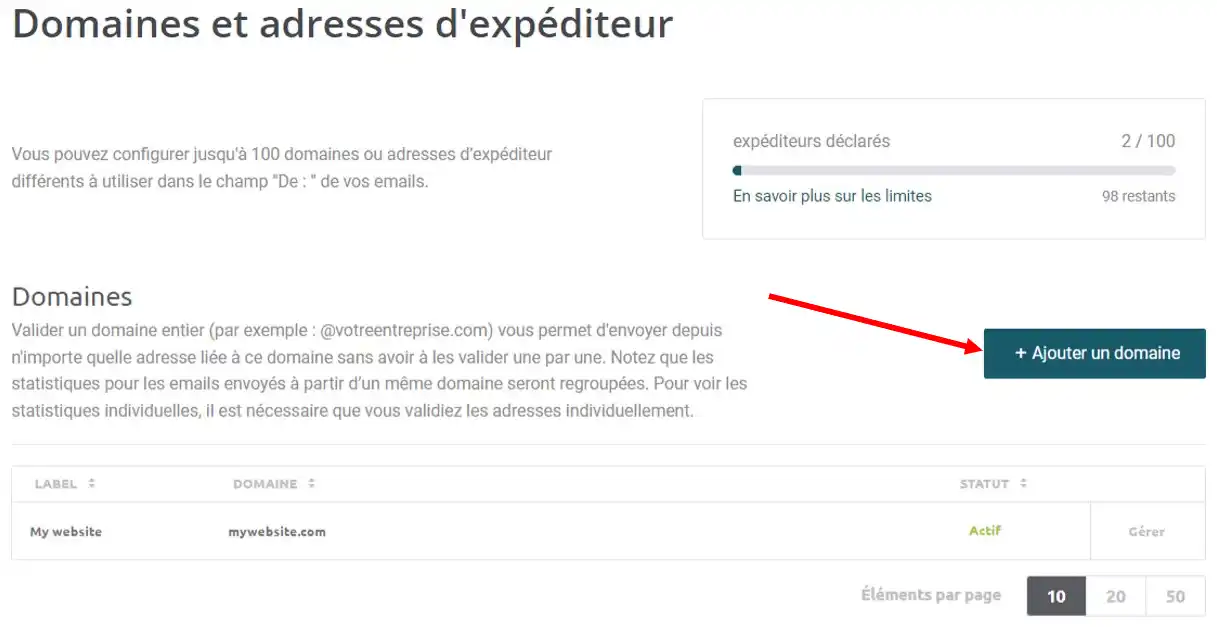
Add [PERSON_NAME] not already done.
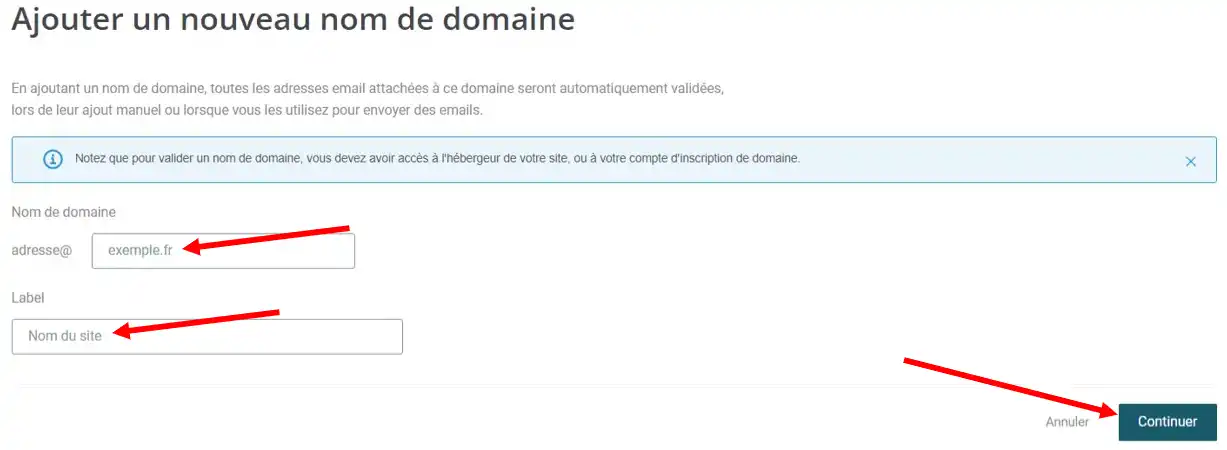
Then open the domain validation or authentication options.
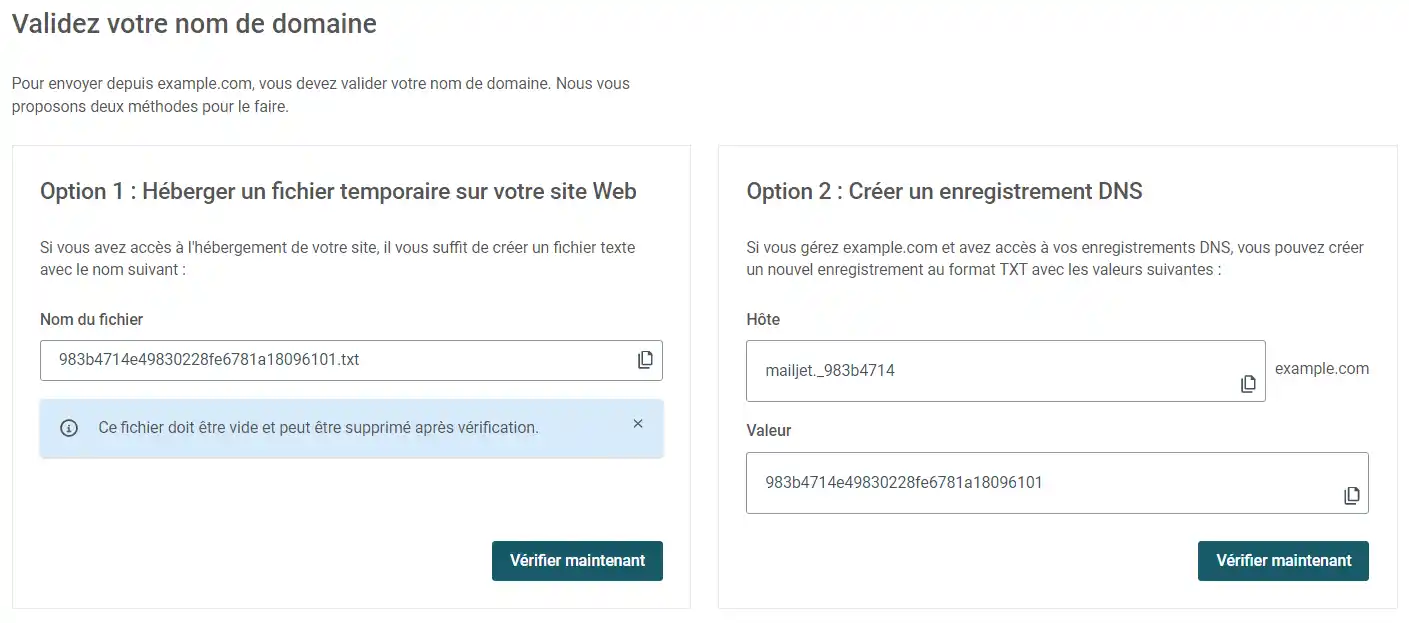
Mailjet then displays the DNS records to create. Keep this page open: you will need to copy the Name, Host or Value fields indicated by [ADDRESS] LWS DNS zone.
Log in to your LWS customer area.
From the list of your services, click Manage next to the relevant domain name.
In the Domain management section, click DNS zone.
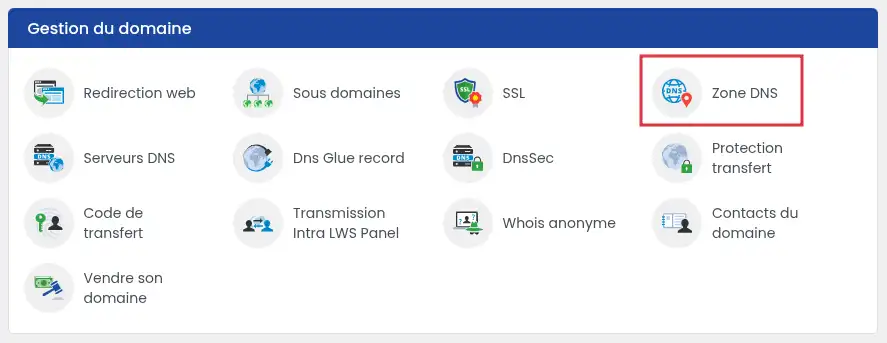
You will arrive on the page where you can add, modify, or delete the domain's DNS records.
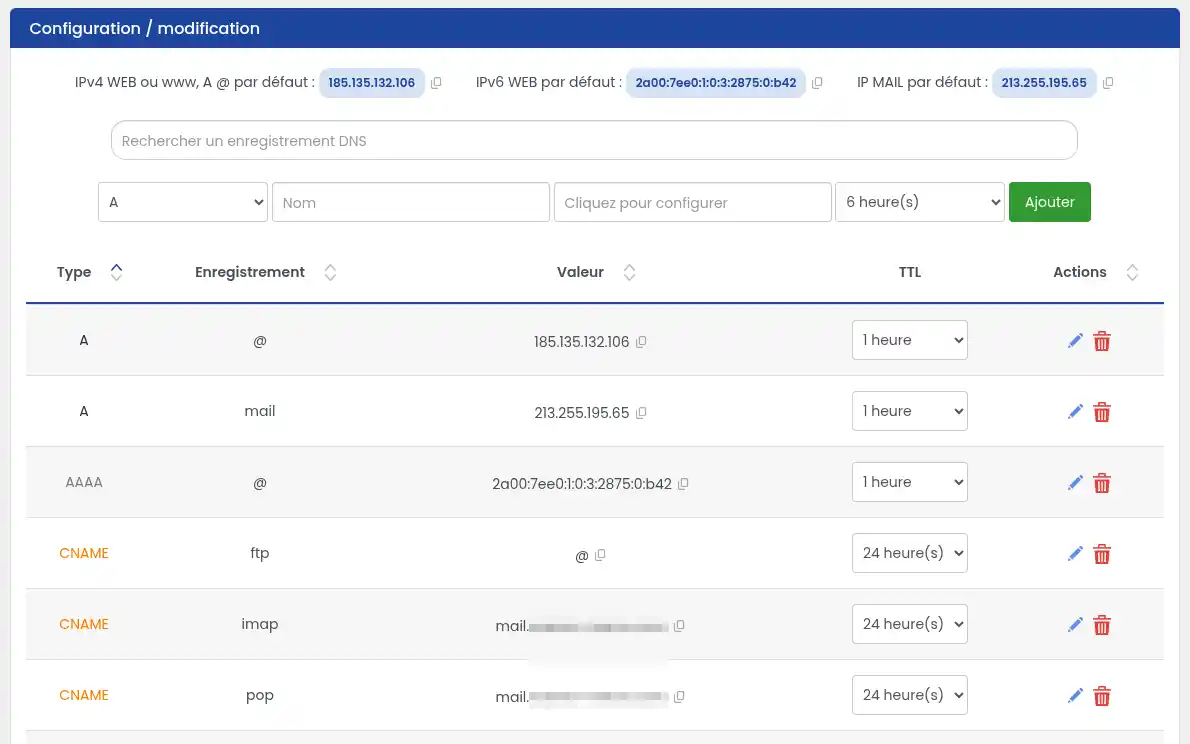
In the [ADDRESS] DNS zone, add a new record of type TXT.
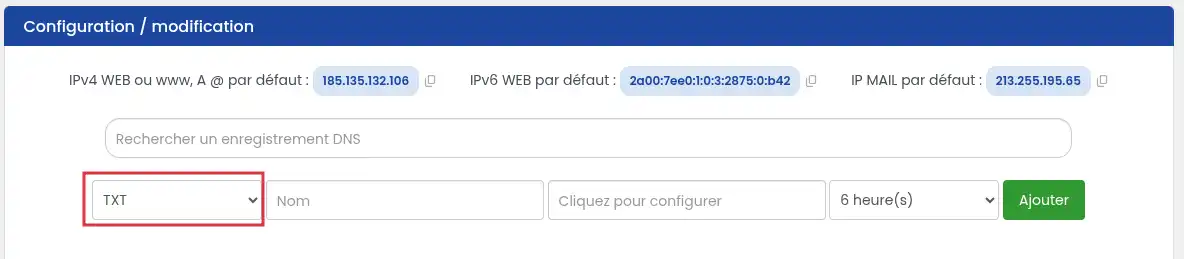
In the Name or Host field, enter the value requested by Mailjet.
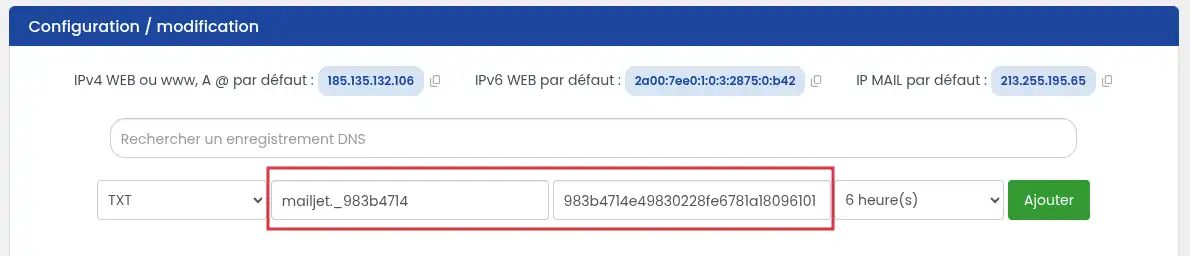
In the Value field, paste the TXT value provided by Mailjet.
Choose a standard TTL, for example 6h, [PERSON_NAME] Add.
If Mailjet gives you a full name such as example.yourdomain.com, you only need to enter the part before your domain name in the LWS DNS zone.
For example, for mailjet._domainkey.yourdomain.com, enter only mailjet._domainkey.
Once the DNS record has been created, click the “Verify now” button in the MailJet interface.
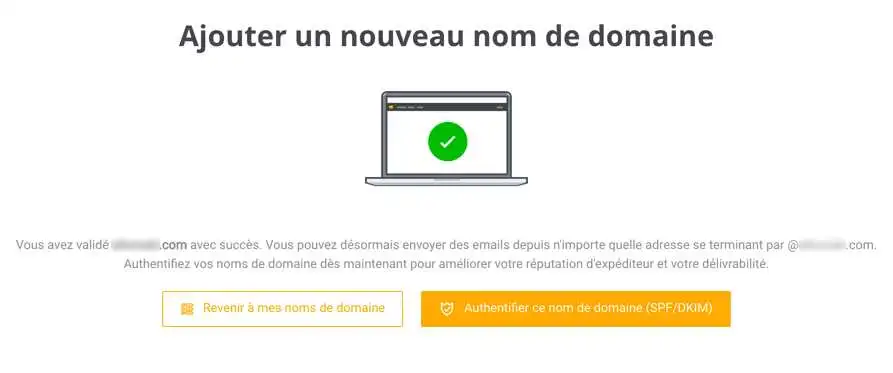
The “Validation successful” screen appears. It allows you to configure your SPF and DKIM records for your domain or return to your domain list.
SPF makes it possible to indicate which services are authorized to send emails with your domain name.
In the DNS zone, first check whether there is already a TXT record starting with:
v=spf1
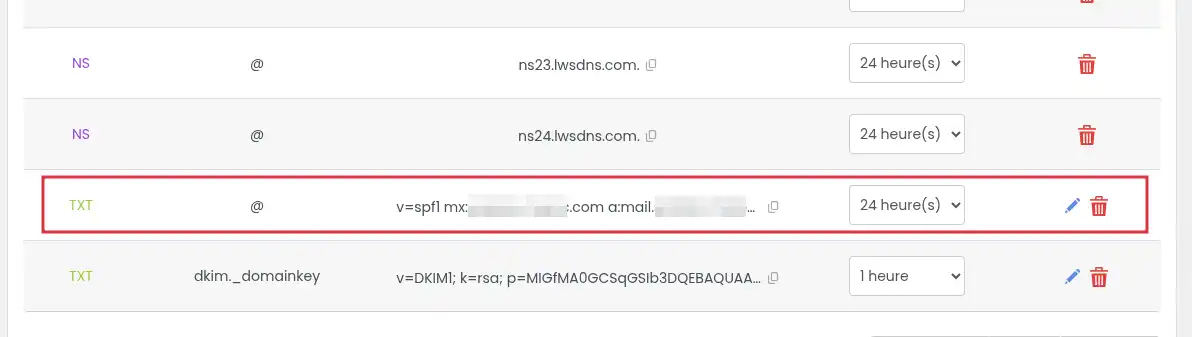
Add a new record of type TXT with the following information:
| Field | Value |
|---|---|
| Type | TXT |
| Name / Host | @ |
| Value | v=[PERSON_NAME] include:spf.mailjet.com ~all |
| TTL | 3600 |
Then save the change.
Do not create a second SPF. Modify the existing record to add Mailjet.
For example, if your current SPF is:
v=spf1 include:exemple.com ~all
you can complete it as follows:
v=[PERSON_NAME] include:exemple.com include:spf.mailjet.com ~all
A domain must not have multiple separate SPF records.
[PERSON_NAME] create a second SPF instead of modifying the one already present, Mailjet or email services may consider the configuration invalid.
DKIM allows Mailjet to sign emails sent with your domain. [PERSON_NAME] helps email services verify that the message has not been altered and really comes from an authorized service.
In the [ADDRESS] DNS zone, add a new record of type TXT.
Fill in the fields with the information provided by Mailjet.
The DKIM name usually looks like:
mailjet._domainkey
The DKIM value is a long key often starting with:
k=rsa; p=...
Copy this full value from Mailjet, without adding spaces or modifying the text.
This key is found in your Mailjet account under the SPF/DKIM Authentication section
.webp "Click to display the original image")
Then click Add or Save.
The DKIM key may be long. Make sure to copy it in full.
An incomplete, truncated, or modified key will prevent Mailjet from validating domain authentication.
After you have [PERSON_NAME] DNS records in the LWS Panel, go back to your Mailjet account.
Go to Account settings > Sender domains and addresses.
Select your domain and you [PERSON_NAME] SPF and DKIM are correctly configured.
.webp "Click to display the original image")
If your domain is properly authenticated, you will see a green mark next to SPF and DKIM.
When Mailjet displays a successful validation or green statuses for SPF and DKIM, your domain is correctly authenticated for sending with Mailjet.
DNS changes are not [PERSON_NAME] visible immediately.
Depending on DNS propagation, validation may take from a few minutes to several hours, and sometimes up to 24 to 48 hours.
In most cases, no.
Mailjet is mainly used for sending marketing or transactional emails. MX records are used to receive emails for the domain.
Do not modify your domain's MX records unless Mailjet or your email configuration explicitly asks you to.
An incorrect modification of MX records can interrupt the reception of emails for your domain.
Mailjet does not validate my domain
Check that the validation TXT record has indeed been added in the DNS zone actually used by your domain.
If your domain does not use the [ADDRESS] DNS servers, the [ADDRESS] DNS zone of the LWS Panel will not be taken into account. In that case, add the record with the provider managing your DNS.
Also check that the Name and the Value fields match [PERSON_NAME]>
SPF is rejected or shown as invalid
Check that there is only one SPF record for the domain.
If an SPF already exists, it must be modified to add:
include:spf.mailjet.com
You must not create a second TXT record starting with v=spf1.
DKIM remains in error
Check that the DKIM record name was not entered twice.
For example, if Mailjet displays:
mailjet._domainkey.yourdomain.com
in the LWS Panel, generally enter:
mailjet._domainkey
Also check that the DKIM key has been copied in full, without any added line break or removed character.
My emails [ADDRESS] must also continue to work
If you also use [ADDRESS] emails to send messages with the same domain, the SPF must authorize both LWS and Mailjet.
In that case, do not replace your existing SPF without checking its content. [PERSON_NAME] Mailjet authorization in the existing SPF record.
Rate this article :
This article was useful to you ?
Yes
No
1mn reading
How do I use a personalised domain name for Blogger?
2mn reading
How do I link my domain name to my wix site?
1mn reading
How can I point my Domain to an external IP?
2mn reading
 About LWS :
LWS is a 100% French web hosting company that focuses on quality and innovation and offers a responsive and competent technical service at affordable prices.
About LWS :
LWS is a 100% French web hosting company that focuses on quality and innovation and offers a responsive and competent technical service at affordable prices.