
Online help
The web host accessible to all
Procédure
A cron job is a process that executes commands at specific dates and times. You can use cron tasks to schedule activities as one-off events or as recurring tasks.
For example, you can set a task to run every 5 minutes, every hour, every day or every week.
You can be notified when a cron job is run by entering your email address when you set it up.
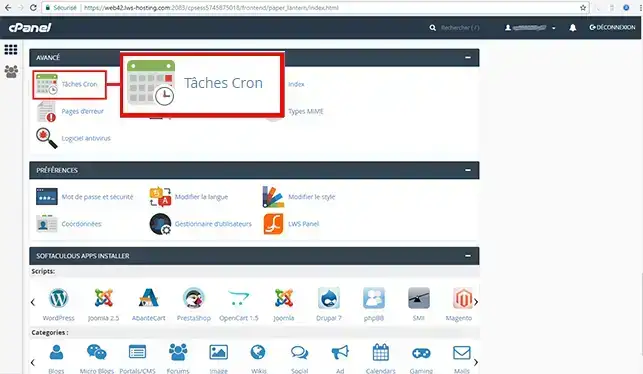
1. Log in to your cPanel account, scroll down the page and click on the "Cron tasks" icon.
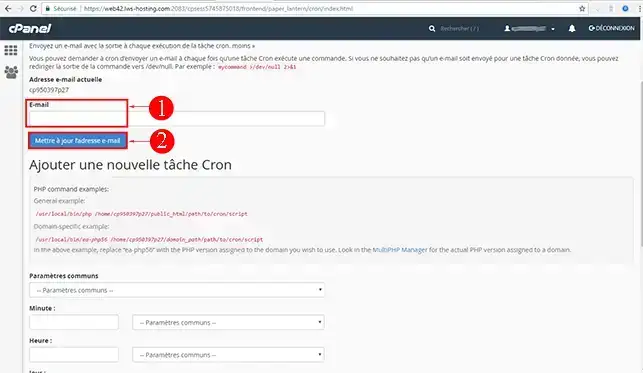
2. Update your email address. This will allow you to be informed when the cron job is run.
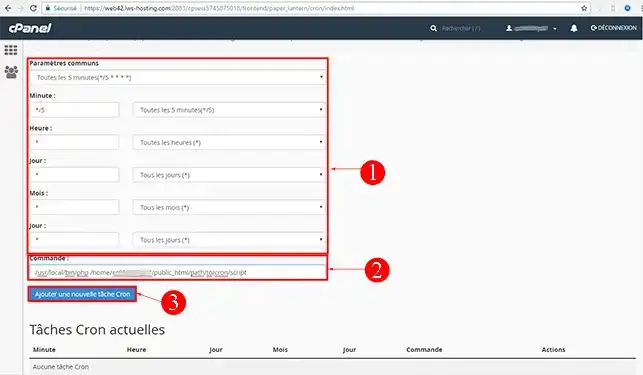
3. Fill in the cron job parameters and the command to be run, then click on the"Add a new cron job" button.
Common parameters: The common parameters are used to define the number of times the cron job should run.
Command: This is the script you want to run.
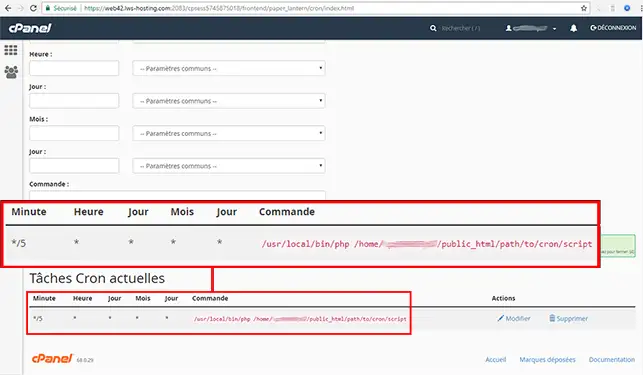
4. All cron jobs are visible at the bottom of the page.
Need help using cPanel?
See all our cPanel training videos
You can modify or delete a cron job at any time via your cPanel web hosting. To do this, log in to your cPanel hosting and click on the"Cron tasks" button in the "Advanced" section of your dashboard.
You can now create, modify or delete a cron job from your cPanel web hosting with LWS. You can be informed by email of the execution of the cron task by modifying it.
Don't hesitate to share your comments or questions!
Ask the LWS team and the community. Answers are published after moderation.
 About LWS :
LWS is a 100% French web hosting company that focuses on quality and innovation and offers a responsive and competent technical service at affordable prices.
About LWS :
LWS is a 100% French web hosting company that focuses on quality and innovation and offers a responsive and competent technical service at affordable prices.



 Yes
Yes No
No