
Online help
The web host accessible to all
Procédure
Delivery Tracking allows you to follow e-mail delivery routes and helps you identify delivery problems.
By default, this interface lists the last 250 failed email deliveries to and from your mailboxes. The delivery states indicated on your cPanel web hosting are as follows:
This interface also allows you to see the score set by SpamAssassin.
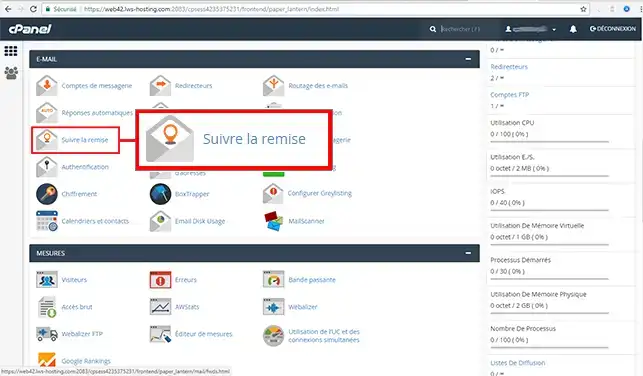
1. Log in to your cPanel account, scroll down the page and click on the "Track delivery" icon.
You can view the delivery reports for the last 10 days:
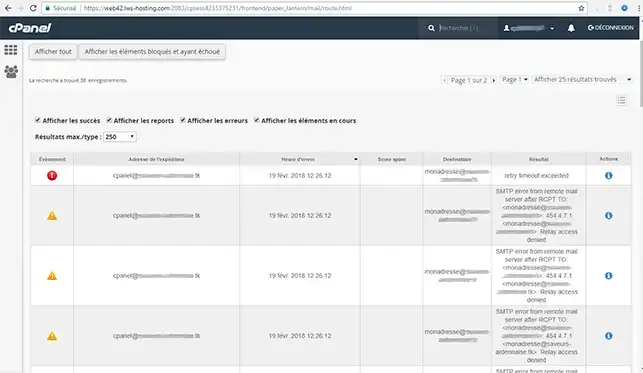
You are now able to track emails sent through your cPanel Web Hosting with LWS. Message tracking allows you to identify the slightest problem with the delivery of your e-mails.
Don't hesitate to share your comments and questions!
Ask the LWS team and the community. Answers are published after moderation.
 About LWS :
LWS is a 100% French web hosting company that focuses on quality and innovation and offers a responsive and competent technical service at affordable prices.
About LWS :
LWS is a 100% French web hosting company that focuses on quality and innovation and offers a responsive and competent technical service at affordable prices.



 Yes
Yes No
No