
Online help
The web host accessible to all
Procédure
This function allows you to block access to your website from certain IP addresses.
This is useful for preventing or stopping a DDOS attack, and for preventing visits from unwanted visitors.
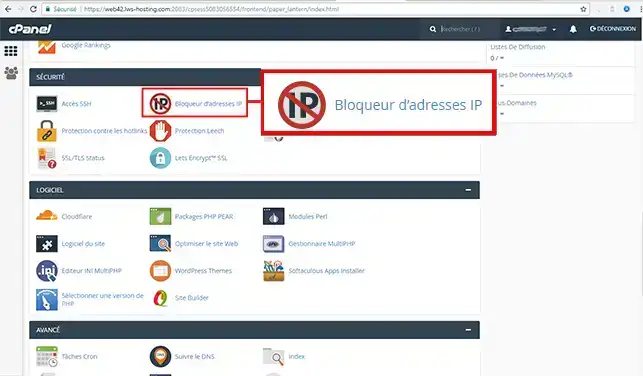
1. Connect to your cPanel account, scroll down the page and click on the "IP address blocker" icon.
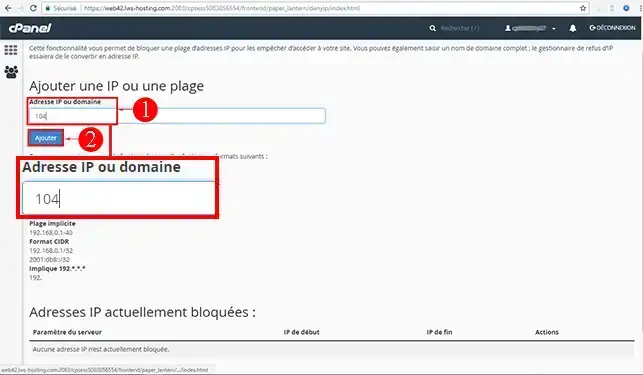
2. Indicate the IP or range of IPs to block, then click on the"Add" button.
In our example, we decide to block the IP range starting with 104
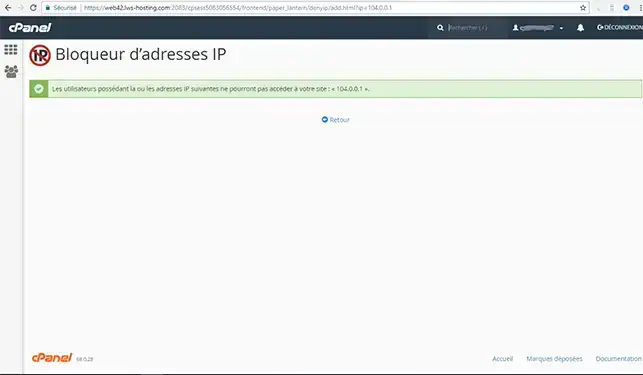
The operation takes effect immediately, and visitors with an IP address starting with 104 will no longer be able to access our website:
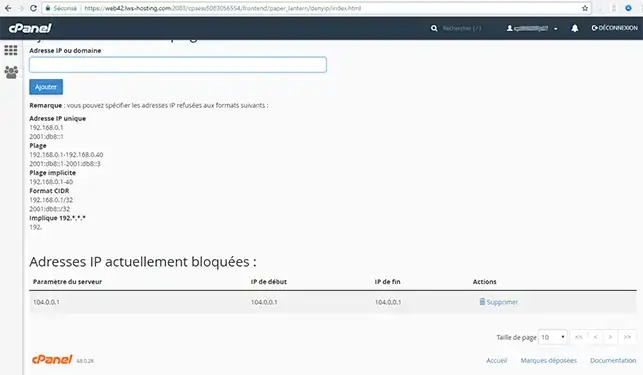
You can unblock blocked IPs at any time from this same section:
Need help using cPanel?
See all our cPanel training videos
You are now able to block an IP address or a block of IPs through your cPanel Web Hosting with LWS.
Don't hesitate to share your comments or questions!
Ask the LWS team and the community. Answers are published after moderation.
 About LWS :
LWS is a 100% French web hosting company that focuses on quality and innovation and offers a responsive and competent technical service at affordable prices.
About LWS :
LWS is a 100% French web hosting company that focuses on quality and innovation and offers a responsive and competent technical service at affordable prices.



 Yes
Yes No
No