
Online help
The web host accessible to all
Procédure
PHP is a Web programming language used to automate certain tasks. PHP communicates with a database to make web pages dynamic. This type of language is essential to the operation of many CMS such as Wordpress, Joomla and Prestashop.
On your Plesk web hosting, you can change the PHP version you are going to use for your website. Some CMS such as Wordpress now use the latest PHP version. For example, it will be impossible to install the latest version of this CMS on an obsolete PHP version. We recommend using PHP version 7.0 or 7.1. These two versions are reputed to be faster and more reliable than the older ones.
Plesk currently has the following versions:
1. Log in to your Plesk interface
2. Click on the"PHP Settings" tab
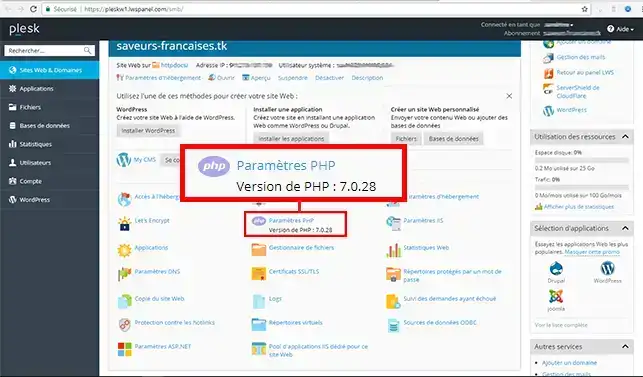
3. Choose the PHP version in the drop-down window then click on the"Apply" button to save your choice. The PHP version changes instantly.
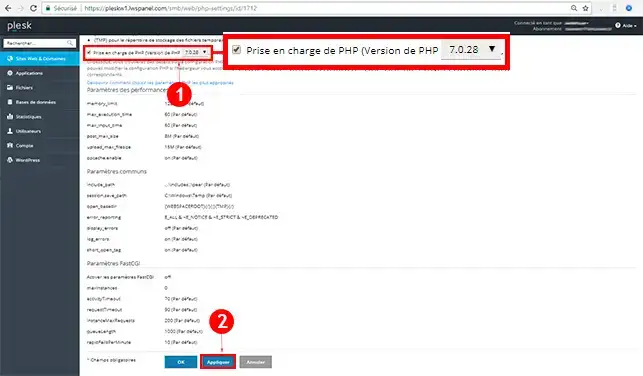
You are now able to change the PHP version of your Plesk hosting with LWS. The default PHP version is 5.3. If you want to install Wordpress automatically, you need to change the PHP version to at least version 7.0 beforehand.
Don't hesitate to share your comments and questions!
Ask the LWS team and the community. Answers are published after moderation.
 About LWS :
LWS is a 100% French web hosting company that focuses on quality and innovation and offers a responsive and competent technical service at affordable prices.
About LWS :
LWS is a 100% French web hosting company that focuses on quality and innovation and offers a responsive and competent technical service at affordable prices.



 Yes
Yes No
No