Understanding LVE quotas (CPU, RAM, IO and IOPS)

Procédure

What is LVE Manager?

LVE Manager allows you to precisely manage your resources, including CPU, I/O, memory, the number of processes and connections a cPanel account can use.

With LVE Manager, you can:

  • Limit resources per cPanel account
  • Create and apply default packages
  • View usage history by account

What is the SPEED value on LVE?

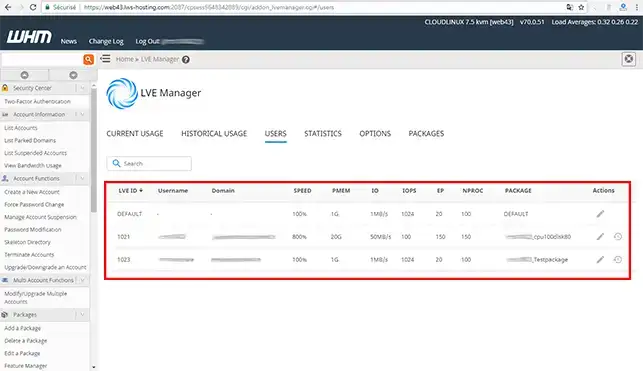
The SPEED memory limit controls the amount of memory that each cPanel account can use. LVE is able to identify, in real time, the amount of memory actually used by a client's processes. Physical limits are particularly effective in preventing problems of insufficient memory and overloading of your cPanel Cloud Server.

What is the IO value on LVE?

IO limits are used to limit the data rate for the cPanel account. They are measured in KB/s. When the limit is reached, the processes are put to sleep.

What is the CPU value?

Process limits define the maximum amount of processor resources an account can use. When the user reaches the process limit, processes are slowed down. This limit is crucial to prevent processor usage peaks, which can often slow down the server.

How do I access the different LVE quotas on WHM?

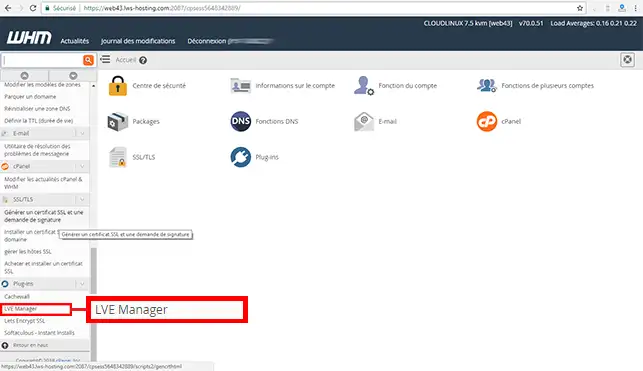
1. Log into your WHM management interface and click on the"LVE Manager" tab in the"Plugins" section.

Understanding LVE quotas (CPU, RAM, IO and IOPS)

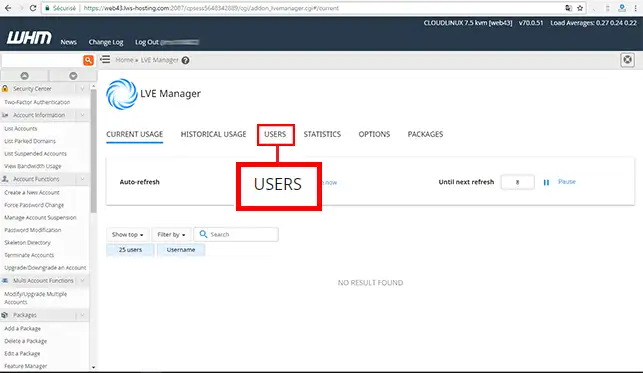
2. Click on the"Users" tab.

Understanding LVE quotas (CPU, RAM, IO and IOPS)

3. In this section, you will find the authorised limits per cPanel account. You can change these limits at any time.

Understanding LVE quotas (CPU, RAM, IO and IOPS)

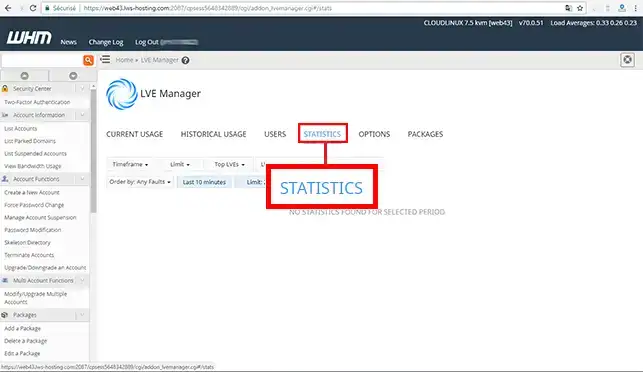
4. If you click on the "Statistics" tab, you will obtain all the real-time statistics for each cPanel account.

Understanding LVE quotas (CPU, RAM, IO and IOPS)

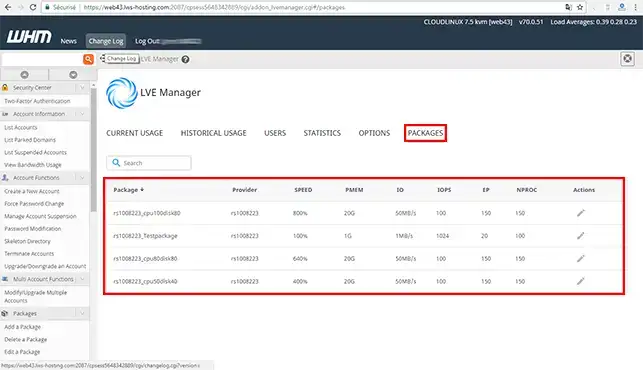
5. The"Package" tab allows you toadd or modify LVE quotas on your WHM interface.

Understanding LVE quotas (CPU, RAM, IO and IOPS)

Understanding LVE quotas in video

Conclusion

You can now understand LVE quotas and see them on the WHM interface of your cPanel Cloud Server with LWS. It is preferable to modify the quotas when creating a Web pack in order to limit the resources of the cPanel accounts and avoid any slowdown of your cPanel Cloud Server.

Don't hesitate to share your comments and questions!

help.lws.net/a/1199
Was this article helpful?

Yes

No

Read 24 886 times

Thank you! Feel free to ask questions about our documentation if you would like more information, and help us improve it.

Similar articles

Questions about the article 2

Ask a question
Jean
il y a 10 mois
Salut, si je tente de faire une lecture intense, au début ça marche mais quelques instants après ça bloque, si je tente d'appeler un fichier php depuis le navigateur, le fichier n'est pas accessible. Quelques minutes après ça revient.
Jordan-LWS Official answer
il y a 10 mois

Bonjour,

Je vous remercie pour votre message.

Je comprends que vous souhaitez obtenir une assistance concernant votre demande. Toutefois, je vous informe qu’il n’est pas possible de traiter ce type de demande via ce canal. Afin de garantir un suivi sécurisé et adapté à votre situation, il est nécessaire de contacter directement notre assistance technique.

Je vous conseille donc de procéder de l’une des manières suivantes :

Si vous avez accès à votre espace client :

  • Connectez-vous à votre espace client
  • Accédez à la section « Assistance » ou « Support »
  • Ouvrez un ticket auprès de l’assistance technique en détaillant votre demande

Si vous n’avez pas accès à votre espace client :

  • Rendez-vous sur notre formulaire de contact : https://www.lws.fr/contact
  • Sélectionnez le motif correspondant à votre demande
  • Renseignez les informations nécessaires afin que notre équipe puisse vous assister

Je vous remercie de votre attention et reste à votre disposition pour toute autre question ou complément d’information. Nous sommes là pour vous aider et vous accompagner dans vos démarches. Vous pouvez également contacter notre support technique depuis votre espace client ou via la page de contact mentionnée ci-dessus.

Cordialement,
L’équipe LWS

Was this answer helpful?
Jean
il y a 10 mois
Pourtant chez un autre hébergeur, un serveur dédié de 1G0 de RAM, quelque soit l'intensité de la lecture, je n'ai aucun blocage. j'ai utilisé la même base de données, les mêmes fichiers php.
Jordan-LWS Official answer
il y a 10 mois

Bonjour,

Je vous remercie pour votre message.

Je comprends que vous souhaitez obtenir une assistance concernant votre demande. Toutefois, je vous informe qu’il n’est pas possible de traiter ce type de demande via ce canal. Afin de garantir un suivi sécurisé et adapté à votre situation, il est nécessaire de contacter directement notre assistance technique.

Je vous conseille donc de procéder de l’une des manières suivantes :

Si vous avez accès à votre espace client :

  • Connectez-vous à votre espace client
  • Accédez à la section « Assistance » ou « Support »
  • Ouvrez un ticket auprès de l’assistance technique en détaillant votre demande

Si vous n’avez pas accès à votre espace client :

  • Rendez-vous sur notre formulaire de contact : https://www.lws.fr/contact
  • Sélectionnez le motif correspondant à votre demande
  • Renseignez les informations nécessaires afin que notre équipe puisse vous assister

Je vous remercie de votre attention et reste à votre disposition pour toute autre question ou complément d’information. Nous sommes là pour vous aider et vous accompagner dans vos démarches. Vous pouvez également contacter notre support technique depuis votre espace client ou via la page de contact mentionnée ci-dessus.

Cordialement,
L’équipe LWS

Was this answer helpful?

A question about this article?

Ask the LWS team and the community. Answers are published after moderation.

Ask the LWS team and its community a question

GDPR: Controller: LWS-Ligne Web Services. Purpose: moderation and public publication of your question, possible notification of an answer. Legal basis: consent (Art. 6(1)(a) GDPR). Email retention: 90 days after notification, 12 months maximum without an answer. To exercise your rights, see the GDPR section of our Terms and Conditions.