
Online help
The web host accessible to all
Procédure
This article explains how to add Google's ReCaptcha protection to a PrestaShop site.
The reCAPTCHA helps protect your site from spam and other malicious actors.
There are a number of PrestaShop modules available that add reCAPTCHA support to your site. Most are chargeable, while others require registration. The EiCaptcha module featured in this tutorial is completely free.
To download the module for Prestashop versions 1.5.x and 1.6.x click here
To download the module for versions of Prestashop 1.7.x click here
To install the Module in your Prestashop, connect to your dashboard:
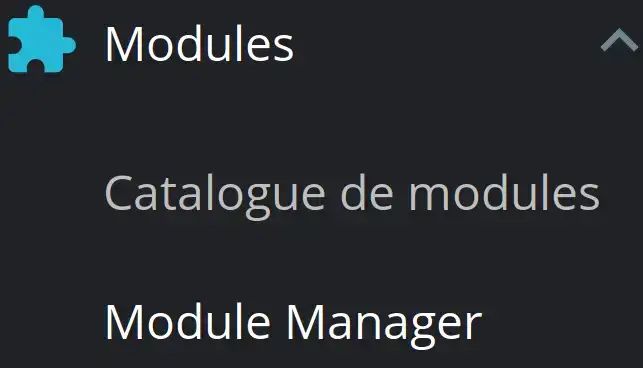
From the Modules menu, click on Module Manager

Then click on Import a module and select the archive downloaded from your PC to start the installation.

When the module is installed, you will see it in the list of Prestashop modules.
Then click on the Configure button:
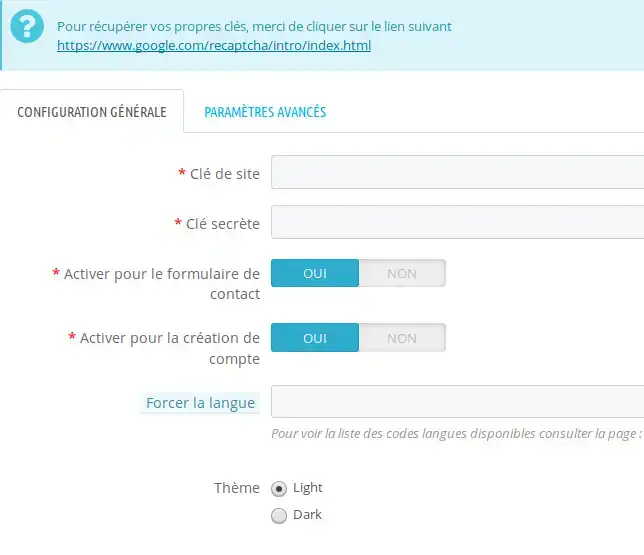
To make the reCAPTCHA work, you need to enter the site key and the secret key, which you can retrieve from your Google account by following this link: https://www.google.com/recaptcha/intro/v3.html
Then choose the desired options, if you wish to activate the reCPATCHA in your contact form and when creating a customer account.
In the field Force language: you can leave empty for French if you want to set another language you will have to indicate the corresponding prefix, the complete list is available on this link: https://developers.google.com/recaptcha/docs/language
That's it, your reCAPTCHA is correctly installed in your Prestashop shop.
You are now able to install a reCAPTCHA in your PrestaShop shop, which will enable you to protect your form from spam.
Ask the LWS team and the community. Answers are published after moderation.
 About LWS :
LWS is a 100% French web hosting company that focuses on quality and innovation and offers a responsive and competent technical service at affordable prices.
About LWS :
LWS is a 100% French web hosting company that focuses on quality and innovation and offers a responsive and competent technical service at affordable prices.



 Yes
Yes No
No