
Online help
The web host accessible to all
Procédure
Cloudflare has several different options for configuring SSL. The configuration depends mainly on the configuration of your web hosting. An incorrect configuration can lead to the error"Too many redirects" which indicates that a redirection loop has been set up during configuration.
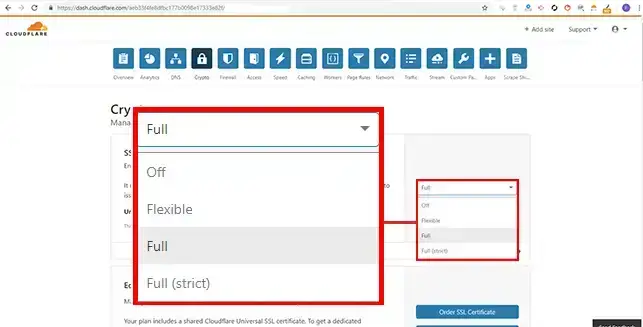
The three SSL configuration options on Cloudflare are as follows:
Full SSL and Full SSL (Strict) should only be used when SSL is active on your LWS customer space.
The Too Many redirect error indicates a redirection loop. If the origin server is configured to redirect your requests from HTTP (insecure) to HTTPS (secure) and Cloudflare is configured with the "Flexible SSL" option, it expects to receive HTTP traffic. Cloudflare will therefore return the same request and cause a redirection loop.
The problem will be similar if no SSL is active on your LWS client space but you activate"Full SSL" or"Full SSL Strict" on your Cloudflare configuration.
You should therefore set up the following configuration:
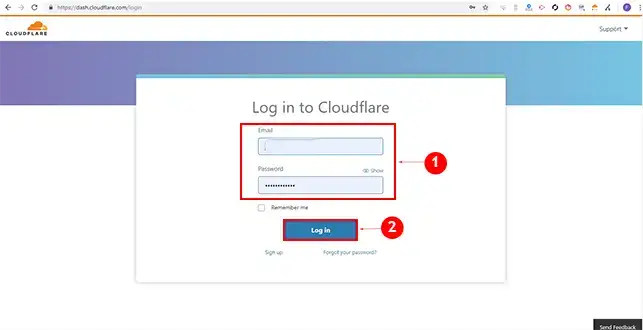
1. Connect to your Cloudflare interface by going to https://dash.cloudflare.com
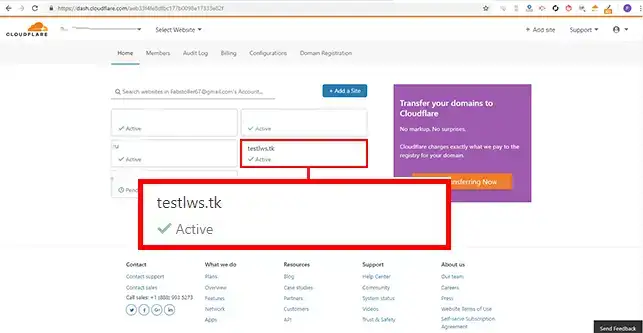
2. Click on the domain name concerned by the configuration.
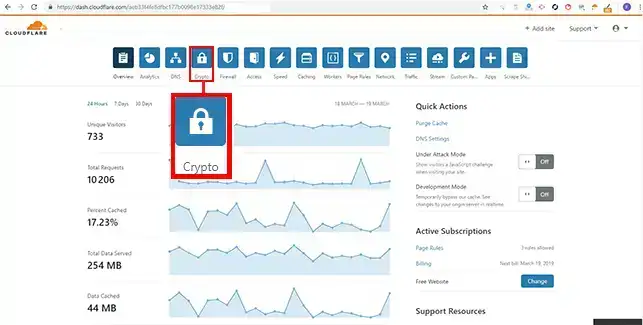
3. Click on the"Crypto" button in the menu at the top of the page.
4. change the value in the SSL drop-down window as required.
You now know the difference between the different SSL options on Cloudflare. You also now know how to solve the"Too many redirects" problem. This error indicates that a redirect loop has been set up when configuring your SSL certificate on Cloudflare.
Ask the LWS team and the community. Answers are published after moderation.
 About LWS :
LWS is a 100% French web hosting company that focuses on quality and innovation and offers a responsive and competent technical service at affordable prices.
About LWS :
LWS is a 100% French web hosting company that focuses on quality and innovation and offers a responsive and competent technical service at affordable prices.



 Yes
Yes No
No