
Online help
The web host accessible to all
Procédure
An email filter allows you to take specific actions when you receive a certain type of email: delete it, file it in a folder or send it elsewhere.
This tool can be used to automatically forward a type of email to a colleague, systematically delete certain unwanted emails, or automatically archive certain emails received.
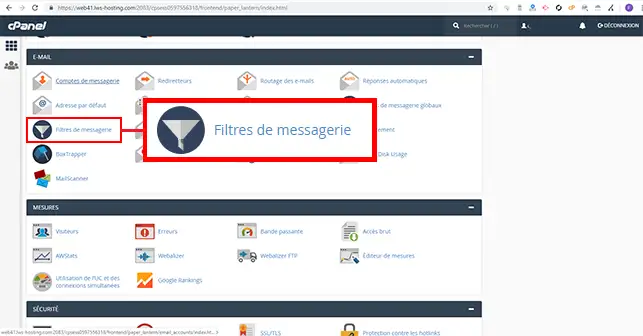
1. Log on to your cPanel interface and click on the"Mail filter" tab in the"Emails" section.
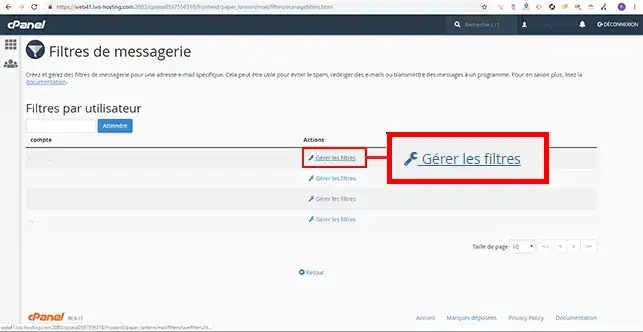
2. Click on the"Manage filters" tab behind the email address for which you want to change the cPanel email filter.
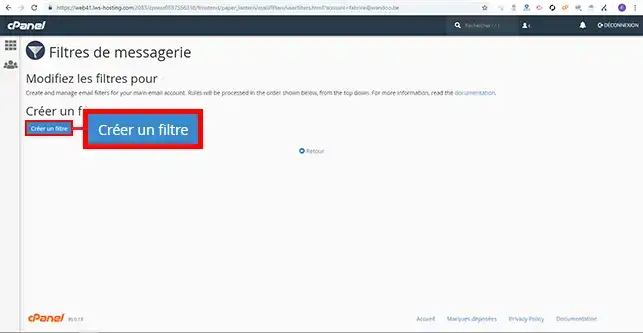
3. Click on the"Create a filter" button.
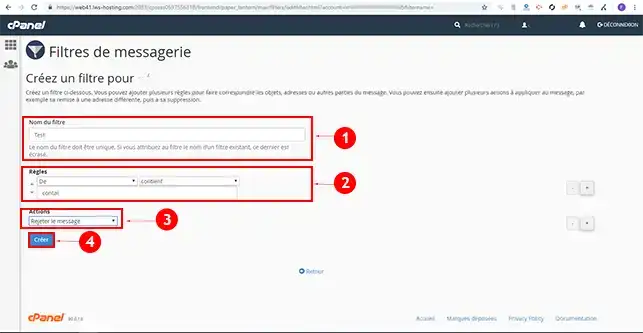
4. Fill in the filter creation form and click on the "Create" button. The form contains the following information:
You can modify or delete a rule defined in the filter at any time. There are two tabs that allow you to perform these actions behind the filter you have set up.
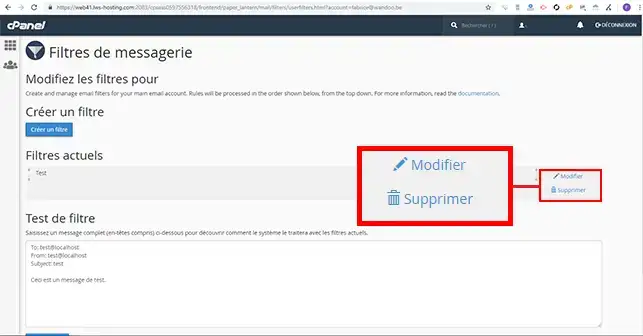
You can now create a filter using cPanel antispam, and modify or delete it on your cPanel web hosting. You can add as many rules as you like to cPanel Anti-Spam.
Don't hesitate to share your comments and questions
Ask the LWS team and the community. Answers are published after moderation.
 About LWS :
LWS is a 100% French web hosting company that focuses on quality and innovation and offers a responsive and competent technical service at affordable prices.
About LWS :
LWS is a 100% French web hosting company that focuses on quality and innovation and offers a responsive and competent technical service at affordable prices.



 Yes
Yes No
No