
Online help
The web host accessible to all
Procédure
An anchor is a clickable link that takes you to a specific position on your web page. Many sites use this method to return to the top of the page. To do this, all you need to do isassign an ID to the element you want to go to and associate a link beginning with the # character.
1. Connect to your SiteBuilder Pro interface
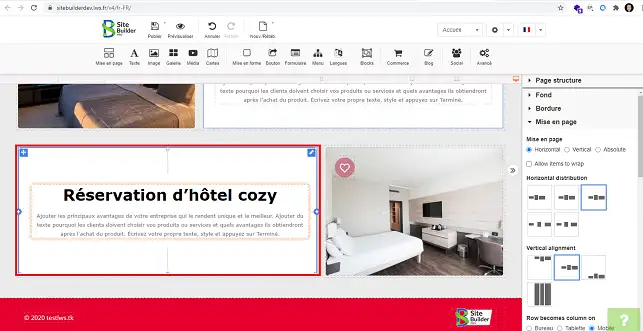
2. Select the block or text for which you want to create an anchor.
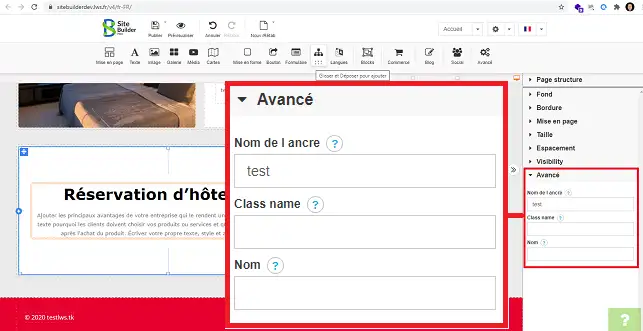
3. Go to the"Advanced" section in the right-hand column and enter a name in the"Anchor name" box.
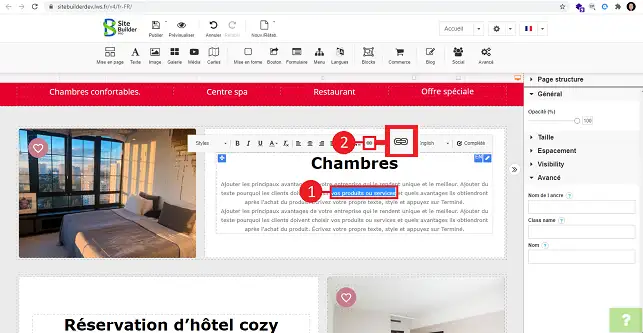
4. You can now link another text to this same anchor by selecting the desired text and clicking on the"Link" tool, represented by a chain.
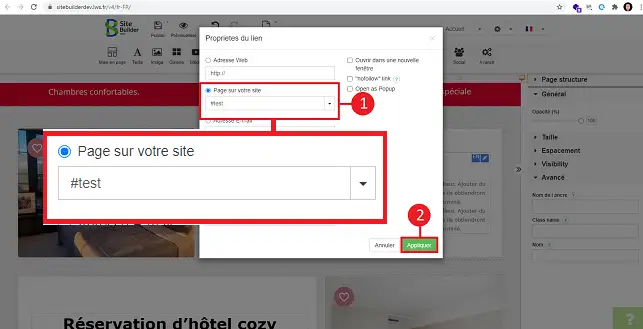
5. Select"Page from your site" and then the anchor you defined earlier by opening the drop-down window. Don't forget to click"Apply" to save your request.
You can now use SiteBuilder to create an anchor for your web hosting package. Anchors allow you to link specific content to another location on the same page.
Don't hesitate to share your comments and questions!
Ask the LWS team and the community. Answers are published after moderation.
 About LWS :
LWS is a 100% French web hosting company that focuses on quality and innovation and offers a responsive and competent technical service at affordable prices.
About LWS :
LWS is a 100% French web hosting company that focuses on quality and innovation and offers a responsive and competent technical service at affordable prices.



 Yes
Yes No
No