How to view my website statistics on cPanel

Procédure

What is AWStats?

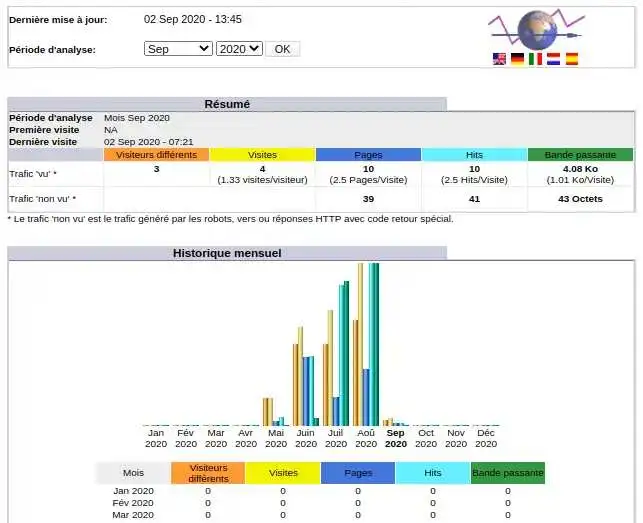
Visualising statistics is an important task in assessing the popularity of your site. cPanel has an integrated AWStats tool that allows you to provide detailed graphs of visits to your website by analysing access log files.

How can I view my website statistics on cPanel?

To view your website statistics, you need to :

  • Connect to your cPanel
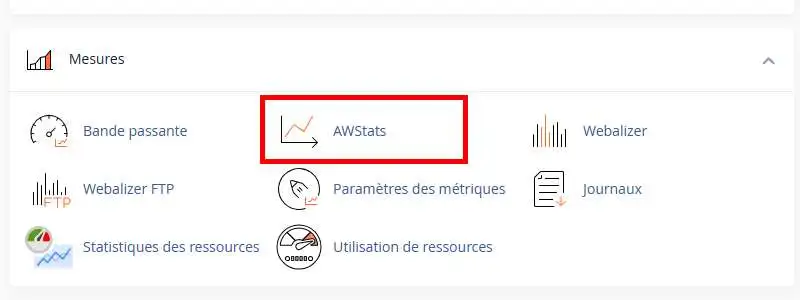
  • Go to the"Measures" section and click on"AWStats".

How to view my website statistics on cPanel

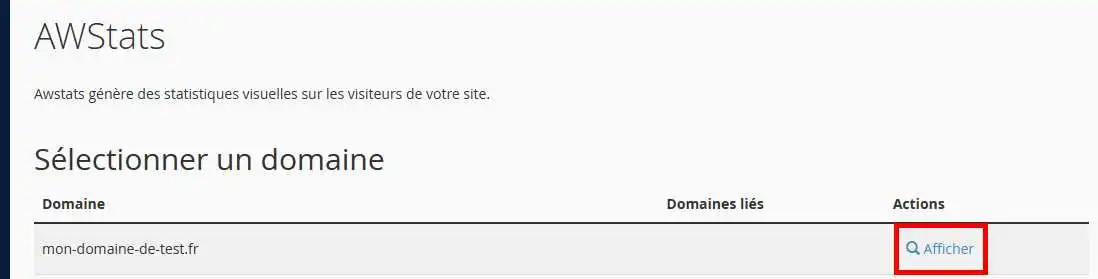
  • Then click on the "View" link to the right of your domain.

How to view my website statistics on cPanel

  • The statistics will be displayed on the following page:

How to view my website statistics on cPanel

Conclusion

You are now able to access your site statistics with your cPanel hosting with LWS. Your site statistics show you the number of visitors to your website every day.

Don't hesitate to share your comments and questions!

help.lws.net/a/1464
Was this article helpful?

Yes

No

Read 22 890 times

Thank you! Feel free to ask questions about our documentation if you would like more information, and help us improve it.

Similar articles

Questions about the article 1

Ask a question
JP
14 Jul 2022
Bonjour, Y a t'il une possibilité d'exporter les données de Awstats sous la forme d'un tableau excel ? Cordialement
fabrice-LWS Official answer
14 Jul 2022
Bonjour, Je suis navré mais AWStats ne permet pas de téléchargement , que ce soit au format Excel ou dans un autre format, de ces statistiques.
Was this answer helpful?

A question about this article?

Ask the LWS team and the community. Answers are published after moderation.

Ask the LWS team and its community a question

GDPR: Controller: LWS-Ligne Web Services. Purpose: moderation and public publication of your question, possible notification of an answer. Legal basis: consent (Art. 6(1)(a) GDPR). Email retention: 90 days after notification, 12 months maximum without an answer. To exercise your rights, see the GDPR section of our Terms and Conditions.