
Online help
The web host accessible to all
Procédure
The integration of a Youtube video on your website can help you better explain, for example, how an item you want to sell works. Thanks to your video, visitors will be able to get a precise idea of the product in question and/or a recipe, for example. However, to avoid weighing down your website and to reduce bandwidth usage, it is preferable to host your video on a platform designed for this purpose, such as Youtube.
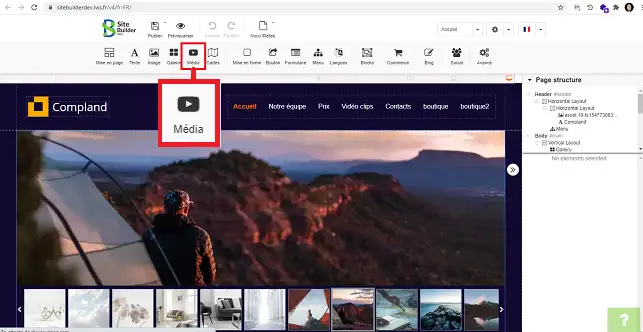
1. Log in to your SiteBuilder interface and click on the"Media" button on the toolbar at the top of the page.
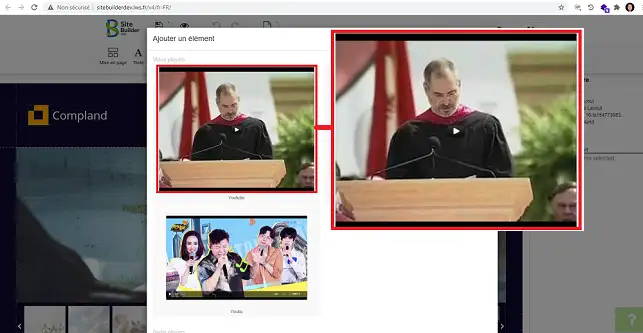
2. Click on"Youtube" in the top left-hand corner of the new window.
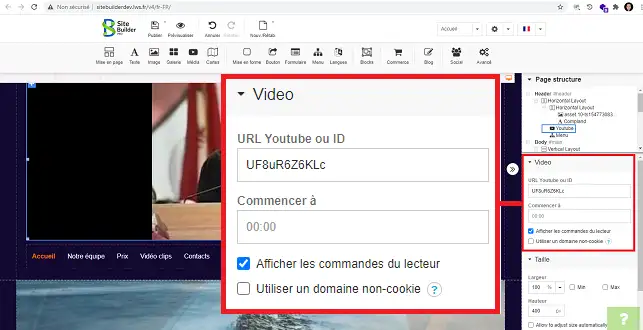
The right-hand column of your SiteBuilder interface contains all the configuration settings for your video.
1. Under"Video" you can enter the URL of your Youtube video. You can also configure the display of player controls.
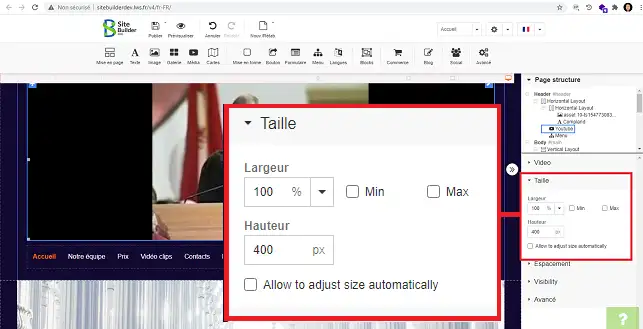
2. Under"Size" you can change the height and width of your video.
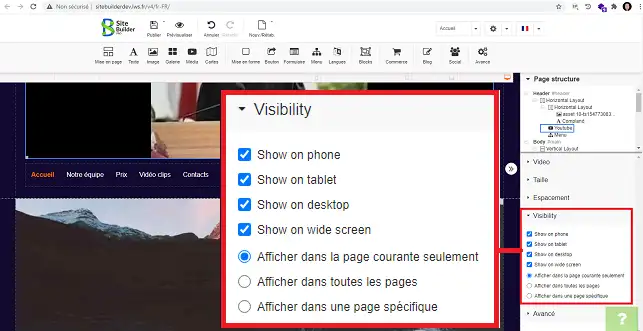
3. The"Visibility" section allows you toindicate whether your video should be visible on all pages or only on a specific page. You can also use this section to hide this element on the desired support (Smartphone, tablet or desktop computer, for example).
You can now add a Youtube video with SiteBuilder Pro to your web hosting package. You can also configure this tool via your SiteBuilder interface.
Don't hesitate to share your comments and questions!
Ask the LWS team and the community. Answers are published after moderation.
 About LWS :
LWS is a 100% French web hosting company that focuses on quality and innovation and offers a responsive and competent technical service at affordable prices.
About LWS :
LWS is a 100% French web hosting company that focuses on quality and innovation and offers a responsive and competent technical service at affordable prices.



 Yes
Yes No
No