SiteBuilder Pro19 October 2020By Aurélien T. 1 min read
How do I add modules to a single page?
Procédure
Why only add modules to a single page?
It may be necessary toadd certain modules on a single page, such as the"Contact form" or"Google Maps" element. This is why SiteBuilder Pro allows you to define whether you want to insert a module on a specific page or on several pages.
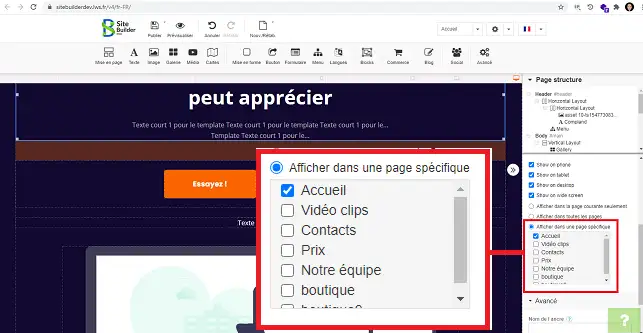
22. Click on the element (1) for which you want to change the visibility and go to the "Visibility" section (2 ) in the right-hand column of your interface.
33. In the"Visibility" section, you have the following options:
Display on current page only: Allows you to display the element on the page you are currently on.
Display the element on all pages: Allows you to display the same element on all the pages of your site.
Display on a specific page: Allows you to display the element on the page(s) of your choice.
Conclusion
You are now able to add a module to a specific page of your site created with SiteBuilder Pro on your Web hosting package.
Don't hesitate to share your comments and questions!
En passant sur la nouvelle version site builder pro , mon site est modifié sur sa structure d'origine
c'est très compliqué d'y insérer des éléments sans bouleversement
Je voudrais avoir à disposition des tutos et des videos plus explicites
cdt
F✓
fabrice-LWS Official answer
1 Nov 2022
Bonjour, je vous invite à optimiser votre site pour les différents types d'écrans en suivant la procédure suivante:
https://aide.lws.fr/a/1445 .
Was this answer helpful?
A question about this article?
Ask the LWS team and the community. Answers are published after moderation.
Ask the LWS team and its community a question
!
To enable this form, please tick the two consent boxes below.






 Yes
Yes No
No About
About 