
Online help
The web host accessible to all
Procédure
The WooCommerce Product Feed Pro plugin helps you generate product feeds for major shopping platforms such as Google, Facebook and Bing. For Google Merchant Centre, you can generate multiple feeds - standard Google shopping, promotions, dynamic remarketing (DRM), dynamic search ads (DSA), local products and inventory. With this plugin, you don't need complicated coding skills as the plugin automatically maps product IDs and other attributes to Google, Facebook & Bing standards.
Here we'll look at how to install this free module on our Wordpress site.
To install this module, we'll simply use the Wordpress plugin library.
This plugin will only work if you have the Woocommerce plugin installed on your Wordpress site.
1. Connect to the administration of your Wordpress site
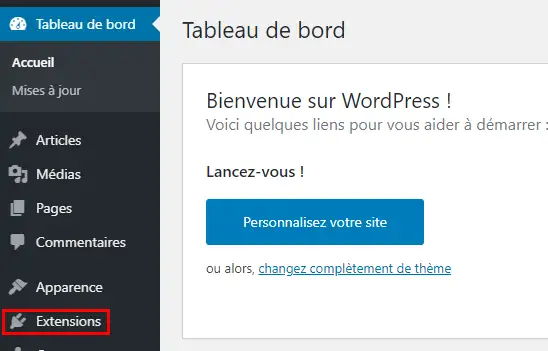
2. In the left-hand menu, click on Extension
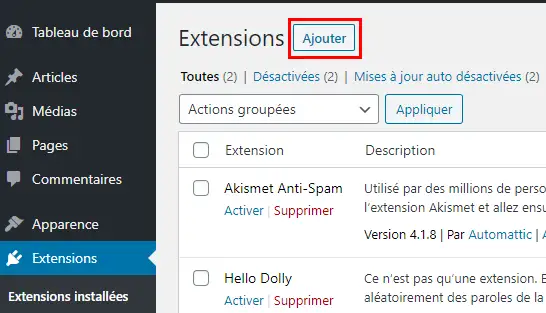
3. Then click on the "Add" button at the top of the page
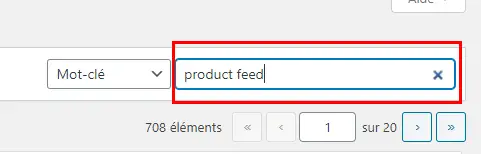
4. In the search bar on the right, enter "Product Feed" and press Enter.
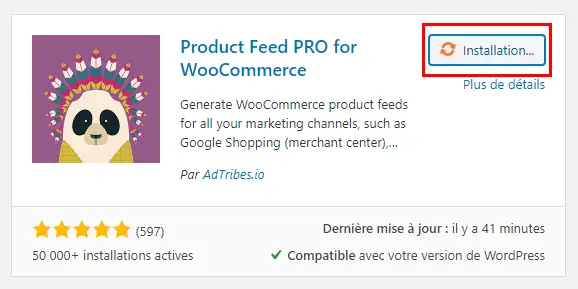
5. The plugin will normally appear first, just check that it's the right one via the image just below. Then click on the "Install" button
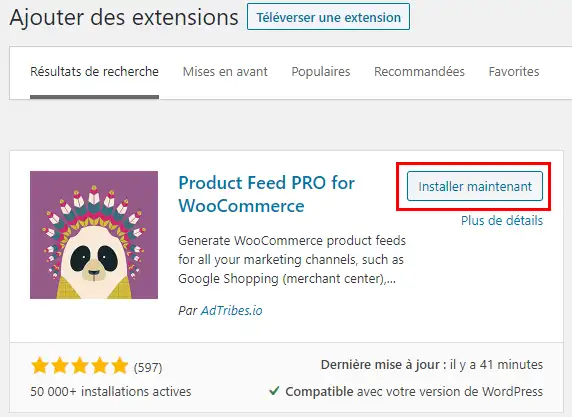
6. Wait a few seconds for the plugin to install. An indicator next to the install button shows you that the operation is in progress. If Woocommerce is not installed on your site, the installation of Product Feed Pro will not work.
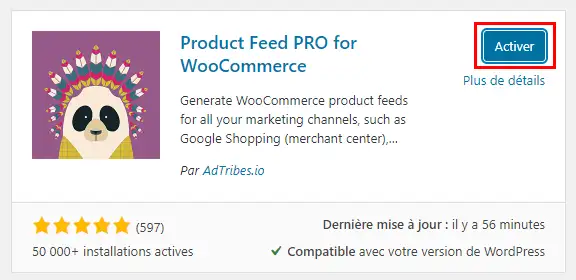
7. Once installed, simply click on "Activate" to make the plugin operational on your Wordpress Woocommerce site.
Ask the LWS team and the community. Answers are published after moderation.
 About LWS :
LWS is a 100% French web hosting company that focuses on quality and innovation and offers a responsive and competent technical service at affordable prices.
About LWS :
LWS is a 100% French web hosting company that focuses on quality and innovation and offers a responsive and competent technical service at affordable prices.



 Yes
Yes No
No