


How do I create a Drupal website?

Procédure

What is Drupal?

Drupal is a content management system ( CMS), with basic functions for editing text, modifying content and adding images. It is possible to install extensions to add new functions to the site, such as :

  • Content editor with links and media insertion
  • Diary / Calendar
  • Send and download files
  • Photo, video and music galleries
  • Online shop
  • Project management
  • Internal messaging
  • Forum
  • Chat
  • etc.

Is Drupal included in all packages?

Drupal is included in all Linux hosting packages.

How do I install Drupal using the auto-installer?

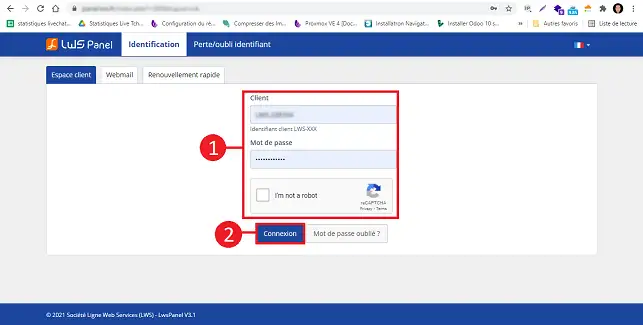
1. Log in to your web hosting administration space

How do I create a Drupal website?

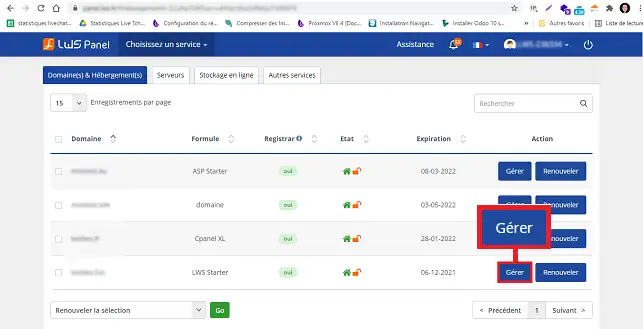
2. Click on"Manage" behind the domain for which you want to install Drupal.

How do I create a Drupal website?

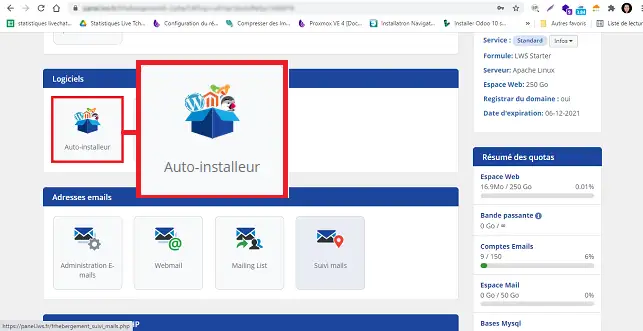
3. Click on the"Auto-installer" button in the"Software" section.

How do I create a Drupal website?


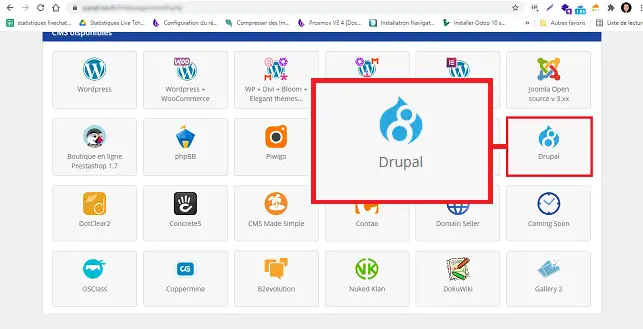
4. Choose Drupal

How do I create a Drupal website?


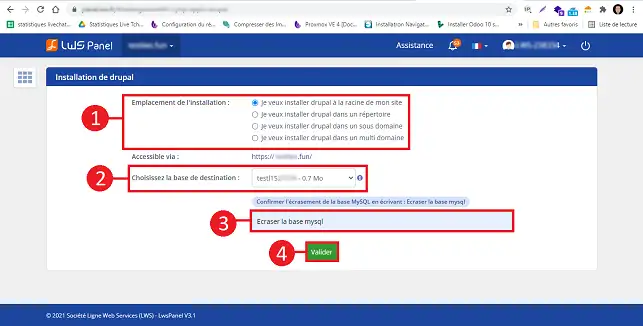
5. Indicate whether you want Drupal to be installed at the root of your site (at the base of your site) or in a folder. Choose the database to be used for installing Drupal and fill in the "Overwrite MySQL database" field.

How do I create a Drupal website?


6. Once the installation is complete, an email containing your connection details will be sent to the email address attached to your customer area.

How do I create a Drupal website?

How to use Drupal

For advice on using the Drupal CMS, please refer to the publisher's documentation on its French-language website:

https://www.drupal.org/fr/docs/user_guide/fr/index.html

How do I create a Drupal site?

How can I get help with Drupal?

To find out more about Drupal, you can consult the official resources:

Conclusion

You can now install your Drupal site using the auto-installer available on your LWS web hosting. Drupal allows you to create both an online shop and a showcase site.

Don't hesitate to share your comments and questions!

help.lws.net/a/157
Was this article helpful?

Yes

No

Read 36 136 times

Thank you! Feel free to ask questions about our documentation if you would like more information, and help us improve it.

Similar articles

Questions about the article 1

Ask a question
nasskro
30 Jan 2023
Bonjour Comment mettre à jour la version de Drupal proposée par LWS
Benjamin-LWS Official answer
1 Feb 2023

Bonjour,

Merci de votre retour.

Malheureusement, depuis le LWS Panel, il n'est possible de mettre à jour Drupal car ce CMS ne propose pas de système de mise à jour, il faudra donc mettre à jour manuellement votre CMS.

Voici quelques étapes pouvant, vous aidez :

  • Sauvegardez votre site actuel : Assurez-vous de sauvegarder toutes les données de votre site actuel, y compris la base de données, les fichiers et les réglages.

  • Téléchargez la nouvelle version de Drupal : Allez sur le site Web de Drupal et téléchargez la dernière version de Drupal.

  • Téléversez la nouvelle version de Drupal sur votre hébergement : Utilisez un client FTP pour téléverser les fichiers de la nouvelle version de Drupal sur votre hébergement mutualisé.

  • Importez votre base de données : Importez votre base de données sauvegardée dans la nouvelle installation de Drupal en utilisant un outil tel que phpMyAdmin.

  • Configurez les réglages : Assurez-vous de configurer les réglages de votre nouvelle installation de Drupal pour refléter ceux de votre site précédent.

  • Testez votre nouveau site : Testez votre nouveau site pour vous assurer qu'il fonctionne correctement.

Nous vous invitons à contacter notre service support à travers votre espace client, afin de vous apporter une aide si vous rencontrez des difficultés sur cette manipulation. (https://aide.lws.fr/a/268)

Cordialement, L'équipe LWS

Was this answer helpful?

A question about this article?

Ask the LWS team and the community. Answers are published after moderation.

Ask the LWS team and its community a question

GDPR: Controller: LWS-Ligne Web Services. Purpose: moderation and public publication of your question, possible notification of an answer. Legal basis: consent (Art. 6(1)(a) GDPR). Email retention: 90 days after notification, 12 months maximum without an answer. To exercise your rights, see the GDPR section of our Terms and Conditions.