
Online help
The web host accessible to all
Procédure
An HTTP 404 error is a standard error message indicating that the web page or resource you are trying to reach has not been found on the server. It is one of the most recognisable errors on the Internet, signalling to the user that the link they followed is either broken or out of date, and that the content they are looking for is no longer available.
An HTTP 404 error, or more colloquially "Page not found", is a server response code indicating that the server was unable to find the requested resource. Unlike other HTTP errors, a 404 error is often the result of human error, such as a typo in the URL, or a link pointing to a page that has been deleted or moved without updating the redirect.
Common reasons for a 404 error include :
The 404 error is generated by LiteSpeed if you see this error page :

If you see this error page, it means that you have activated LiteSpeed on your hosting and your website and that a configuration problem is causing a 404 error to be displayed.
To solve the problem simply follow these steps:
Step 1: Connect to your cPanel hosting
Step 2: Go to LiteSpeed configuration in the Performance section of your cPanel control panel
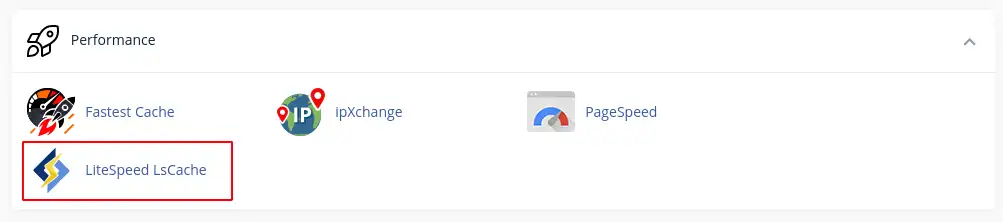
Step 3: Deactivate LiteSpeed caching and then reactivate it to restart a new configuration.
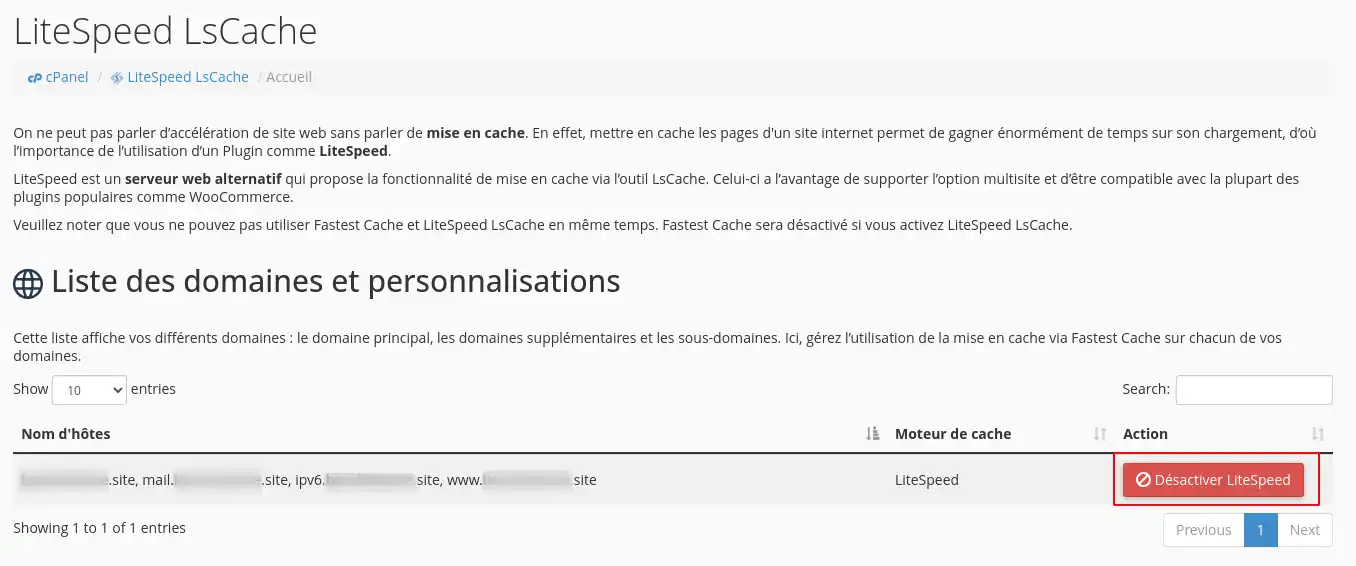
If the problem is not resolved, please contact our technical support team so that an agent can deal with the problem.
If you get a 404 error that does not come from LiteSpeed, then you need to check several points:
You now know how to :
🛠️ With this knowledge, you are armed to tackle one of the most common problems on the web and ensure a smooth and uninterrupted user experience. 🌐
We hope this article has been helpful and provided you with the tools you need to effectively resolve 404 errors. We thank you for reading and invite you to share your experiences or ask your questions by leaving a comment below 👇. Your feedback is valuable and helps us improve our services!
Ask the LWS team and the community. Answers are published after moderation.
 About LWS :
LWS is a 100% French web hosting company that focuses on quality and innovation and offers a responsive and competent technical service at affordable prices.
About LWS :
LWS is a 100% French web hosting company that focuses on quality and innovation and offers a responsive and competent technical service at affordable prices.



 Yes
Yes No
No