When you pay for your VPS server when you order by credit card, your account is automatically set up for automatic renewal, which can be deactivated in 1 click from your customer area.
You will then be debited every month or every 3, 6, 12 or 24 months depending on the commitment period you chose when you ordered. You can set the commitment period in 1 click from your customer area.
If you have not paid by credit card, or if your card has expired, you can renew manually from your customer area.
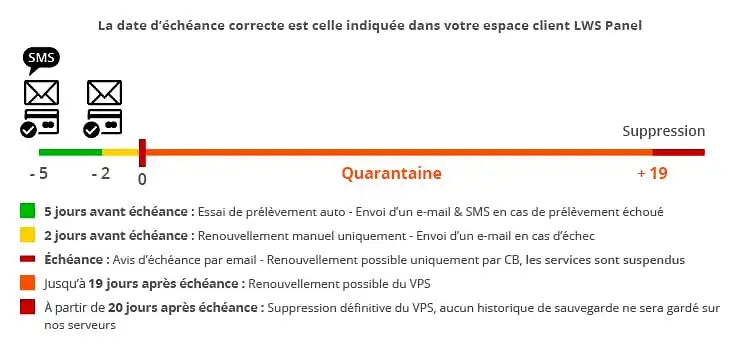
Renewal reminders - Tacit renewal
If you have activated automatic renewal on your VPS, then you will receive several notices by e-mail & SMS to warn you of the scheduled renewal as well as in the event that we are unable to carry out the direct debit.
The direct debit is carried out 5 days before the due date of your account.
If this is unsuccessful, we will attempt to debit your account each day until 2 days before the due date.
If 2 days before the due date, the direct debit has not been made, you will have to renew manually from your LWS Panel customer area.
Managing overdue payments
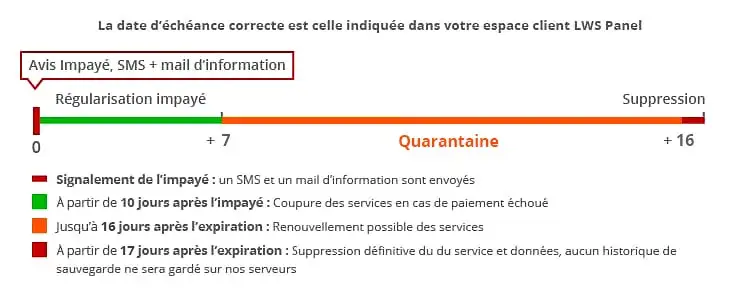
If we receive an overdue notice for a manual or automatic renewal, an SMS will be sent to you upon receipt of the notice to inform you of this and the steps to take to rectify the situation.
If no action is taken within 7 days of receipt of this notice, all services associated with your VPS server will be stopped and quarantined. You have up to 16 days after receipt of this notice to take the necessary steps to regularise the situation.
17 days after receiving this notice, your service will be deleted.
Abuse management
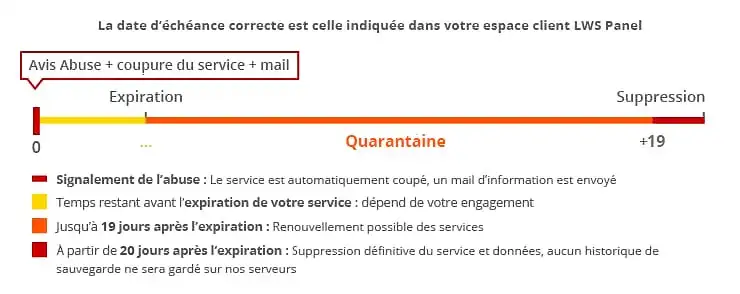
If we receive an abuse/report against your VPS server, indicating the presence of malicious files, a page usurping the name of a banking institution (bank, PayPal ....), we will immediately stop the service in question.
An email will be sent to let you know why your service has been suspended.
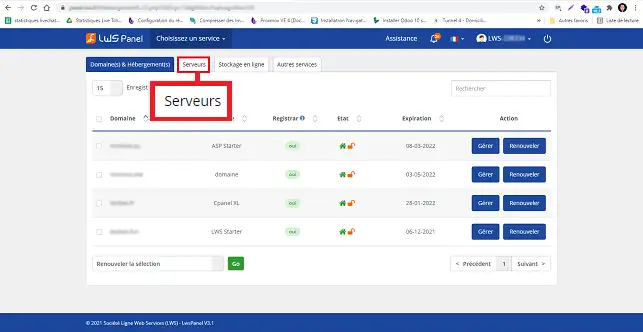
How do I manually renew a VPS server from the customer area?
We advise you to renew your VPS private server a few days before it expires to avoid the service being suspended.
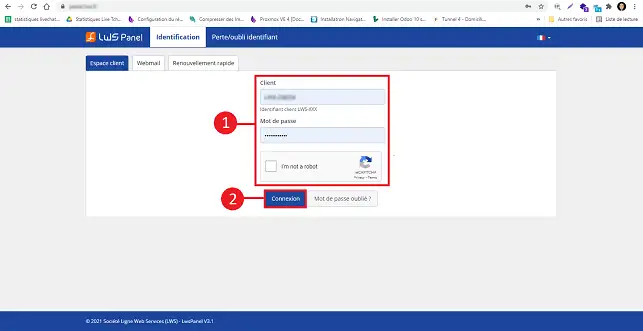
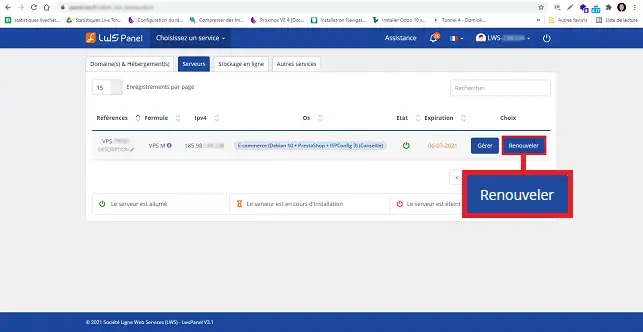
3. Click on the"Renew" button behind the server in question.
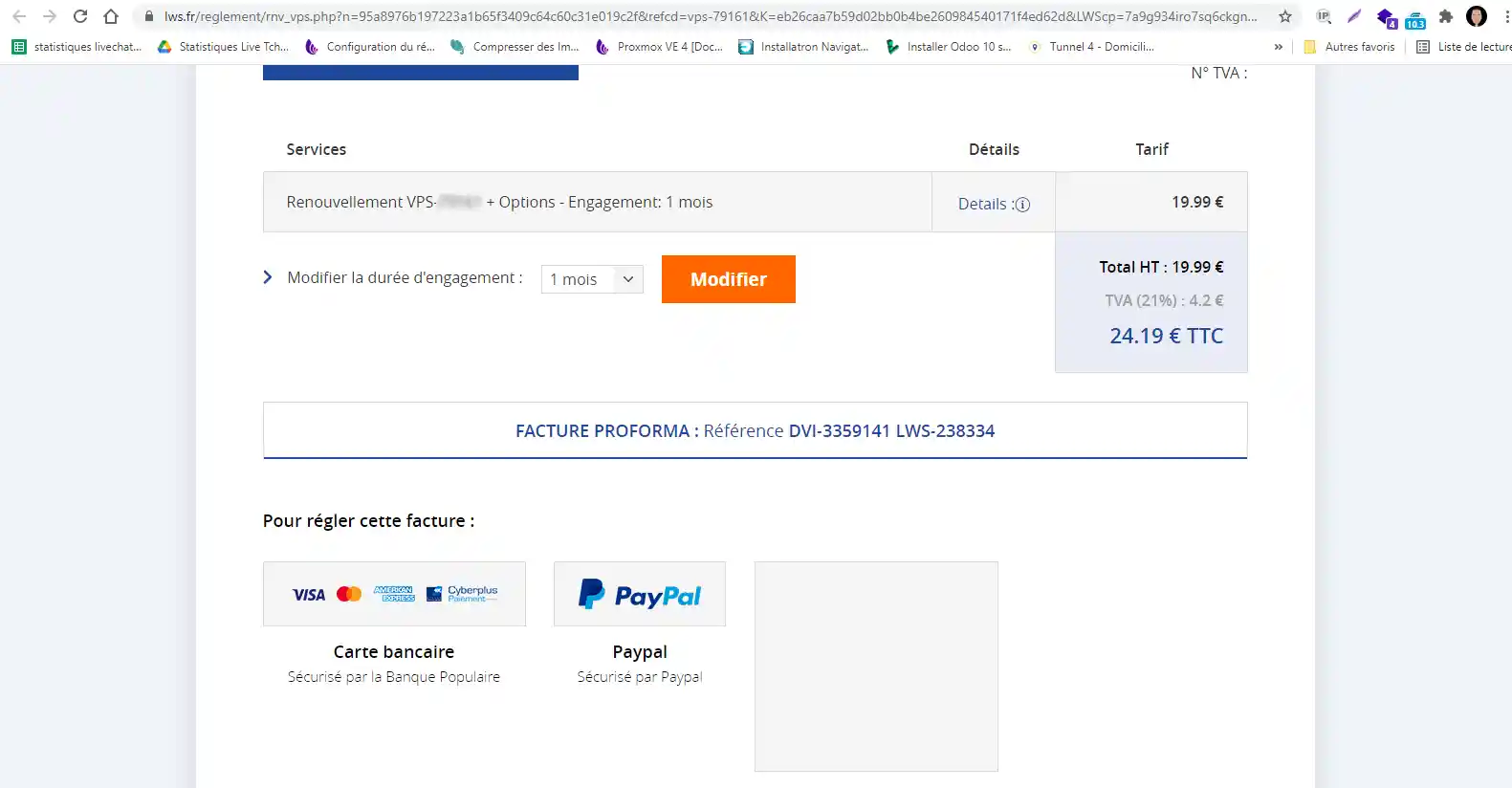
3. You will then see the quote appear on the screen: choose the period for which you wish to renew and pay using the methods proposed.
Your VPS server will be renewed within 2 hours of receipt of payment. If it has expired, it will be reactivated within 6 hours (with no loss of data).
Video Tutorial: How do I renew a VPS server?
Conclusion
You can now renew a dedicated VPS server with LWS. We advise you to renew your VPS private server a few days before it expires to avoid service suspension.
Don't hesitate to share your comments and questions!
Rate this article :
5/5 |
1 opinion
This article was useful to you ?
Yes
No
Article read
32575 once
Merci ! N'hésitez pas à
poser des questions sur nos documentations si vous souhaitez plus d'informations et nous aider à les
améliorer.
Bonjour Madame/Monsieur,
je suis client [ID client masqué].
Je constate que mon hébergement VPS n'existe plus.
Quelle est la conduite à tenir pour son renouvellement ?
Cordialement,
B✓
Benjamin-LWS Reponse officielle
11 janv. 2023
Bonjour,
Si vous ne constatez plus votre service VPS, c'est qu'il est arrivé à expiration.
Après expiration, vous avez 30 jours pour renouveler votre service, passer ce délai l'hébergement est supprimé.
Si vous souhaitez récupérer votre service et vos données après suppression, je vous invite à ouvrir un contact depuis votre espace client. (https://aide.lws.fr/a/268)
Cette reponse vous a aide ?
E
Eeeee
4 fev. 2024
Depuis le matin je n'arrive pas à renouveler mon vps j'arrive l'endroit où on peut cliquez pour choisir une carte mais ça refuse
J✓
Jordan-LWS Reponse officielle
6 fev. 2024
Bonjour,
Je suis désolé de l'inconfort que vous rencontrez avec le renouvellement de votre VPS, malheureusement pour ce type de problème, je ne serais pas en mesure de pouvoir vous aider, car le problème doit être lié à votre compte client et je vous inviterais à contacter le service commercial afin de trouver une solution à votre problème.
Je vous remercie pour votre attention et reste à votre disposition pour toute autre question ou complément d'information.
Cordialement, L'équipe LWS
Cette reponse vous a aide ?
Ask the LWS team and its community a question
!
Pour activer ce formulaire, veuillez cocher les deux cases de consentement ci-dessous.

 Contact us
 Customer Area


 Visit LWS


 Yes
Yes No
No Article read
32575 once
Article read
32575 once Merci ! N'hésitez pas à
poser des questions sur nos documentations si vous souhaitez plus d'informations et nous aider à les
améliorer.
Merci ! N'hésitez pas à
poser des questions sur nos documentations si vous souhaitez plus d'informations et nous aider à les
améliorer.
 About
About 