
Online help
The web host accessible to all
Procédure
Prestashop is an open source e-commerce platform from France. This solution is now recognised as an excellent alternative to Oscommerce, from which it takes one of its main advantages: ease of maintenance, thanks to a source code that is much more technically accessible than Magento.
The design side is also managed by Smarty, a world-renowned template engine.
Its well-constructed interface and simple functionality make it very intuitive for merchants to use.
We recommend the Prestashop solution for simple-to-medium e-commerce projects, with no particular technical constraints, or for projects where the merchant wants to quickly become autonomous without the need for specific training.
1. Log in to your LWS panel customer area Server section
2. Click on the"Reinstall OS with CMS" icon
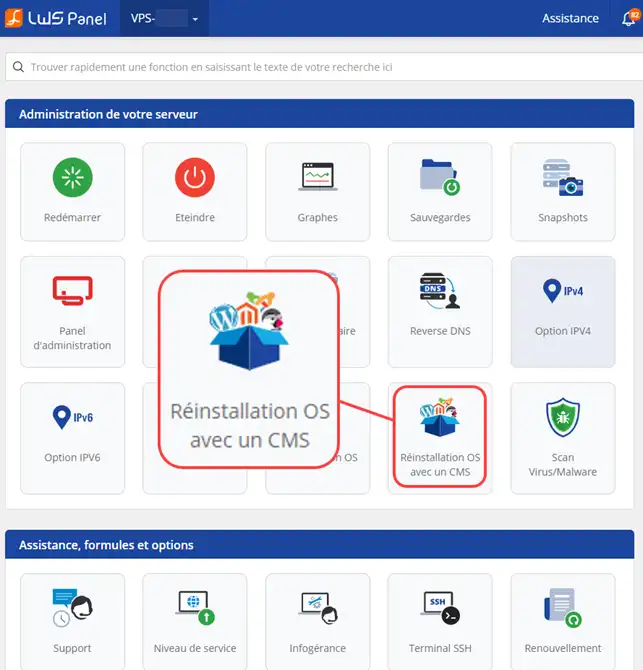
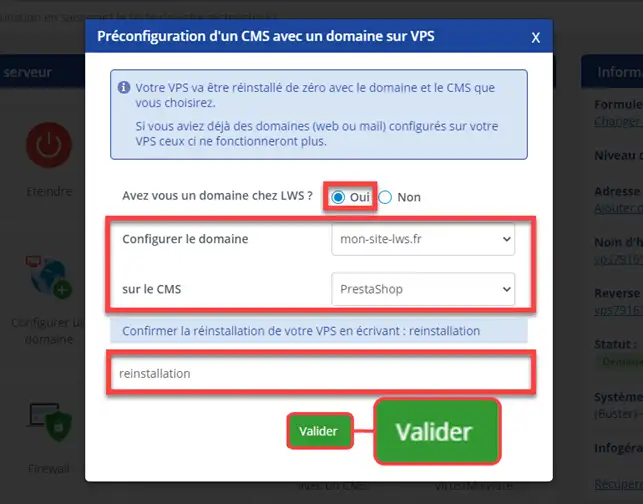
We are now going to define a domain for our Prestashop shop.
3. Fill in your domain and click on the "Validate" button.
5. The hourglass icon will indicate that installation has begun.
Your shop will be activated in approximately 4 hours.
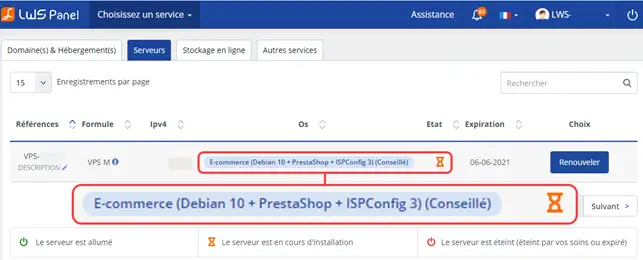
You will receive your login details by e-mail so that you can connect to your shop during this time.
Ask the LWS team and the community. Answers are published after moderation.
 About LWS :
LWS is a 100% French web hosting company that focuses on quality and innovation and offers a responsive and competent technical service at affordable prices.
About LWS :
LWS is a 100% French web hosting company that focuses on quality and innovation and offers a responsive and competent technical service at affordable prices.



 Yes
Yes No
No