SSH VPS Dedicated Servers1 January 2020By Aurélien T. 1 min read
How can I connect as root on a dedicated VPS server with Putty?
Procédure
What does root mean?
On Unix operating systems, root is the conventional name for the user who has full permissions on the system. Such a user is equivalent to an ennobled user, with superior functions and privileged access.
Why should I log on to my machine as root?
Connecting to your machine as root is equivalent to being the administrator of a Windows machine.
You can use this user to stop or restart a service or the entire server.
You can also view your logs in the event of a BUG on your server.
How do I make an SSH connection as root on my dedicated VPS server?
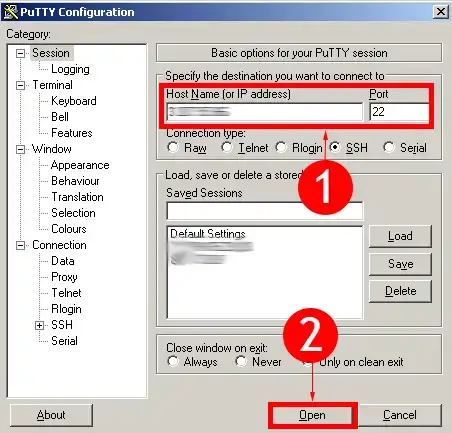
22. If these elements are verified, you can now open a terminal.
Depending on the operating system you have, the terminal is launched in different ways.
On Mac or Linux, all you have to do is open a command terminal (this program is built into these systems) and then enter the command
ssh root@YourIP address
On Windows, you need to download an SSH client such as Putty.
Once downloaded, launch the programme by clicking on this icon on your computer.
You can then enter the IP address of your server in the " Host Name (or IP address)" field. There is no need to enter the port, as Putty naturally tries to connect to the default port, i.e. port 22.
When you have entered the IP address, click on the"Open" button.
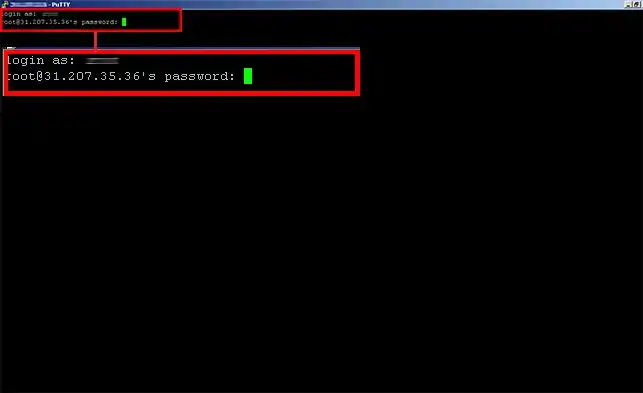
33. This is what you get when you attempt an SSH connection
You are asked for the password that was sent to you by e-mail.
Please note that when you enter the password, NO characters are visible.
However, you can copy and paste the password by performing a standard copy operation(CTRL + C) and then right-clicking with your mouse.
Then click on the"Enter" key
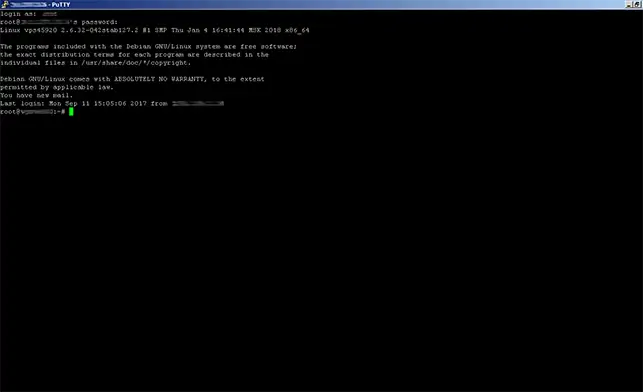
You will then see this window
55. You are now connected to your VPS server as root.
Conclusion
You are now able to connect to your VPS dedicated server using SSH software such as Putty. Warning: using certain commands may cause your VPS dedicated server to be blocked. If this happens to you, you will be forced to ask for paid facilities management.
Don't hesitate to share your comments and questions!
Bonjour
J'aimerais savoir si l'accès root pour installer Postgresql et LibreTime est gratuit ou payant.
F✓
fabrice-LWS Official answer
31 Dec 2022
Bonjour, si vosu désirez bénéficier d'un accès ROOT, il vous sera nécessaire de souscrire à un serveur VPS. Vous pouvez prendre connaissance des formules VPS en vous rendant sur la page suivante: https://www.lws.fr/serveur-virtuel.php . L'accès ROOT est totalement gratuit, mais vous perdrez l'infogérance sur le serveur VPS.
Was this answer helpful?
K
kelli
23 Jun 2025
Bonjour, l'offre prévoit un nom de domaine offert, comment puis je en disposer ?
J✓
Jordan-LWS Official answer
24 Jun 2025
Bonjour,
Merci pour votre message.
L’offre que vous avez souscrite inclut effectivement un nom de domaine offert. Toutefois, pour en bénéficier, il est nécessaire de l’ajouter au panier au moment de la commande de la formule concernée.
Si le domaine n’a pas été sélectionné ou ajouté lors de la commande, l’offre gratuite ne pourra malheureusement pas être appliquée par la suite.
Je vous remercie pour votre attention et reste à votre disposition pour toute autre question ou complément d'information.
Cordialement, L'équipe LWS
Was this answer helpful?
A question about this article?
Ask the LWS team and the community. Answers are published after moderation.
Ask the LWS team and its community a question
!
To enable this form, please tick the two consent boxes below.




 Yes
Yes No
No About
About 