
Online help
The web host accessible to all
Procédure
Awstats and Webalizer are web statistics tools for a web server.
They therefore make it possible to see, for example for a website, whether there are many visits, which pages are the most visited, how much data is transferred, and "who" most often comes to visit a site
They allow you to archive your statistics over several years; they offer a very detailed view of all accesses to your site (countries, unique visitors, page views per day, traffic per page, keywords typed into search engines...).
These tools are simply the best tools in the world for web statistics analysis.
This article is intended only for customers who have subscribed to a VPS Server plan; if you have a shared web hosting plan, please refer to the article: "How do I access the site's visit statistics?"
1. Log in to your ISPConfig 3 management panel
2. If you have not yet added your site, Add your website to your VPS server with ISPConfig 3
If you have already added your site, click on "Sites" in the horizontal menu at the top of the page, then on the name of your website.
3. Click on the "Statistics" tab, choose your password or generate one. Finally, select your statistics program "AWStats or Webalizer" from the drop-down menu before saving.
It is not possible to choose the username, which will remain "admin"
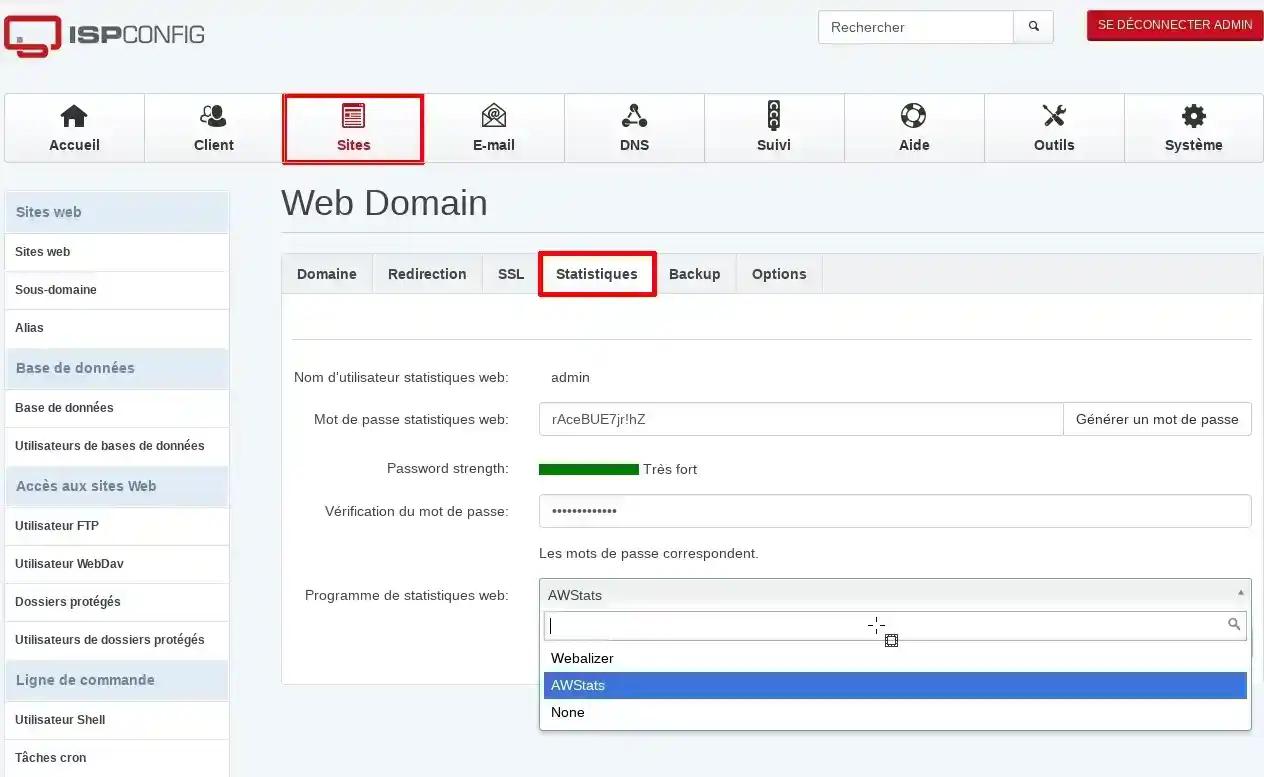
Your statistics will be accessible after a delay of 24 hours (the time required for the software to record your visits), at the following address; http://www.yourdomainname.ext/stats
The expression "yourdomainname.ext" should therefore be replaced with your own domain name
Ask the LWS team and the community. Answers are published after moderation.
 About LWS :
LWS is a 100% French web hosting company that focuses on quality and innovation and offers a responsive and competent technical service at affordable prices.
About LWS :
LWS is a 100% French web hosting company that focuses on quality and innovation and offers a responsive and competent technical service at affordable prices.



 Yes
Yes No
No