
Online help
The web host accessible to all
Procédure
This is a tool that we provide to our affiliates so that they can easily integrate a domain name search module into their site. We pay a commission to the affiliate on all sales made using this tool.
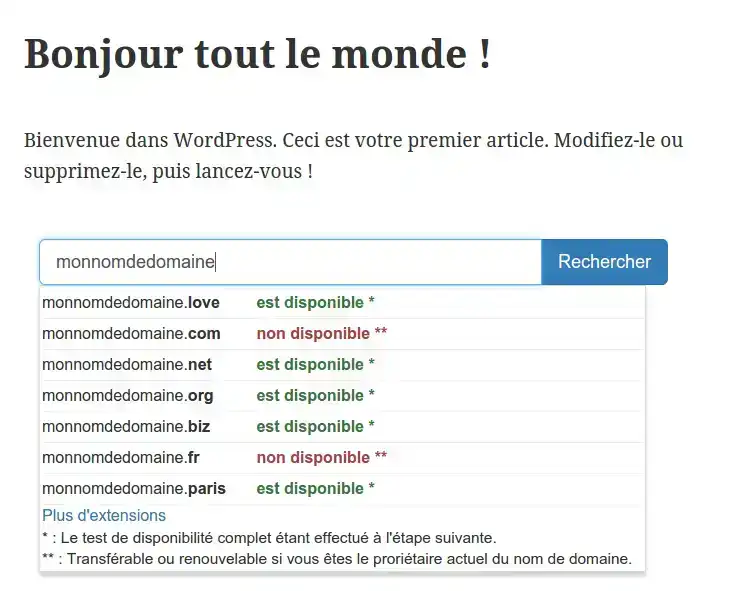
To find out more about our affiliate programme, go to : LWS Affiliation.
Change the default extension:
By default, we offer the .COM extension as the first suggestion. If you wish to display another extension as a priority, you will need to indicate the desired extension in place of com when calling up the Widget:
http://affiliation.lws-hosting.com/banners/widget/[BANNER_ID]/[MEMBER_USERNAME]/com/default/Order/blank
If the indicated extension does not exist or is not sold, we will display the .COM extension first.
Changing the button colour:
We offer several button colours so that you can integrate the Widget into your site in the best possible way.
To do this, simply change the name of the default theme in the Widget call:
http://affiliation.lws-hosting.com/banners/widget/[BANNER_ID]/[MEMBER_USERNAME]/com/default/Command/blank
We offer several themes:






Modify the button text:
To customise the text of your button, replace the word Order with your own text when the Widget is called up:
http://affiliation.lws-hosting.com/banners/widget/[BANNER_ID]/[MEMBER_USERNAME]/com/default/Command/blank
Do not open a new tab:
By default, when a visitor clicks on a suggested domain name or on the button, a new tab opens so that the visitor doesn't leave your website.
You can change this behaviour so that no new tab is opened and the redirection is made to the current page.
To do this, replace the term blank with parent in the Widget URL:
http://affiliation.lws-hosting.com/banners/widget/[BANNER_ID]/[MEMBER_USERNAME]/com/default/Order/blank
Ask the LWS team and the community. Answers are published after moderation.
 About LWS :
LWS is a 100% French web hosting company that focuses on quality and innovation and offers a responsive and competent technical service at affordable prices.
About LWS :
LWS is a 100% French web hosting company that focuses on quality and innovation and offers a responsive and competent technical service at affordable prices.



 Yes
Yes No
No